Thursday, July 26, 2018

Ethics, Accessibility, and Security–Condiment or Ingredient

Too often people think of ethics, accessibility, and security as condiments; something to add at the end rather than ingredients essential from the beginning.

Last night was the latest #EthicalCS Twitter chat and as usual it got me thinking. A pretty common occurrence during those chats BTW. The discussion was of course about ethics but I was thinking that people see ethics as an add on – something to tag in as a filler in a course or a later thought in a project. The same seems to be true about some other things like system security and accessibility.

These are all related in some ways. An ethical system is accessible and secure for example. More importantly, though they have to be baked into the system. They have to be considerations from the start if they are really going to be the best they can be for the most number of people.

As educators I think we have to make sure that our students learn that. Learn it by example, by discussion, and by plan.

Wednesday, July 18, 2018

Updated ACM Code of Ethics Released

ethics ACMThe ACM has released the latest update for the ACM Code of Ethics. It’s an interesting and important document. I wonder how many computing professionals know about and try to follow it though.

Clearly, as computing becomes more and more a part of daily life ethical practices become more and more important. As an educator I see it as my responsibility to make sure my students know about it though. The word “ethics” appears 100 times in the CS 2013 Curriculum report with specific mention of the ACM code of ethics listed as a reference and resource.

As I plan for the new school year I am thinking about how to incorporate more ethics discussion into the curriculum. I really want students to think, and think hard, about ethical issues.

Monday, July 16, 2018

Is This The Future?

Narrator: Alfred Thompson, you’ve just attended an amazing CSTA Conference. Now what?

Alfred: I’m going to Disney World!

magic bandAnd so I did. I just got home from about 5 days at DisneyWorld with my family. It was a great time  and I spent a lot less time online than usual. That doesn’t mean I wasn’t thinking about technology though. At DisneyWorld technology is everywhere. For most visitors this wrist band is the center of much of the activity.

It’s called a Magic Band and basically it is a cool container for an RFID chip. This band serves as the key to ones hotel room, a charge card, admissions to the various parks, and more. It’s not the only RFID chip one will run into though.

Fall-2015-Disney-World-Refillable-Resort-Rapid-Fill-Mugs-5-453x600Even the beverage containers also have RFID chips attached. The most obvious to may people are the refillable mugs. These mugs allow unlimited refills for a specific period of time. The dispensers only work if they read a valid RFID chip. Yes, in case you are wondering, even the paper cups have chips in them. The chips in the paper cups allow for a specific number of refills. I wish I had brought one of them home to play with. Anyone want to send me one (or more?) I really want to experiment with RFID.

So this is cool technology. The question really is, is the a utopian future or a dystopian future?

Disney uses this information to make the guest experience better. Well, that’s the theory and I suspect it is largely the case. I’m sure it helps them make money as well. No doubt it is useful to know how many refills people take. Tracking visits to the parks tells them a lot about guests interests and routines. Who knows what else they know about.

But what about outsiders using the data? Other companies? The government? What information can or does Disney provide to law enforcement and under what circumstances?

There is also the question of people with malicious intent stealing information. Not just from Disney RFID chips either. More and more credit cards and other ID cards are using RFID chips. My newest wallet is advertised as blocking RFID signals so apparently a lot of people are concerned about this sort of thing. With good reason I think.

The potential uses of RFID are both good and bad. We can use them for many things but should we? Good stuff to talk about with students. I think they need to understand this technology, how it works, and what its risks and benefits are.

Thursday, July 12, 2018

Microsoft Makes Large Commitment to CSTA

One of the big announcements at the recent Computer Science Teachers Association conference was that Microsoft is donating two million dollars to CSTA over the next three years.

This is obviously a big deal. This money is first off a huge help towards building a strong financial base for CSTA to grow and to do more. It will allow more professional development, more help to local chapters for new programs, and generally make some long desired programs to happen. It is also a great vote of confidence in CSTA and its leadership.

I was able to chat with Mary Snapp, Corporate Vice President and Lead for Microsoft Philanthropies, who announced this grant at the conference. She told me that Microsoft strongly believes that CSTA is going to be able to expand and scale operations in a big way over the next few years.

A number of companies I talked to at CSTA told me they are interested in helping build computer science education. They all really need people who understand computing. Not just to hire (though there is some of that) but also the companies they partner with and sell to need more people. And of course a society where people understand computing is a benefit to us all.

So thank you Microsoft. And thank you to the other companies supporting CSTA in various ways.


Wednesday, July 11, 2018

Taking the Microsoft Technology Associate (MTA) Exam

Contrary to popular opinion I did not do it for the free t-shirt. Certaport was offering teachers at the CSTA Conference the opportunity to take a MTA exam (or exams) for free. If you passed you also got a t-shirt with your certificate. I had other reasons to take it though.

Yes, I wanted to test myself a bit. I had not studied for any of them and I hadn’t planned on taking any exams. When several of my friends took exams (and passed of course) I decided maybe I should try. I chose the Block Based Programming exam because I teach some block based programming. The exam is currently based around TouchDevelop which has been discontinued but the exam will be rewritten for the blocks in MakeCode.com soon. In any case, I know some TouchDevelop so it seemed a good choice.

More importantly I was curious as to how the tests were given. What sort of questions where asked? How are they presented to the test taker? And more process sorts of questions.

It turns out that questions are asked several ways. There are a few ordinary multiple choice questions. There are a few questions where you have to read and understand code. There are also questions where a problem is explained and code is shown with “holes” that you have to fill from drop down lists. There are also Parsons Problems types of questions. In these you are presented with a problem, 6 to 8 lines or blocks of code and asked to place the right blocks in the correct order to solve the problem. There are usually extra blocks of code. It’s harder than you might think. There were also questions I would categorize as software design or software engineering questions.

In fact, the whole test is harder than you might think. You really do have to think and I was concerned about the 60 minute time limit for the 39 questions. My friend, Doug Bergman took the Java certification and told me he thought it was Advanced Placement CS level of hard. I feel pretty confident in saying that these are rigorous (especially for first level certifications) exams.

I wish I had a system like that to give quizzes and exams to my students. Especially the Parsons Problems style of questions.

Oh, yes, I did pass and I did get my free t-shirt.

Tuesday, July 10, 2018

Reflecting on #CSTA2018

I feel like I have really fallen behind on reporting on the CSTA Conference in Omaha. Part of the problem is being a bit overwhelmed. Usually I write blog posts in boring sessions. I didn’t attend any boring sessions.  I have to absorb some of it and I will write a more detailed post soon. I hope.

Right now I am sitting in an airport waiting for a delayed flight and not up to gathering all my notes. Who am I kidding. What I have for notes are tweets I have posted with the #CSTA2018 hashtag. A lot of people tweeted a lot of good stuff and others have already posted summaries on blogs.

This conference was a bit different for me. I wasn’t there as a presenter, a CSTA board member, or representing a company. Just me – teacher from New Hampshire. In some ways that was freeing but it felt different. The size of the conference is different as well. Back when there were 50 or 60 of us at the conference I knew almost everyone. At 700 attendees there was an amazing number of new faces. First time attendees. People brand new to teaching Computer Science and people in district roles that didn’t exist a few years ago.

That’s not a bad thing at all. It’s a great thing. When we were so small a group we risked too much group think. Now we have lots and lots of views. Having people with so many backgrounds and experiences is an amazing opportunity. So while I loved spending time with people I have known for years and years it was wonderful to meet and talk to so many new people.

A lot of people told me they read this blog or follow me on Twitter (@AlfredTwo) which was very encouraging. Like many who post to social media I don’t always know if there is anyone out there or if I am yelling in a vacuum. Speaking of Twitter. I talked about that already but it was humming. Lots more teachers are tweeting these days. It really is a good way to share information.

The exhibit hall was a lot larger this year,. I blogged about that the other day (Pictures From #CSTA2018) and I really appreciate the companies and organizations (three universities for example) who show up to talk to teachers. Even at 700 attendees, CSTA has an atmosphere that is a lot more conducive to real conversations with exhibitors than a conference like ISTE or TCEA (as great as those conferences are in their own ways.)

There were a lot of people who were at CSTA because of company funded scholarships. Rolls Royce funded about 25 people (including me). Oracle Academy provided grants and goodie bags to a bunch of people. Google provided money for CSTA Chapter leaders to come for two days of special training and the conference. This is real support of teacher development. These companies understand the need for teachers who actually know what they are doing and are willing to put some money behind their talk.

If you were there and we didn’t connect I am sorry. 700 people can make that harder than we might like. I hope though that you had some great conversations with others and learned as much as I did.

Next year CSTA will be in Phoenix, Arizona from July 7th to 10th, 2019. It’s going to be even better. I just know it.

Monday, July 09, 2018

Computer Science Teachers Association announces CSTA+

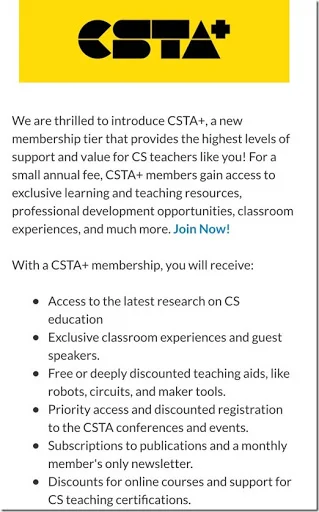
One of the big announcements at CSTA today was a new premium level of membership in CSTA. There is and will continue to be a free membership. This new premium membership offers some additional benefits and will also provide money for local chapters. Half of the CSTA+ dues will go to local chapters to enable them to expand their program.

This is something that has been under discussion for several years. My local ISTE affiliate, NHSTE has had a similar two levels of membership for some years and I have benefited from that paid level. I expect this CSTA+ membership to be well worth the money. Yes, I’ve signed up!

Find out more at CSTA.plus There you can find some additional benefits and sign up.

CSTA Plus

Sunday, July 08, 2018

Pictures From #CSTA2018

Before I get into some pictures of the exhibit hall let me tell you that there are a lot of people here. This was lunch on Sunday.WP_20180708_12_35_44_Pro

Arkansas is in the house. A large and visible group from Arkansas. And they brought flags and pins and lots of personality. Arkansas is doing great things with developing CS for AllWP_20180708_12_36_49_Pro

The exhibit hall is much larger than in previous years and it really looks like a real exhibit hall. I went around while they were still setting up and took a few pictures. This is just a taste of who was there. I may post more pictures tomorrow but this gives you some ideas.

CoderZ showing off their virtual robots.

WP_20180708_13_45_58_Pro


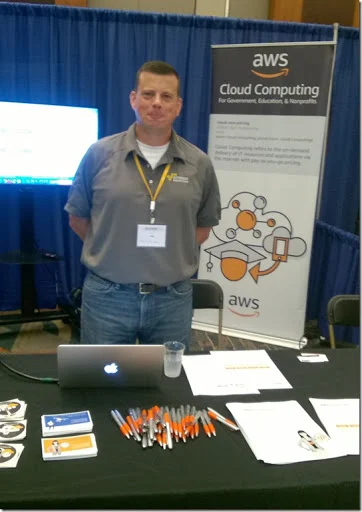
Amazon Web Services are here. No not selling books but sharing some of there tools and options for teachers to teach cloud computing. I will be looking closer at this for my AP CS Principles class among other things.


WP_20180708_13_43_53_Pro

Birdbrain always has an interesting table. Physical computing is big again this year at CSTA.

WP_20180708_13_35_11_Pro

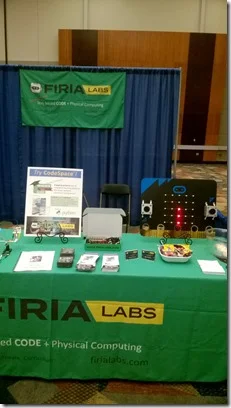
Is this the largest Micro:bit in the world? Firia Labs has some interesting things on display. I need to spend more time there tomorrow.

WP_20180708_12_30_41_ProWP_20180708_12_30_30_Pro

CodeHS has a big booth and a large team here. A great opportunity to talk to them about their offerings – free and paid. I used some of their free materials last year with my AP CS Principles students.

WP_20180708_12_29_41_ProWP_20180708_12_30_51_Pro

 Vernier had some great sensor projects. Some even programmed in Scratch. I have to get their catalogue. I want to make some of those projects myself.


WP_20180708_12_28_25_Pro


TEALS was here with a good crew. Very exciting program that places industry professionals in the classroom to co-teach with (and train) classroom teachers teaching computer science.

WP_20180708_12_20_07_Pro

IBM is at CSTA for the first time. They are talking about heir Master the Mainframe contest, IBM Activity Kits, and other offerings. Surprisingly mainframes are a growing business for IBM and there are jobs for people who understand them. I’ve heard from others that kids learn a lot from that competition.

 WP_20180708_12_07_06_Pro

And it begins–#CSTA2018

Yesterday opened the CSTA Conference with afternoon workshops. And there was a nice reception put on by Google. For me it was a travel day and a getting settled day for the most part. Thant and a lot of opportunities to have conversations. I didn’t take any of the workshops so I can’t report on them first hand but from Twitter it seems like they went very well.

chibiThe conference bag had some real treats in it though. The big surprise was this Chibi chip starter kit.  There is a microchip and accessories with a book. I expect a lot of people will have some fun with that.

I’m helping out at the registration booth for a while this morning. Volunteering is a great way to meet people as well as to help the conference run smoothly. I’m glad I had time in my schedule to do so.

After lunch the exhibit hall opens. There are a lot more exhibitors this year and I am really excited about that. My next blog will be a report on that.

Friday, July 06, 2018

Thoughts Before #CSTA2018

My bags are packed. Normally I pack the night before a trip but my suitcase has been packed for days for my trip to the annual CSTA Conference. I even got a haircut this morning. I cleaned out my computer backpack and loaded my Kindle with books for the plane rides. I’ve been to just about every one of these conferences dating back to before there was a CSTA and it was the CS & IT Conference. Somehow this year feels different. My level of excitement is higher.

Sure there are more workshops than ever before and the sessions next week look awesome. But there is more to it than that. There is real energy in the computer science education community these days. We’re making progress in getting computer science moved into the mainstream of education. Here in New Hampshire, teaching computer science is defined in law as being part of an adequate education. Similar things are happening across the country.

We’re seeing tremendous growth in students taking computer science courses. Advanced Placement Computer Science numbers are seeing amazing upticks.

Teachers are more and more involved in conversations in social media. Twitter, Facebook, blogs, and anywhere else teachers communicate online. The ISTE conference has more CS every year as well.

But for most of us in K-12 computer science the CSTA conference is the place to meet in real life. Besides sessions and workshops the hallway conversations look to me amazing. Informal gatherings of all sorts are being planned and more will happen spontaneously. They’ll happen in the exhibit hall. (Can I say I love that the companies and organizations who come to exhibit really see to understand our community?) They will happen in hallways, lobbies, nearby food and drink establishments, bus rides to receptions, and anywhere two or more CS teachers bump into each other.

I already know there will be conversations about pedagogy training rather than just content. I know there will be talk about training for more advanced teachers who have a solid content knowledge already. And this is besides the scheduled birds of a feature sessions.

I can’t wait. Hope to see many of you there. I’ll be wearing my hat so come find me.

Wednesday, June 27, 2018

Teach Me How to Teach NOT What to Teach

Today is the last day of ISTE and I’m not there. I am following a lot of conversation from there on Twitter though. One thing that is coming up is that a lot of the computer science related professional development there is for beginners and/or for K-8 teachers. Now this is wonderful but it is not what I need.

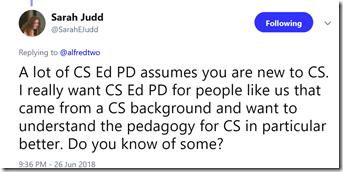
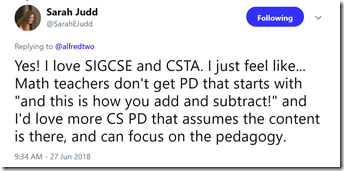
Sarah Judd had a couple of wonderful tweets that sum things up for me.

image

image

Some of us have a lot of content knowledge. This is especially true for career changers from industry such as myself. It is equally true for many teachers who have been teaching for some number of years. What many of us need is more about how to teach. In a word pedagogy.

I don’t mean “here is this robot and here are some example projects and code” and that sort of thing. I mean that is nice and all but it is usually a lot more about the tool and not the pedagogy. We are finally seeing some real research in how to teach computer science better. I’ve personally learned a lot from papers submitted to the SIGCSE conference and I’d really like to attend in person again.

The problem with SIGCSE for a lot of teachers is it at a tough time to get away for a lot of us. And there is that whole perception (not 100% wrong) that it is for higher education educators.

ISTE is going to be highly focused on beginners for some time to come. I don’t have a problem with that. I think ISTE can have a large impact on generating awareness among school administrators and technology integrators and teachers who are really serious about preparing students for a modern world that includes computers.

CSTA is the group I think should really increase their focus on training teachers how to teach. I would love to see a pedagogy track at the 2019 conference. 

Let’s hear about people using Parsons Problems, sub goal labeling, and other techniques. (BTW maybe take a look at How To Teach Computer Science where I talk about some of this) How about some case studies of project based learning? Not with a focus on the projects but with a focus on evaluation, maintaining student progress, and what does and doesn’t work about them?

I am reminded of a conversation with a peer when I was an undergraduate. Someone asked him why he was a business major when he grew up on a farm and planned to stay in the family business. Why not agriculture? He replied that he knew how to farm. Modern farming is also a business and that is the peace he didn’t learn growing up. Those of us who “grew up” in the computer science field know about computer science. Now we need help becoming bettor teachers.

Tuesday, June 26, 2018

Facial Recognition, Augmented Reality, and Teaching

Summer is a time of reflection and learning for me. I really want to be a better teacher and summer give me a chance to read more and to think more. This week I have been thinking a lot about facial recognition and augmented reality. One of the things that I know from experience and from research is that knowing students, especially their names, is a powerful thing for a teacher. Faces are hard for me. I don’t know if it is the way my brain is wired (there is a thing called prosopagnosia or face blindness that I would like to blame) or if I am just not working hard enough at it (as my son who knows every student in his elementary school – he’s the principal – suggests) but I would really love augmented reality that would let me know each student’s name.

I also think “wouldn’t if be nice if a computer scanned the class room and took attendance for me?” On the other hand if we take that to a (perhaps) logical conclusion were get computers that track every student’s face to see who is paying attention. They are trying that in China (link below) and that scares me. It especially scares me if it gets tied into a ‘social credit’ ranking system like China is setting up. (Link below or search for China social credit) Oh boy! I can’t see a lot of students liking that one! Below you will find a link to an article about the CEO of a company that develops facial recognition who warns about how ready it is – or is not! Are we really ready to have it judge people? I think I’d rather see people doing the evaluations.

BTW, there are schools experimenting with tracking students with RFID chips. Does using facial recognition take this to a new level or is it just a logical next step? Do we really want to normalize this level of tracking? I’m a little uneasy with the idea. Maybe more than a little.

But to keep this positive and closer to education and making teaching better, Vicki Davis is seeing a lot of artificial reality and augmented reality at the ISTE conference (link to her recent post below) and seeing some positive things. As well as some risks. Could artificial intelligence replace teachers? Maybe the bad ones but what about the good ones? She doesn’t talk about the costs of teachers vs AI though. You and I know that some people would rather have poor to average “teacher” who are inexpensive than spend more money for the best.

I see artificial reality and augmented reality as being very different. Later this week I am getting a demo of the VR system my wife’s school has installed. I may blog about that after. But for now, augmented reality.

Things that lead to more and better interaction between students and teachers is a good thing. Imagine if every teacher in the school could address every student by name the first time they saw them. My gut tells me that is a good thing. Students want to be known and a name is a powerful part of that.

What if a student showed up at my desk and asked me what they got on the recent test? They do that you know. Somehow they think you remember every grade for every one of their students. A AR system could pop that information up for a teacher. That would be good. Right? Potential for abuse? Sure. There is a fine line between deciding to call or not call on a student based on their grades as a good thing or a bad thing. A reminder that a student is on a concussion protocol might be a good thing though.

So both risk and benefit to facial recognition and AR. How we balance that determines if we use it to improve education and learning or just become control freaks who limit student options. Do we use it to build relationships or to hand off everything to computers? Do we use it to share excitement and new ideas or do we just use it to make education inexpensive at the cost of quality?

So much to think about!


Recommended reading

Thursday, June 21, 2018

Autonomy, Motivation, and Teaching Computer Science

Of the several courses I teach, my favorite course is call Honors Programming. Its a one semester course that is the first real programing course for my students. Its my favorite course because it is the one I have the most autonomy teaching and because I am very prepared to teach it. I extend this autonomy to my students as much as possible. I find that the end of year semester wrap up project is the best learning experience of the course. In large part that is because the students select their own projects and seem very motivated to learn what ever they need (and somehow missed during the semester) to get their projects to work.

My biggest frustration with the course is that students get a solid base, do one pretty interesting proj3ect and then they are done. At least for a while. Many take Advanced Placement CS (some AP CS A and some AP CS Principles) but both of those courses tend to be pretty constrained. They don't really allow for really big projects that as self selected.

What I really want to do is teach a follow on course that is purely project based. I want students to pick a major project that they are really interested in and commit to learning, on their own, the things they need to know to complete it. Yes, I want a whole classroom full of students learning different things and working on different projects. I've seen amazing projects come out of classrooms run this way over the years. I am tired of grading simple easy to create programs that are only mildly challenging.

I'm working on a proposal for this sort of course. My friend Doug Bergman runs some serious project based courses and is partly the inspiration for this. As are a couple of other teachers I have learned from over the years. It seems that students really get motivated to work on big projects, even scary projects, when those projects are meaningful to them. A motivated student will really put in a lot of work. They also pay attention when a teacher points them in a direction.

One plus about Doug is that he has written the book on this sort of thing. I'm learning a lot from Computer Science K-12: Imagining the possibilities!: Bringing creative and innovative Computer Science to your school  It really has me excited. (I recommend Doug's book BTW for anyone looking to create or expand a computer science program. Lots of good stuff there.

I'm looking for more ideas as well. Grading is a concern especially for administrators and parents. Doug has some stuff on that in his book but I'm always open to more ideas. I know that giving students too much autonomy scares some people. Keeping them on task and making steady progress can be an issue. Students often think they can goof off now or change priorities for what they think will be temporary needs and still get everything done at the end. They often guess incorrectly so keeping track is important.

In the long run, I think that this sort of opportunity with motivated and interested students can result in a lot of learning. It can also help build interest in computer science, help students learn to learn, and result in benefits for all concerned.

BTW, earlier today I heard an interesting, and I think related, report on NPR. A Lost Secret: How To Get Kids To Pay Attention

One key quote.

“Many studies have shown that when teachers foster autonomy, it stimulates kids' motivation to learn, tackle challenges and pay attention, Deci says. “

That’s what I am talking about!

Saturday, June 16, 2018

Congressional App Challenge 2018

One of my students won for her district last year. She found it a very valuable experience. I highly support this challenge. Share it with high school students you know.


What is the Congressional App Challenge?

The Congressional App Challenge (CAC) is a congressional effort to encourage high school students to learn how to code. Last year, 200+ Members of U.S. Congress in 42 states conducted an App Challenge in their respective districts. Nationally, the contest inspired 4,956 students to code in 2017, and over 8,800 students cumulative in past 3 years.

Students (in teams of up to 4) code applications for the chance to:

  • get recognition from their Member of Congress,
  • win prizes,
  • display their app in the Capitol Building in Washington, DC.

How can your students get in on it?

Here's a 3-minute "explainer" video:
https://youtu.be/cnM-Bb3TmCU

We would love to see a diverse range of students shine on the national stage!

Website: www.CongressionalAppChallenge.us

In the first 3 years of the Congressional App Challenge, the program has yielded 605 App Challenges across 42 states. Over 2,400 apps have been created by nearly 9,000 students, and participant demographics surpass all industry diversity metrics, with young women representing 30% of all competitors. This year, the CAC initiative aims to reach even more constituents.

Tuesday, June 12, 2018

Reflections on Programming and Teaching

Mark Guzdial has an interesting post called Reflections of a CS Professor and an End-User Programmer in which he compares end-user programming and professional programming and how.if/what we teach for the two. I started a comment but decided it didn’t really fit there.

I'm pretty much in the same boat Mark is in. While I have been a professional programmer, these days I mostly write code to use as examples or to solve my own little problems.

I like to think that I bring some of what I learned and did as a professional into my little projects but it's hard sometimes. I was talking to another teacher today about a program that he wrote that we both use to track our course schedules. He gave me a new version and said to let him know if I  found anything weird because he was so used to it that he probably subconsciously ignores some things. That is why a lot of end user programs are only usable by the programmer. I know that some of my projects are the same -  not usable by anyone but me.

I'm starting to think that is a problem. But do I really want to spend the time to make them usable by others when the problems they solve are so personal and individual? Perhaps the best I can hope for is that they don't embarrass me too much if someone else sees the code.

I teach beginners. Real beginners who usually have no prior programming experience. I am not turning out professional developers. Oh sure some of them go on to internships with what they learn in my classes but I would not call them profession ready. I can’t teach them all that in a semester or even three semesters of high school. That doesn’t mean I can afford to teach them to be sloppy.

The basics I can deal with. Good naming, planning ahead, top down design, breaking down problems into small, manageable chunks, and some good error handling. I’m pretty careful about the code I show them. Some of my personal code I wouldn’t show them while others I would. I remember showing a game I was working on to some students once. One of the students remarked to the other “look at that! He’s already coding preparation for expansion.” That I can teach.

So where do I come down on this? Well, I think I can lead by example if I am careful. And maybe I should take my own code more seriously.

Monday, June 11, 2018

School Year is Over, Time to Get Ready for Next Year

It is teacher wrap up day at Bishop Guertin. The warning bell for homeroom just rang but of course the students were done on Friday so there are no students coming into my room. It feels a bit off.

I started planning for next year already. Over the weekend I got about half way through creating my day by day schedule for Advanced Placement computer science principles. Oh who am I kidding. I got a lot of it done but probably not half way. And I'll spend a lot more time reading through all the lesson plans and will probably make more adjustments. I learned so much teaching it this past year.

I've got to do the same for Mobile Application Programming and I have less to start with there. At least I have last year’s experience to build on. I didn’t really have that last summer.

Honors Programming is probably the easiest to plan for but I have work there. I have already organized a lot of that but want to write some new things. This is my favorite course to teach so I may leave working on it as my reward for finishing the others.

I feel like I have plans better laid for my summer organization than ever before. We'll see if I can follow the plan. I really want next year to be the best year of teaching ever.


Friday, June 08, 2018

Thoughts on Textbooks in Progress

My first published book, Microsoft Visual Basic FUNdamentals, came out 18 years ago. It was for Visual Basic version 6 and what I did was to take what and how I taught and turn it into a textbook. It was a good book. It didn’t sell a ton of books but I was able to take my wife out to dinner a couple of times.

I wrote several others after that. Both of them were new editions of a book someone else first wrote. But they were good books and I am proud of that work. Honestly though I haven’t used textbooks in class for a number of years now. They just don’t fit my style of teaching. What I have done is supply students with  copies of my PowerPoints (with speaker notes) and some short one or two page documents on various language features. Plus the occasional video presentation.

I've been working on a couple of reference books to use in my programming classes since the first of the year. They're getting close to done. I decided to bring home a real C# textbook to look at as I work.

There are 17 chapters and over 700 pages. I cover things from about 9 of them in my one semester course. This might be a good book if I were teaching university students. Maybe. For high school and the limited time I have no way.

Obviously it has a lot of depth and that is great. The problem is that I really need to make projects interesting to hold student attention. So I teach things like simple file handling, timers, adding images dynamically, collision detection (essential for a lot of games), and a few other things that are in my books under "Fun Stuff." I find very little of that in the real textbook. What I do find is hard to find and it is not obvious how they lead to fun stuff.

And then there is that whole 700 pages thing. Your average high school student is going to put that in their locker and never look at it unless you assign questions from the book.

Well forget that! Homework sucks! Besides I can come up with my own quizzes, projects, tests, and other evaluative instruments and they will be far more tailored to the needs of my course.

My VB book is currently at 76 pages including table of contents and index. My C# book at 80 pages. They're not going to get much longer either. They've got everything I cover in class and more for the real go getters. Short and to the point and things are explained in context and directed at high school kids.

They're designed to be a reference, a study guide, and something like advanced notes. That is really all most students really need. They should not have to dig though 700 pages to get what they need in a very first programming course.

Students seemed to get real value from the drafts I gave them this year. I don't know if they'll work for anyone else. The work is worth it if it helps my students.

Computer Science Teacher as Unicorn

imageThe t-shirt image here showed up on my Facebook feed the other day.  My first thought was “Yes, computer teachers are the coolest.” Of course I know a lot of teachers who teach other subjects who are every bit as exciting as any computer science teacher but there is another thought here.

Unicorns are both magical and rare. I would argue that all good teachers have a bit of magic to them. Computer science teachers are more rare though. And frankly, computer science feels a lot like magic to a lot of people.

Today is the last day with students at my school and what I’m thinking about is “did I make magic this year?” and “how can I make more magic next year?” Maybe being the unicorn is the goal.

Wednesday, June 06, 2018

Looking Back At APCS Principles–My First Year

During a conversation with my dean, he said it takes about three years to really get teaching an Advanced Placement course down pat. I don't know if that is the right number but it is surely more than one. This past school year I taught APCS Principles using the curriculum from Code.Org. It was a life saver. I had four preps this year and two of them were first time for me. Well one of them wasn't completely first time but I was doing a complete starting from zero rewrite of it. So there was a lot of work to do.

The tools supplied online were really quite good. The simulators were amazing and let me do some things I could not have done without them. Code's videos, some of which I used in other courses as well, are just outstanding. High production values, outstanding and diverse presenters, and just the right length to not lose kids. In all honesty, a properly motivated students could probably use it as a self-passed course. They would not get as much out of it as being part of a class but they would do ok.

We had some great discussions in class which I think were very valuable. I had three students from China which made talking about issues like censorship and government control of the internet, among other things, extra interesting.

There are a few things I know I need to do differently next year though. The performance tasks are a big part of what I need to do differently. I gave the Explore task in the start of the second semester. That has to get moved to first semester. That will give me some more flexibility in the second part of the year.

Like a lot of people I made the Create task due at the official “drop dead” date set by the College Board. Huge mistake as panic set in and only an extension owing to system glitches on the College Board site made it possible for all the students to submit. Next year, we’re doing it earlier. No midnight deadlines on a system that will be overloaded.

I also need to work on making sure the students understand the requirements on the performance tasks better. Now I had to be teaching to the test and that is what I’d be doing. At the same time they REALLY need to learn to read and follow requirements. That is an important lesson. That makes me feel better about it.

My students all come in with previous programming experience but what I found this year was that was somewhat uneven. I have to be more aware of the students who are not as into coding as others. APCSP is about a lot more than programming but I don’t want students to miss out on that piece. I may reorder some things in the course around that as well. I need to get more programming in before I assign the Create Task I think.

I still have a bunch of processing to do and I hope to talk to other teachers at the CSTA Conference next month. I figure that knowing I have to do things differently is half the battle though. If you taught APCSP, with the code.org curriculum or with something else, I hope you’ll share what you learned about teaching it in the comments. 

Tuesday, June 05, 2018

Programming Projects–The good, the bad, and the ugly

End of the semester project time for me. All of my programming students have been finishing up[ their self-selected projects and I have been grading. It’s always an interesting ex3ercise. None of the students have much experience designing and writing programs. One thing that is clear is that they don’t always spend enough time planning before they start.

Students often seem to think in small steps without thinking about what steps will follow. Sometimes this results in user interfaces that look great and are fairly sophisticated. Unfortunately, they often haven’t thought about how to implement more of the code behind the user interface. Other times they do think further but not far enough. In either case they run into road blocks because the initial design is just not complete. As ugly as these designs can get it is interesting and challenging to try to develop workaround for them. I’ve learned a few tricks over the years. I only wish we had time to restart from scratch and redesign the programs.

Some of the mort popular projects are easy enough to design and code but can be tedious with the limited background in programming the students have. These designs require a lot of code. That takes time to write and to debug but is usually manageable. What concerns me this year is the number of my advanced students who don’t use language or features that they have taught and should know to use that they don’t use.

No matter how many times I tell students that a list of variables that are differentiated only by a number should probably be an array some students take what they think is a short cut. They are almost always wrong about that. I’ve got  to work on that next year.

On the plus side, some of my students take it upon themselves to learn features, methods, and functions that we don’t have time to cover in class. this year students found a couple I didn’t know about. Modern programming libraries have far too many features for anyone to know all of them. Some of these features will get covered next year as they are more efficient than what I have been using. Others I have to think about how or if I cover them. Sometimes features make things easier for programming but harder for a teacher to instill an understanding of concepts.

Students seems to learn a lot from this end of semester projects. That is great. It’s a real plus when I can learn things from them as well.