Friday, October 13, 2017

CSTA 2018 Conference Call for Proposals

It’s that time again! I have to get to work on a proposal. Or two. This is the best conference for computer science educators. If you have something good to share you should definitely submit a proposal.


CSTA Logo white

The Computer Science Teachers Association (CSTA) invites you to submit a proposal to present at the 2018 CSTA Annual Conference. This event will be held July 7-10, 2018 in Omaha, Nebraska.

The CSTA 2018 Program Committee seeks proposal submissions related to the practice of teaching and learning computer science and information technology in K-12. This year the conference is seeking 3 hour workshops; 1 hour sessions; 20 minute mini-sessions; and 1 hour Birds of a Feather sessions.

Proposal submission requires presenter and presentation information including a brief overview/abstract used to inform attendees about the session; as well as a PDF providing more detailed information about the session.

All proposals will be submitted through our online system; however, You may preview the application before starting your submission here.

Proposals may be started and updated between the opening and closing of the system. The deadline for proposals is midnight (Hawaiian time) on November 26, 2017. Review of proposals will occur shortly thereafter and notification of the program committee's decisions will be made in December/January 2017.

All submissions will be evaluated on the following criteria:

  • appropriateness and relevancy for professional development for K-12 computing;
  • feasibility of the proposal;
  • timeliness of the topic;
  • writing and presentation;
  • completeness of the submitted information; and
  • consideration for the breadth and balance of topics at the conference.

Successful proposers should expect to submit a draft copy of their presentation by June 1, 2018. Draft presentations will be posted on the website for attendee reference and note-taking. Some sessions may be selected for videotaping, which will be shared online post-conference. All workshops and sessions will be photographed. Workshop presenters will be given a list of registered attendees prior to the conference so that they may email them with any pre-workshop materials or downloads. All presenters are expected to register for the conference.

Why present at CSTA 2018?

The CSTA annual conference is the only CS conference specifically dedicated to meeting the needs of K-12 computer science educators. Come network with your peers, present your great ideas, and learn best practices. Here is what some 2017 conference attendees had to say about the conference:

  • I learned so much and am more motivated than ever to bring essential CS skills
    to my students and to my colleagues.
  • Amazing conference with so many takeaways and ponderings.
  • I am leaving with specific strategies for our district,
    and numerous contacts for help, as we move forward.
  • It is a real live computer science conference. Loved it!
  • The resources...Best Exhibit hall, great sessions.... it was just... timely

Additional conference details can be found here.

The deadline for proposals is midnight (Hawaiian time) on November 26, 2017.

Submit your proposal here.

We look forward to receiving your proposals and to your attendance at the conference.

The 2018 Annual Conference Planning Committee

Thursday, October 12, 2017

CS Educator Interview: Bob Irving

Bob Irving teaches middle school students and seems to have a lot of fun doing so. He constantly learning new things to share with his students. He is half of of a great CS team at Porter-Gaud School in Charleston, SC. I interviewed the other half a couple of years ago – Doug Bergman. Between the two of them students have some great opportunities to learn computer science.
WHERE DO YOU TEACH? WHAT SORT OF SCHOOL IS IT?
I teach at the Porter-Gaud School in Charleston, SC. It's a 150 year old k-12 independent school with enrollment of about 900.

HOW DID YOU GET STARTED TEACHING COMPUTER SCIENCE?
I actually taught history and English in high school for years. Was an early adopter of computers (owned a Commodore 64!) and used them in my classes, eventually became a tech integration coordinator. Went back to school to learn application development, which included building business applications with databases. Plan at the time was to segue into development. Graduated just in time for the first tech bubble to burst! Decided to go back to teaching school and haven't looked back since!

DESCRIBE THE COMPUTER SCIENCE CURRICULUM AT YOUR SCHOOL. WHAT COURSES DO YOU HAVE AND WHAT ARE THE FOCUSES OF EACH?

We have a fabulous curriculum at Porter-Gaud, which was started by Doug Bergman. CS is a required course for all students from grades 5-9, after which students may apply to be in our program. Current upper school enrollment is about 35% of each class, with about that percentage of female participation.
I teach grades 5-8. I have each student in the middle school for a quarter. We just were able to institute required classes in 5 and 6 this year, so I am building those out. CSTA said middle school computer science should be about exploration with different technologies, and I heartily concur. So in our ever-changing landscape of tech, right now I am teaching the following in various grades: micro:bit, Kodu, Dash robots, LEGO robots, Scratch game programming, HTML, Minecraft Pi (intro to Python by coding Minecraft), Sonic Pi (live music coding), and physical computing using Raspberry Pi's. I have 2 networks of computers in my room: Windows 10 and Raspberry Pi. I use both according to what best suits the needs. As always, there are other things on the horizon that I am investigating for future use. Right now that includes 3 new 3D printers and MIDI controlled music, and looking into Makerspace stuff that fits with what we do.

WHAT IS YOUR OVERALL TEACHING PHILOSOPHY? PROJECT BASED LEARNING? FLIPPED CLASSROOM? IN SHORT, WHAT MAKES YOUR CS PROGRAM “YOUR CS PROGRAM?”
I live for the "aha" moments in education, and I think they are best achieved by having a very hands-on, project-based experience. I like to answer student questions with other questions ("Where do you think you could find help for that?" or "Have any of your neighbors figured out how to do that?"). I believe in giving as little direct instruction as I can get away with, though I do supplement lessons with videos on my YouTube channel (crouchingpython). Middle school students do not want to listen to me talk! But I am sensitive to those who are struggling and need some hand-holding!
 
WHAT IS THE BIGGEST CHALLENGE IN TEACHING CS AT YOUR SCHOOL?

I really can't complain. We have amazing support from our administration and have a lot of latitude to explore different approaches. One factor that helps us is being an independent school. That not only frees us from mandated teaching to various tests, but our CS program has become a major selling point to prospective families.

WHAT IS ADMINISTRATION’S SUPPORT (OR LACK OF SUPPORT) LIKE AT YOUR SCHOOL?
See above. We get financial support, as well as time in the schedule.

HOW DO YOU MEASURE SUCCESS FOR YOUR PROGRAM? FOR YOUR STUDENTS?
This is going to sound a little cheesy, but I measure it by the excited students who usually run into my classroom to get started! I'm always trying to up the engagement factor. I also get a wide range of interest and ability, so I try to make sure that those students who are self-described "not techy" are also getting it, are engaged, and leave the class feeling that all this coding and stuff is actually pretty cool.

WHAT IS THE ONE THING YOU LIKE TO TALK ABOUT REGARDING YOUR PROGRAM THAT I HAVEN’T ALREADY ASKED?

I promise my students on day one.... HARD FUN. This is something that I stole from one of my heroes, Seymour Papert. They all know exactly what I mean by that in a week or two! It's not easy stuff, but they want to make it work.
I also host a Minecraft Club here, which this year has over 70 members. This is just for "playing" Minecraft.
   TELL ME ABOUT YOUR ONLINE PRESENCE (IF ANY)
Note: The index for this interview series is at http://blog.acthompson.net/2017/10/computer-science-educator-interview.html and is updated as new interviews are posted.

Tuesday, October 10, 2017

CS Educator Interview: Vicky Sedgwick

My first teaching jobs were teaching in a pair of schools (half time in each) where I saw students from kindergarten through eight grade. It was a great learning experience but I was happy to move on to high school after a year. Vicky Sedgwick has been teaching computer science to grades K to 8 for ten years now and has developed a great program. I was very pleased when Vicky agreed to answer a few questions for this interview series.

WHERE DO YOU TEACH? WHAT SORT OF SCHOOL IS IT?
I teach at St. Martin’s Episcopal School which is located in the Los Angeles area, specifically in the San Fernando Valley. It is a very small Preschool-8th Grade private, religious school. I teach Kindergarten-8th Grade.

HOW DID YOU GET STARTED TEACHING COMPUTER SCIENCE?
In the summer of 2007, the computer teacher at my youngest daughter’s school left and I agreed to take over the computer classes – at least until December. Well it’s now 10 years later and I’m still there even though my daughter moved on from the school years ago. When I started teaching the classes, they were focused on learning computer applications, learning to keyboard, and playing curricular related games.

In a previous life, I had been a programmer and systems analyst so when I got bored watching students type for class after class and wanted to do more, I started to investigate what others were doing with programming and kids. Initially, I started with having my Middle School students do some coding in Scratch. Then I found the CSTA 2011 standards and realized that I could be teaching all of my students about computer science and I had even been including some CS into classes already! That’s when I started adding more computer science to all the grades that I teach and each year has become more computer science and less other things.

DESCRIBE THE COMPUTER SCIENCE CURRICULUM AT YOUR SCHOOL. WHAT COURSES DO YOU HAVE AND WHAT ARE THE FOCUSES OF EACH?
At St. Martin’s, all Kindergarten through 8th grade students have class with me twice a week. Those classes focus on five main areas: Computer Science, Digital Citizenship & Literacy, Productivity Software (yes, I do still teach this), Computer Graphics / Computer Art, and Keyboarding (a small block of time at the beginning of the class to practice technique). We are on a quarter system at my school and at least one-quarter of the year for younger grades and about one-half of the year for older grades is devoted to Computer Science.

I am lucky in that I can set my own curriculum which I try to scaffold each year based on what the classes have learned the year before, what new things are available, and this year, the new CSTA K-8 Standards that were released in July. I am really excited about using Micro:Bits and Circuit Playgrounds with my Middle School students and using some Raspberry Pis to teach networking concepts.

WHAT IS YOUR OVERALL TEACHING PHILOSOPHY? PROJECT BASED LEARNING? FLIPPED CLASSROOM? IN SHORT, WHAT MAKES YOUR CS PROGRAM “YOUR CS PROGRAM?”
I’m a “less me, more them” person as much as I can be. I do a lot of “flipped classroom” IN the classroom with tutorial videos that my students can watch if they need help rather than a lot of whole group lectures. I am also a big believer in students sharing their work. All classes have either a classroom blog (for K-2) or student websites (grades 3 and up) where students share what they are creating.

For most grades, I like to have a major “project” that students will end up creating during their CS classes and often these will tie into another subject of the curriculum. For example:
  • Kindergarten students used ScratchJr to show what they knew about the butterfly life cycle
  • 2nd grade created tours of parts of the school in Scratch to share with a class outside of our school
  • 3rd grade students also coded the butterfly life cycle, but they used Scratch
  • 5th grade students created math games in Scratch last year that the younger students in the school played and rated
  • Middle School students created light-up music boxes using Arduino and then had a showcase day at school to show them off
WHAT IS THE BIGGEST CHALLENGE IN TEACHING CS AT YOUR SCHOOL?
The biggest challenge is outdated equipment and lack of budget to update things. It is amazing what you can do with older equipment though and I like to think that I’m very good and coming up with solutions that cost little or no money.

WHAT IS ADMINISTRATION’S SUPPORT (OR LACK OF SUPPORT) LIKE AT YOUR SCHOOL?
My principal is great. She trusts me and lets me have control over the curriculum. She loves to tell the community what we are doing and makes sure to bring visitors to the lab to see what is happening there.

HOW DO YOU MEASURE SUCCESS FOR YOUR PROGRAM? FOR YOUR STUDENTS?
Since all students in my school are required to take computer classes, I measure success based on:
  • The engagement in the classes
  • The “fist bumps” or “hi-fives” when things work well
  • The number of students who want to know if they can do this at home and then actually DO it at home
  • The students who take interest in community events I share that are CS related
  • The “when can we do that again” comments or questions like “Do we get to do that when we are in whatever grade?”
In the future, I want to look at how many students take a CS course in high school, if I can get that information for all of them.

WHAT IS THE ONE THING YOU LIKE TO TALK ABOUT REGARDING YOUR PROGRAM THAT I HAVEN’T ALREADY ASKED?
There is something truly special about being able to teach all students from Kindergarten through 8th grade. It is a real asset to modifying the curriculum to the needs of the students when you see all of them every year they are at the school. It really is gratifying to see the growth of the students throughout their time at our school. They amaze me every single year.

LAST QUESTION. YOU’RE ONE OF THE KEY PEOPLE INVOLVED IN THE #CSK8 CHAT. CAN YOU TELL US ABOUT THAT? WHEN, WHY, WHO, ETC?
Back in late 2014, Sheena Vaidyanathan, who was the K-8 Teacher Representative on the CSTA Board at the time, put together a K-8 Task Group for CSTA which included: Sheena, Todd Lash, Aung Nay, Laura Blankenship, Patrice Gans, Myra Deister, Irene Lee, and me. We were tossing around ideas of what we could do to bring together K-8 (ages 5-14) CS teachers and help to promote CS in K-8 (ages 5-14). Back when Patrice Gans was the K-8 Teacher Rep on the CSTA Board, she had hosted some #csk8 chats on Twitter and we decided to resurrect those. They started up again in January of 2015 and have been going ever since.

The task group doesn’t actually exist anymore but the chat continues with a core group of people which includes Sheena, Todd, Grant Smith, and me. We are also having guest chat moderators more regularly. The live #csk8 chats currently happen on Twitter on the 1st and 3rd Wednesdays of each month at 5pm PT/8pm ET and cover topics of interest to K-8 (ages 5-14) teachers of computer science. We invite anyone who is interested in computer science for students ages 5-14 (you don’t have to be a K-8 CS teacher) to join us during the live chat or just follow the hashtag #csk8 at any time for posts about K-8 Computer Science.

TELL ME ABOUT YOUR ONLINE PRESENCE (IF ANY)
Note: The index for this interview series is at http://blog.acthompson.net/2017/10/computer-science-educator-interview.html and is updated as new interviews are posted.


Thursday, October 05, 2017

CS Educator Interview: Rebecca Dovi–the update

imageRebecca Dovi is a ball of energy. She is full of ideas and always doing cool things. When I last interviewed her (http://blog.acthompson.net/2013/08/cs-educator-interview-rebecca-dovi.html)she was a classroom teacher. Today she is the Director of education and co-founder of CodeVA, a non-profit CS education effort in Virginia. I thought is was time to catch up with her is learn more about what she is doing.

Tell us a little about CodeVA and what your goals are?

We are a statewide non-profit with the mission of bringing computer science education to all kids in Virginia. We are the first state in the country with mandatory computer science standards.

The legislation that passed in 2016 makes computer science co-equal to the other four subjects. In other words computer science must be integrated with math, science, language arts and social studies from kindergarten through eighth grade. This includes coding, and non-coding computer science topics.

Our goals are to support schools and teachers with the training and resources needed to support them as they implement the new standards.

Why did you move from classroom teaching to starting something like CodeVA?

I honestly never thought it would happen. My husband is our Executive Director. In his former life he was an investigative journalist, and saw the impact of poor access to computer science on the communities he covered. When he first mentioned me leaving and us forming a nonprofit I was not exactly enthusiastic about the idea. He made the case - and he was right. Over the last 7-8 years of my classroom life I was doing more and more teacher training. On top of teaching I was our district's computer science lead and doing curriculum and professional development. I also worked for the local NMSI group running AP Computer Science A training across the state. I developed a MOOC for AP CS A, which has been 10% of the growth in APCS A over the past three years - including a lot of the increase in the number of females taking the exam.

Seeing the impact that these programs had on the number and diversity of kids able to access computer science was what finally convinced me we needed to try to do this at scale. I miss my classroom, but not including this year (we don't collect demographic data until mid-October) our teachers have taught over 21,000 middle and high school students computer science. I never could have done that from my little classroom.

At CodeVA you are doing a lot of teacher education. How is preparing teachers to teach different from teaching students?

Teachers won't ever shush! ;)

Seriously though, adults really need to buy into what you are presenting. After 20 years in the classroom I experienced a lot of professional development, and very little of it impacted my classroom practice.

Now we are able to deliver professional development that really meets the needs of computer science teachers. We have a group of 20 experienced facilitators, from elementary all the way through high school. Since 2014 we have trained over 330 middle and high school teachers and almost 1000 elementary teachers. The best part is watching the community the grows from the teachers in our programs.

At CodeVA you also have student programs. What age groups are you working with and what are you doing with each age group?

We do camps and programs for kids from first through twelfth grades. All of our programs are arts-integration. Kids spend half their time on computers, and half on hands on activities that support learning the concepts of computer science.

As an example one of our most popular camps is called Critter Code. The students participate in a design process to create their own sock animal. They learn Scratch, sew their animal, and by the end of the week they use their sock animal as the sprite in their Scratch story. We've had everything from mosquitoes to falcons, they get really creative.

We partner locally in Richmond VA with various organizations in town to bring computer science programs to kids that wouldn't otherwise get access. We are very proud of our numbers. This summer our programs were 55% underrepresented minorities, 49% female, and 35% underrepresented minority female. Out of the kids we served 44% were able to attend through needs based financial aid.

This past year we were awarded a Google Rise grant to build an online platform to share out our camps to schools and programs across the state.  This is especially important as districts move to incorporate computer science into their core curriculum. These camps give kids more access to computer science,and allow the teachers to practice and try out teaching computer science outside the pressure of the classroom.

For high school students we also run a Computer Science Honor Society. We had a lot of requests from our teachers who were required to run co-curricular clubs. Central to the program is the completion of service hours. These hours help teachers run programs, recruit and do tutoring programs in support of computer science. As an example the students from Powhatan HS from a rural district with only one high school completed over 1700 hours of Computer Science Community Service.

As a non-profit you must rely on external support. Who is supporting your work these days?

We have been very fortunate in our partners. We work closely with a local foundation, the Robins Foundation, that has supported our programs since 2014. In addition we have great continuing corporate partners such as Capital One, Car Max among others. Grants like the Google Rise program have really supported spreading computer science across the state.

We have worked closely with Microsoft on our legislative agenda and they have been invaluable in supporting our efforts.

This summer we were awarded a grant from the The Tobacco Region Revitalization Commission grant of $361,625 to bring computer science programs to the most rural parts of the state. This is especially exciting for us as we move to learn about the unique needs of teachers and students in this part of the state.

What else should people know about you and what CodeVA is doing?

We have three really exciting things on the horizon.

First, we have been working very closely with our department of education, and the computer science standards are about to come out of draft form and be finalized.

Second, to support the new standards we are currently piloting a K5 Coaches Academy that prepares local school district personnel to be elementary computer science coaches and deliver professional development in their home districts. This past summer eighteen people participated, and next summer we will be running multiple cohorts across the state.

And finally, to support districts we are working to create district Computer Science Roadmaps. Districts give us data, and participate in interviews, then we supply them with a list of suggestions as they work to implement the new computer science standards over the next few years. We are especially looking at what programs and systems districts already have in place that can be used to support the effort.

Learn more about CodeVA at https://www.codevirginia.org/ image


Note: The index for this interview series is at http://blog.acthompson.net/2017/10/computer-science-educator-interview.html and is updated as new interviews are posted.

Tuesday, October 03, 2017

CS Educator Interview: Saber Khan

I believe I first met Saber Khan over Twitter. Since them we have interacted in a number of ways on and off line. We met face to face for the first time this past summer at the CSTA Conference. To say we’ve had some interesting conversations would be putting it mildly. His was one of the first names that popped into my head when I decided to restart interviewing CS educators for my blog.

WHERE DO YOU TEACH? WHAT SORT OF SCHOOL IS IT?

> I teach at the Browning School, a K-12 independent boy's school in Manhattan, NYC.


HOW DID YOU GET STARTED TEACHING COMPUTER SCIENCE?

> I used to teach math and science and was very interested in tech. I became a tech integrator and teaching some tech classes where I really enjoyed teaching coding. Over the past past five years I taken a deep dive into learning and teaching coding.

DESCRIBE THE COMPUTER SCIENCE CURRICULUM AT YOUR SCHOOL. WHAT COURSES DO YOU HAVE AND WHAT ARE THE FOCUSES OF EACH?

> I am fortunate that we have a comprehensive tech education program at our school. Starting in kindergarten and all the way up to the Upper School we have dedicated tech classes that focus on CS, design and engineering. We have electives in CS and Engineering in the Upper School. I love teaching Python, JavaScript, Ruby with resources and programs such as CodeHS, Codesters, Ruby the Hard Way, etc. I have outlined our program here - https://medium.com/@ed_saber/k-12-tech-ed-w-computing-engineering-e552f8abb9e9

WHAT IS YOUR OVERALL TEACHING PHILOSOPHY? PROJECT BASED LEARNING? FLIPPED CLASSROOM? IN SHORT, WHAT MAKES YOUR CS PROGRAM “YOUR CS PROGRAM?”

> Learning together is essential, both because I am still learning but also it create a environment that supports risk-taking. Blended learning tools, such as CodeHS and Codesters, along with books and online tutorials and help sections such as Stack Overflow have been essential for me and my students. I explained this approach in a video with CS50 here - https://www.youtube.com/watch?v=t0I7wQhuHdI

WHAT IS THE BIGGEST CHALLENGE IN TEACHING CS AT YOUR SCHOOL?

> We are fortunate in many ways, we have a strong team, good resources, etc. Our challenges are turning student learning into projects to share with a larger community. We have started a Tech Expo to create more excitement about sharing projects. We are also focusing more on creative coding with the p5.js library. On a bigger scale, we need to figure out and act on being a helpful and supportive member to the CS learning community. I put on the CC Fest event in NYC and LA to create a K-12 community around creative coding - http://ccfest.rocks.

CC Fests are organized collaboratively with a great group of people. In NYC I work with Danny Fenjves of Upperline Code,  Stephen Lewis of the Heschel School, Dan Shiffman of NYU and others. The LA version was organized with Jolina Clement of Archer School for Girls, Maxwell Bigman of Immaculate Heart, and Lauren Mccarthy of UCLA.  


WHAT IS ADMINISTRATION’S SUPPORT (OR LACK OF SUPPORT) LIKE AT YOUR SCHOOL?

> They are supportive and encouraging. The best thing they have done, aside from resources and staffing, is let us evolve as a department and let us find our focus on CS, design, and engineering.


HOW DO YOU MEASURE SUCCESS FOR YOUR PROGRAM? FOR YOUR STUDENTS?

> Good question, not sure this is the best answer but I look at enrollment in our elective class, which is going up. I also look at the quality of the projects and engagement in the Tech Expo. After a couple of years of doing that I think we have created an expectation about creativity and portfolios that will show the community what we do.


WHAT IS THE ONE THING YOU LIKE TO TALK ABOUT REGARDING YOUR PROGRAM THAT I HAVEN’T ALREADY ASKED?

> I am always striving to build an inclusive and diverse CS ed community. I am excited to collaborate with anyone on that. Please get in touch.

THIS PAST SUMMER YOU STARTED #ETHICALCS CHAT ON TWITTER. WHAT MOTIVATED YOU TO DO THAT AND HOW IS IT GOING?

> I think that despite good intentions we have not done a good job is showing our students the impact of computing. To support a holistic CS education we need to engage deeply in ethics and identity while we learn the tech. The #ethicalCS edchat is an attempt to build a community of teachers and experts that will work together to create this curriculum. This project is a collaboration with Jeannie Crowley (Ethical Culture Fieldston School), Kara Chesal and Aankit Patel (of NYC Department of Ed CS4All team). I outline our hopes in this Medium essay: https://medium.com/@ed_saber/ethicalcs-bring-ethics-identity-and-impact-to-computer-science-education-eae5a9d4682


TELL ME ABOUT YOUR ONLINE PRESENCE (IF ANY)

Note: The index for this interview series is at http://blog.acthompson.net/2017/10/computer-science-educator-interview.html and is updated as new interviews are posted.

Friday, September 29, 2017

Who Says There Is No Room for More Computer Science

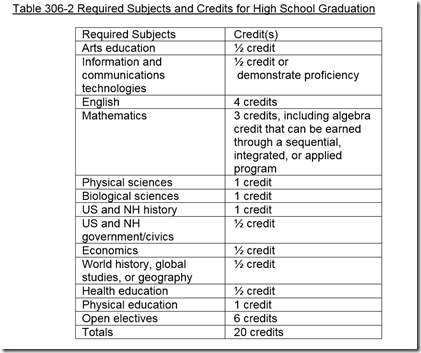
People keep asking me what required course I would remove to make room for a required computer science course. So I decided to take a look at current requirements for graduation in my home of New Hampshire. This is what I found:

From the state itself:

image

20 credits? Five classes a day? And 6 of those credits are elective? Seems like a lot of room to me. Now of course in New Hampshire local school have a lot of control so I looked into the local public high school.

image

Twelve and a half elective requirements. Seems like an additional credit of CS could be added without having fewer of any other required courses.

I teach at a private Catholic high school that requires 4 credits of Religion and still have room for a full year computer science requirement.

So where is the problem fitting in a required computer science course?

Thursday, September 28, 2017

Fear and Loathing and Required Computer Science Education

It seems like every time someone suggests that computer science be a required school subject someone (sometimes several people) bring up on particular objection – that making a subject required makes I a turn off for students. The problem is stated several ways. For example

  • Requiring CS would result in students with unenthusiastic or unprepared teachers
  • Required CS courses would have to be watered down courses
  • Required CS courses force the wrong kind of motivation (extrinsic rather than intrinsic)

While those are all valid concerns are they enough to prevent us from requiring CS? They are apparently not enough to keep us from requiring Math, English, Science, and (in many places) World Languages.

A question that needs to be asked as well is, if students are never exposed to computer science how will they become excited by it? I’m sure we all know someone who got excited about writing from a required English course. Or a math wiz who didn’t know they loved math until that one inspired teacher of a required course got them interested. And the same for just about any subject.

Are we going to turn off some students though poor teaching? Perhaps but that is no more a fear for CS than any other subject. We’re even more likely to excite more students if more students take CS though. Sure the idea of requiring CS is scary to some and the fears must be addressed. But we’re never going to achieve computer science knowledge for everyone if we limit CS courses to people who already know they want to learn it.

Tuesday, September 19, 2017

Designing Projects for Programming Students

Last night a teacher friend of mine gave me a USB stick with the projects he uses with his students. I have projects for C++, Python, Java, and Visual Basic from him. Oh and there are 60+ in each category. It’s going to take me quite some time to go through them. It’s got me thinking about projects in general though.

Keeping students interested is important when designing and assigning projects. The projects I’ve looked at from my friend and the ones I have used myself over the years seem to mostly do that. Although knowing what students a quarter your age will find interesting can be tricky.

For me a big issue is that the more interesting a project is the more programming features and functionality it usually requires. For that reason I am moving up where in the curriculum I teach reading files this year. Projects become a lot more interesting when larger amounts of data are being processed. It also means i can get some good test data in front of students.

Determining  the level of scaffolding is another trick. The projects I am looking at show a wide range of scaffolding. And that makes sense of course. In the early projects you want some solid scaffolding to avoid too much frustration. Over time as students get more comfortable with problem solving and how things work you want less. I usually have students work on a concept with me (following my demo step by step) as one way of scaffolding.

Hinting is also an issue once a project has been assigned. I’ve written about that before - Would You Like a Hint? The more interesting the project the more willing students seem to be to figure things out on their own though.

Sources for projects are an other interesting thing to think about. Some of my favorite projects have come from student suggestions. Others from textbooks. Still more for other teachers.

BTW are you sharing cool projects with others? Blogs or conference talks are both great ways to do that. Do you know about Nifty Assignments from years of SIGCSE conferences? Many of them are for more advanced students but some will work with students still at the beginner ranks.

Other sources are informal conversations like at CSTA Chapter Meetings or other events. I’ve been on a number of advisory boards for career technical programs. Those teachers have shared lots of great project ideas over the years. The Advanced Placement readings are still another great venue for sharing project ideas.  Always look for chances to learn from other teachers.

So where do you get project ideas? What makes for a good project for you?

Monday, September 18, 2017

Congressional App Challenge Launches Today

Something that looks interesting at least in Congressional Districts where there is a sponsor. Visit the web site to check it out.


app-challenge-logo-transparent

Congressional App Challenge Launches Today!

It begins today! The third annual Congressional App Challenge (CAC) has now launched and will run through November 1, 2017. The CAC is a congressional initiative to encourage student engagement in coding and computer science through local app challenges hosted by the Members of Congress. This year, there are over 165 Members of Congress signed up to participate!

The CAC aims to bridge the gender, geographic, and racial gaps in tech. In its first two years, the program yielded 239 challenges across 33 states. Over 1,150 apps were created by nearly 4,000 students, and participant demographics surpassed all industry diversity metrics, with young women representing 30% of all competitors. This year, the Congressional App Challenge will strive to build upon those numbers.

During the next 14 weeks, thousands of students in participating Congressional districts will create and submit their own original applications, that will be evaluated by panels of local judges.The Members of Congress will announce the winners during Computer Science Education Week in early December. Winners will be honored by their Member of Congress. More prizes will be announced throughout the Challenge.

The CAC was created because Congress recognizes how essential computer science and STEM skills are for economic growth and innovation, and that the U.S. is currently experiencing a dearth of adequately trained technical talent. By some estimates there are nearly a quarter of a million unfilled programming jobs in the US, right now. The CAC is a congressional effort to maintain American competitiveness, by proactively inspiring our youth and encouraging them to pursue these crucial skills.

The Challenge owes gratitude to Representatives Bob Goodlatte and Anna G. Eshoo, co-chairs of the Congressional Internet Caucus, who requested and supported the creation of the CAC. Challenge execution is supported by the efforts of our Advisory Board, which includes the American Indian Science and Engineering Society, the Computer Science Teachers Association, Girls Who Code, Hispanic Heritage Foundation, Capital One, and Cisco, as well as a broad coalition of CS-focused partners.

For more information about the Congressional App Challenge, please visit CongressionalAppChallenge.us. If you are interested getting involved or in supporting the Congressional App Challenge, please contact our Director, Rachel Decoste, at rdecoste@congressionalappchallenge.us.

Friday, September 15, 2017

Illustrating the Difference Between Bandwidth and Latency

Earlier this week my AP CS Principles classes were discussing the difference between latency and bandwidth. My curriculum resource (I’m using the curriculum from code.org) describes these two words like this:

  • Bandwidth - Transmission capacity measure by bit rate
  • Latency - Time it takes for a bit to travel from its sender to its receiver.

These are useful descriptions but how to make that real for students? Today I found two great examples of high bandwidth but low latency.

BandwidthOne was in the form of this graphic on the right. The latency is slow. It takes a lot of time for the pigeon to fly to the other site. So moving one bit or even byte at a time would not be a good idea. On the other hand since all the data gets to the destination at the same time the bandwidth is high. The story is a bit dated but still interesting.

I shared that graphic on Facebook and a friend of mine who works for Amazon Web Services pointed me to a more current story.

Amazon’s Snowmobile is Actually a Truck Hauling a Large Hard Drive

From the article:

“Using multiple semis to shuttle data around might seem like overkill. But for such massive amounts of data, hitting the open road is still the most efficient way to go. Even with a one gigabit per-second connection such as Google Fiber, uploading 100 petabytes over the internet would take more than 28 years. At an average speed of 65 mph, on the other hand, you could drive a Snowmobile from San Francisco to New York City in about 45 hours—about 4,970 gigabits per second.”

Now that is a story that speaks to moving really large amounts of data. And again, showing the difference between latency and bandwidth.

Thursday, September 14, 2017

Be a Router and Share Messages

The curriculum I am using for Advanced Placement Computer Science Principles is the excellent Code.Org curriculum. I really like the Internet Simulator that is involved in many of the early lesson in the Internet unit. It really lets students try a lot of things. I like to add a bit of my own flavor though and involving physical objects and activities is part of that. So today I had my students send messages through routers where students played that part of routers.

Here’s what I did. I semi-randomly assigned each student a two part address. The first number indicated a router and the second a student “connected” to that router. I randomly assigned a students to be routers. I selected the number of routers based on the number of students in the section. I think you need at least two routers but more would be better if the class size allows it.

imageI prepared a bunch of “message packets.” and handed a couple of them to each student who was not a router.

A list of students with their “IP addresses” was displayed on the board. I could have printed them out if I liked wasting paper but I don’t.

Students were to write out a question in the message field as well as the send to and return addresses (the codes I had created) and send the message. They were to give the message to the “router” they were connected to. The router was then responsible for either handing the message directly to the intended recipient if they were “on the same router” or pass it along to the appropriate router if not. That router was responsible for passing it to the recipient connected to them.

After a bunch of messages and replies were sent we discussed what happened. Some good things happened. Well bad things depending on how you want to look at them. I love learning moments so they were good from my point of view.

One router was overwhelmed with messages and took a while to get them all to the right place. Great! Bottleneck simulated!

Some addresses were not well written and could not be delivered. I may send some messages like that myself next time to make sure that happens. Dropped message and what that means for the learning experience!

I did this with minimal discussion first so that students didn’t know exactly what to expect. I’m hopeful this made the later discussion and the exercise with the Internet Simulator.

What do you think? Look reasonable to you? What do you do to help students understand routers and what they do?

Wednesday, September 13, 2017

NCWIT Aspirations in Computing 2018

Several of my students have applied for this award and all found it quite worthwhile.There are many benefits for students in high school and college. It’s really helpful for girls and young women to be recognized for their interests and accomplishments in technology.


Calling all 9th-12th grade women and educators, as well as college women in tech! 2018 Aspirations in Computing award applications are open: https://www.aspirations.org.

  • Earn scholarships for college
  • Find computing internships
  • Connect with a large network of other technical young women
  • Discover resources to increase your knowledge of technology

See also Top 10 Reasons to Apply for the NCWIT Award for Aspirations in Computing

Tuesday, September 12, 2017

National Briefing Call on K-12 Computer Science Education

I'm told this will be very well worth the time. I may even join with my Advanced Placement Computer Science Principles students.


We are pleased to invite you to join an important national briefing call on K-12 computer science education and the Computer Science for All (CSforAll) movement Monday, September 18 at 2:00 pm ET featuring remarks from a very special guest (please join 5 minutes early as our featured guest will be speaking at the top of the call).


We will share important updates and progress towards Computer Science for All from key national leaders; mark the one-year anniversary of the launch of the CSforAll Consortium at the White House Summit on Computer Science for All; and provide a sneak peek into the agenda and speakers at the upcoming CSforAll Summit, October 16-17 at Washington University in St. Louis.


Don’t miss this important conversation on K-12 computer science in the US and the role we all can play in achieving CSforAll. To join, add this call to your calendar using the links below.

Feel free to share this opportunity with your networks. Students and educators are especially welcome.

image
You can also follow along via social media using #csforall.

September 18 @ 2pm ET

Conference Line: (888) 946-4716  //  Code: 3267553#

ADD TO YOUR CALENDAR:

iCalendar  •  Google Calendar  •  Outlook  •  Outlook Online  •  Yahoo! Calendar

Yet Another Example of the Importance of Good Names

A little Tuesday humor. I think I may use this to help students understand the importance of good variable names and other identifiers.

groundhog

Monday, September 11, 2017

Who Wants to be the DNS Server?

We’re studying how the Internet works in my AP CS Principles course. I wanted a little exercise to help students understand how DNS servers work and maybe through in a bit about address caching.  So I came up with a little role play to try out. I think it worked ok. I’ll try it again tomorrow with some more instructions.

Here’s what I did. I started by taking screen shots of a half dozen or so web sites. The usual suspects: Google, Apple, Microsoft, Twitter, CNN, MSNBC, and the school’s home page. I printed them out and assigned students to “serve” each site. An other students was assigned to be the DNS server. I handed him a form and asked him to record which student was “serving” each web site. So the address in this case was a student name.

Another student was assigned as the user and still another was assigned to act as their computer. The computer had their own sheet for looking up addresses (student names) for each web site. As we started it was empty. This would become the address cache for the computer.

The user asked the computer for a web page. If the address was known to the computer they asked the appropriate student to display the web page. If they address was not known the computer asked the DNS server for an address.  The DNS server would return the address which the computer would record in cache and then ask the server to display the page.  We ran through several request to see how this worked.

I did this before any detailed explanation of the process. I followed the role play with a video from code.org called THE INTERNET: IP Addresses and DNS that can be found on their collection of videos. Not surprisingly, this video went into some good detail on the very things we observed in the role play. I’m hoping that the combination of the role play, the video, and in-class discussion will help with both understanding and retention of the information.

What do you think? How would you add or change this? Do you do something similar?

Tuesday, September 05, 2017

Curriculum is Hard

Generally speaking I am a roll my own sort of teacher when it comes to curriculum. This year that is a bit overwhelming because I am teaching four different courses. Now two of them are easy. I have been teaching our freshmen Explorations in CS course for about four years now. It’s well set up. I’m not the only teacher teaching it and between us it’s all laid out pretty well. Sure we tweak it a bit every time we teach it but mostly it is good to go. Honors Programming (mostly sophomores and juniors) is also pretty solid. The other two courses not so much.

My Mobile Application Programming course is a total redo this year. I was not happy with how it went last year so I have switched to App Inventor. I’m putting things together from resources that are available from others (see http://appinventor.mit.edu/explore/) So a bit of mix and match with some ideas of my own. Still largely my own design in my eyes. It’s a one semester course and I know what I want to cover pretty well.

Advanced Placement Computer Science Principles is a whole different matter though. For one thing it is a full year. All my other courses are a single semester. It’s also more high stakes. My students will be taking the AP exam and like it or not we (them and me) will be judged a bit more seriously on the results. It’s not like the other courses in other ways as well. There are performance tasks to accomplish for example. In a sense they are just big project and I use projects all the time. But in an other they are different in that I am not designing my own rubric. I need students prepared properly so they can be graded by others. I want to get this right for my students.

imageSo for AP CS P I am using a pre-written curriculum. There are several great ones out there. There is The Beauty and Joy of Computing out of US Berkley for example. It looks really good but I didn’t want to use Snap!. Not that Snap! isn’t pretty cool but I wanted something different from what I was using in Mobile App Programming and AppInventor and Snap! are very similar.

imageMobile CSP also looks great but it uses AppInventor which, again, I wanted to avoid since I was already using it in another class. 

Yes I know that some people think using the same language over and over again is a great thing. Even a preferred thing. Miles Berry makes the case for One Language at a Time in a recent article. I disagree and I may elaborate on that in a future post.

So what did I go with? I went with the AP CS Principles curriculum from code.org. For programming it uses their app lab which uses both block and JavaScript. We’ll be moving into the JavaScript as much as possible when we get to the programming. JavaScript is a growing language and I see learning that as a good thing for my university bound students. They all know some Visual Basic and C# and a good number are also fairly fluent in Java.

But AP CS P is more than just programming which is one reason I am enjoying teaching it. Code.org has a lot of good resources for teaching that. Videos (short and interesting) and collaborative exercises. Right now students are using an internet simulator to create and use their own communications protocols. It seems to be going well so far. We’re only two weeks in of course but so far I think this is going to work well for me.

I’m still going to tweak things a bit as we go along. And next year, once I’m comfortable with the course and the curriculum I am sure I will tweak it more. Overall though I’m glad I am taking this route. Your mileage may vary of course.

What are you using and why? I’m especially interested in opinions on AP CS Principles curriculum.


Monday, September 04, 2017

SAVE THE DATE! CSTA2018 Omaha, Nebraska

Dates for the next CSTA Annual conference have been announced. Put it in your calendar and start making plans now. Get your request for professional development funds into your school/district now and beat the rush. More information about the CSTA Annual Conference at the CSTA web site.


CSTA will be bringing its world class professional development and educator community together again in July of 2018. We are excited to offer teachers of Computer Science the opportunity to build skills, meet other teachers, and get inspired!

We are happy to announce that the  National Integrated Cyber Education Research Center (NICERC) will again be joining us for the conference and offering their Education Discovery Forum immediately following the CSTA conference on July 10 & 11. To find out more about EDF: Omaha click here.

Want to learn more about what Omaha has to offer? Click here.

This family-friendly location is easy to navigate and offers our attendees world-class attractions, dining, and of course, professional development for teachers of computer science. Want to know more? Click here for a fact sheet on Omaha.

Want to know more about the Silicon Prairie? Click here.

Sunday, September 03, 2017

Executive Director for Computer Science Teachers Association Search

The CSTA  is seeking an Executive Director. A link to the full position profile with the official details is here. That’s the official list of requirements. I have a bit of a wish list myself. It’s an ideal and I don’t know that anyone fits it all but since I have absolutely nothing to do with who is selected I’m going to give some opinions anyway. It’s my blog. Smile

I’d like someone who is already known in the computer science education community. Someone with some experience either teaching or managing computer science related outreach who people with say “oh yeah, good choice” rather than asking “Who?”

The executive director has to do a lot of fundraising (something I am not that good at BTW – it’s hard) so previous experience dealing with funding organizations like NSF, various foundations, and large tech companies would be very helpful. Closely related to this is the ability to make the case for CSTA. By that I mean able to communicate the unique nature of CSTA (by, for, and about the people who teach), explain its contributions to expanding CS (research, advocating for over 10 years – since before CS Ed became “a thing”), and all the various ways CSTA is helping CS education (conference, chapters, standards development, and more).

Clearly we need a strong and effective communicator. Our EDs have to present to a lot of different audiences both as a speaker and a writer.

CSTA is getting bigger all the time in membership and that growth has to be managed well. It also means that we have to have a staff that works together and is well supported by the person at the top. I think that is laid out in the official requirements fairly well.

CSTA is a special organization to me and I think to many members. We need a very special person in the Executive Director role. Here’s hoping we find someone great.

Thursday, August 31, 2017

Gamification and Teaching Computer Science

Gamification is a huge buzz word in education generally today. There are proponents and opponents of course. And both sides have good arguments behind their opinions. I’ve had mixed feelings about the whole topic for a while. This is largely because it is hard to re3ally know what it means and how it might work for me and my teaching style. A couple of recent events have me looking at it some more.

I had one group of students brainstorm using how to get students more involved and attentive in class. They seemed to really like Kahoot!.image I was hoping for something new and out of the box and I know a number of teachers who use Kahoot! (and some similar tools as well.) So I thought I would take a look at it again. It looks interesting. I am not sure I have enough time to set up sessions right now but apparently there is a huge library of questions from other teachers. I plan look through that when I have time. (Christmas break is coming.)

Time is a problem for some of these gamification tools.

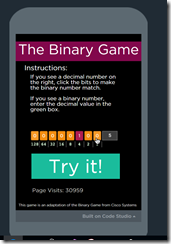
imageThe other event was sending my students to a somewhat addictive Binary number practice game from @codeorg. My students wanted to play it for a while. I could never have gotten to convert Binary to decimal or decimal to Binary as many times as they did playing this game using a worksheet.

On one hand I can see where that looks like an old fashioned “drill and kill” sort of exercise. On the other the students had fun, got some great practice doing conversions, and they seem (how will I check? )to be a lot more comfortable with the idea of doing these conversions. So there is something there.

imageAn other tool I have used in the past that is along the lines of gamification is Code Hunt. It has coding puzzles available in C# and Java. A teacher can create their own or use the ones that are already there. I’ve had mixed success with this. Some students love it and some students struggle. Code Hunt involved writing code that works with test data that is generated and displayed with results. Some students are terrible at this and get frustrated. Other students just eat it up!

 Problets by Amruth N. Kumar are a somewhat similar tool. Problems for students to solve. Amruth describes Problets as “problem solving software assistants for learning, reinforcement and assessment of programming concepts.” All of the problets are available in C++, Java, and C#. Some are also available in Visual Basic. I may try problets this year. We’ll see. There is that whole time issue again.

I want learning to be fun. I don’t want to have students playing games just to be “the cool teacher.” Things that look like games have to have real value and promote actual learning and/or indicate that learning has taken place.If a game does that I’m ok with it. But I need to make sure it has value first.

Tuesday, August 15, 2017

Ideas for Computer Science Teachers from CS Teachers

For me one of the big benefits of social media is getting and sharing ideas from other computer science teachers. Blogs, Twitter, and Facebook are regular sources of good information. I’ve got several to share today.

It starts with Kimberly Laron’s Facebook post on a teaching aid for number systems.image I’m always looking for new aids for teaching binary and the like. Her Google Sheets tool is pretty cool.  I made my own version for Excel because I’m an Excel sort of guy.

Then there are the cool images that Jill Westerlund shares on her blog at Say it better with Boolean && binary. She has a bunch of them and both shows images of how she is using them and direct links so you can download copies of them for your own use. Check them out. I’ll be using several of them in my own lab.

Another favorite thing is new projects or new takes on older projects. Doug Peterson who had a recent birthday wrote about the Birthday Project. Maybe you’ve used on or maybe not. In either case Doug’s take on it is a great read. Plus he links to the Wikipedia article on the Birthday Project for more information.  But there are more links than just that one. Visit Doug’s post for more.

Thursday, August 10, 2017

#BUILTBYGIRLS Challenge - for teen girls with startup ideas

This looks interesting. Know a girl with entrepreneurship dreams and ideas?


#BUILTBYGIRLS is looking for the next wave of startup founders and change-makers. Are you building a mobile app, hardware device, robotics project, game, or something no one has invented yet? Does it have the potential to succeed in the real world?

Wow us with your product concept, designs and working prototype for the chance to win $10,000. Finalists will get the trip of a lifetime to San Francisco to pitch in front of expert girl judges, tech moguls and industry experts.

Are you ready to build the next big startup?

https://www.builtbygirls.com/programs/challenge

Eligibility

Girls 13-18 years old who can participate in SF from 9/14-20, 2017. Open to teams of up to 4.

Tuesday, August 08, 2017

How To Retain Computer Science Teachers

One of the big topics around computer science education is the shortage of teachers with enough CS knowledge to properly teach the subject. One fear is that anyone well enough versed in computer science to teach it is likely to leave teaching for industry. Mike Zamansky addressed this a bit recently with his post On Retaining Teachers. And earlier in Will we lose CS teachers to industry? This sort of discussion comes up a lot. The typical "answer" advanced is higher pay. Sounds great but not really practical.

Union rules in most public school systems prohibit paying premiums for different subject teachers. Where rules don't often custom or a systemic view of fairness (all teachers do the same job regardless of subject) prevent different salaries. If that is out, how does a school or school system retain teachers.

Mike Zamansky in his posts suggests non financial benefits for teachers. New electives for example. Letting teachers teach courses they enjoy is a good incentive. In the case of computer science teachers I can think of other incentives. Of course everyone is different and is motivated in different ways. So what seems good to me may not make everyone happy enough to stay. But I think they'll appeal to many.

Really things boil down to treating computer science teachers with trust and respect as well as giving them the tools to do their job better. For example, do computer science teachers have administrative privileges on the computers in their lab? If not, why not? One would expect that a well prepared CS teacher should be able to safely handle that responsibility. In fact it is often necessary for them to experiment with new tools and teaching techniques. Keeping administrative access from them shows a lack of respect and trust. That will make anyone feel less valued.

How about keeping teaching labs up to date? Yes it costs money but if you want students to be current then the equipment they learn on should be current. Plus making CS teachers find work around and hacks to deal with inadequate computers leads to frustration and discouragement. And by the way, the CS teachers should be consulted on decisions about computers and software for their labs. Believe it or not stories of teachers returning from summer break to find that PCs have been replaced by Apple Macs or Google Chromebooks are far to common. This is incredibly disruptive and makes for serious stress and aggravation for teachers.

Professional development is another area where CS teachers can use some support. While most systems have some money for professional development but teachers are not always encouraged to apply for it. With CS constantly moving regular PD is really necessary. Unfortunately it is not always close or inexpensive. Conferences like CSTA are wonderful but often districts are unwilling to pay the full cost (transportation and housing are the big costs.) These events are great for teachers but not all teacher can afford to pick up the slack on their own. Not on a teacher salary. Schools need to invest in CS teachers.

Related to both professional development and new electives (there are huge opportunities for CS electives that appeal to teachers and students alike) is some funding for new equipment for teaching. Not just the previously mentioned lab computers but things like Micro:bits, robots, quadcopters, and other electronics that can make CS more interesting and even more cross curricula. Different teachers have different interests and encouraging them to follow those interests and bring them to their teaching can be very motivating. And help with retention.

So that's my bit of brainstorming on the subject. What do you think? If you teach CS what sorts of thing motivate you to stay teaching and stay are your present school? What sorts of things make you want to leave? Maybe we can help our administrators out with some ideas.


Monday, August 07, 2017

Twitter Chats for Computer Science Teachers

With the isolation that many computer science teachers feel social media can be an important part of both building community and professional development. Recently I have focused on blogs (Five Must Read Blogs for Computer Science Teachers ) and an online forum ( An Online Forum for Computer Science Educators ). Today I'd like to list a few useful Twitter chats.

  • #csk8 5pm-6pm Pacific Time every other Wednesday during the school year. This is a must attend chat for CS teachers in pre-secondary education. I get a lot out of it myself FWIW.
  • #ethicalCS 5pm PT/8pm ET Wednesdays during the summer. I'm hoping it continues as discussions so have have been fascinating.
  • #caschat 8-9 pm London time, during term time.Hosted by Computing At School in the United Kingdom. Lots of value for those of us in other parts of the world as well.
  • #PiChatUSA Thursdays 8:30-9pm Eastern Time, if you use Raspberry Pi. in class you'll want to join this one
  • #InfyEdChat 5 PM PT / 8 PM ET Mondays. Each chat is hosted by a different person and very well run. I hosted one myself back in July 2017 Always interesting chats.
  • #TynkerChat Mondays at 4pm PT / 7pm PT for a 1/2 hour. very useful for people who use Tynker in their classroom.

The Exploring Computer Science people are running their first Twitter chat tonight at 5PM Pacific time. Follow at #ECSeduECS Chat

Personally I really like Twitter chats. I've really found a bunch of people to learn from through these events. And of course learned a lot from them.

BTW I recommend checking those hash tags from time to time when there are not formal chats going on. People often use them to signel information of value to others who participate in these chats regularly.

Tuesday, August 01, 2017

Cybersecurity–This Summer's Computer Science Education Buzzword

Cybersecurity seems to be all the rage these days. It was a big topic of conversation at this summer's CSTA conference, I've had a number of parents ask me if we teach it at my school, and it is been big on the CS ed social media scene. The NSA even came to talk to teachers at the CSTA conference! It's a big deal! But what does it really mean? Well to quote the great philosopher:

"When I use a word," Humpty Dumpty said, in rather a scornful tone, "it means just what I choose it to mean—neither more nor less."

Or perhaps the story of the blind men studying the elephant is even better? In short, every seems to have a different idea or no idea at all of what cybersecurity means or how it should be taught in schools.

I've been asking around for people's thoughts on this lately. One of the people I asked is a former student who does security work at a local university. Some of his thoughts are below with some edits of my own.

There are two 'tracks' in education that I've seen as a result of this. 

1. Security IT people.  These people think at a business-process level at best, and simply IT service provisioning at worse.  They clean viruses, install operating systems, evaluate products, establish procedures, write policy, inspect network traffic etc.  Security for these people is either strategic or tactical.  They are concerned about 'doing the right thing' as far as security goes, even though they are usually not a technical nerds as one might generally like.

When I've seen people do this at a college level, they do blue-team/red-team hacking and defending either as a class or in clubs.  I personally _hate_ this approach, but I get why people do it. 

A. its fun,

B. its sexy

C. it can be competitive and cooperative and

D. it give something much closer to real world experience.

its also E. Not what _most_ people spend any serious time doing.  That pen-testing stuff gets outsourced to whatever place can do it the cheapest.  Its usually done as part of audits and other really-boring activities and the burnout rate for new people in those professions is 2-5 years.  In my experience, students that do it need lots of oversight so they don't go hacking things they shouldn't and sometimes people need to make a 'safe' lab environment so they don't affect anything else.  That can translate to a lot of time and resources. 

A better approach would be to do a IT modeling course of some reasonable kind.  At one university, there was an course on networking at the grad level, and while they didn't do much actual networking, they would work in teams to design IT technology layouts.  The students learned a lot about modern IT systems, servers, desktops, networking, software management, firewall, IDS/IPS tools, etc.  The Big Project was, given a somewhat real-world-ish scenario (a courthouse, a college, a city, etc) design an IT system from the ground up.  There was a presentation to a small panel and the winners won a prize. 

2. The other track, secure programming.

This is an extremely useful skill too, but its absolutely not sexy.  These people design good algorithms, write solid encryption, read and debug code, do proper QA and acceptance testing, etc.  The lower-level code, the better.  I'm not sure how useful this is though to the average programmer.... never-mind a high school student.... given the fact that if you are using reasonable libraries and sticking to a high-level language, you are usually fine for most development.

A similar approach that might have less direct programming, would be to look at a book like 'Threat Modeling' by Adam Shostack.  He's a Microsoft guy and has done a lot of work thinking about applications of a threat model to different situations.  You would have to do a little 'translation' of the book to high-school programming skills, but in it he talks about software design and thinking through potential security use-cases using a standard model.  Being able to read and debug code someone else wrote, thinking about things in psuedo-code before writing something ('Ready', 'Fire', 'Aim'? ;-), and understanding Information Security goals of Security, Integrity, and Availability without getting all theoretical about it. 

The first category, Security IT, seems like the natural thing for high schools. It fits in very well with network management type courses. And there are all those CTF (Capture the Flag) contests that many students seem to like. Plus is plays into a desire that seems to be prevalent to learn hacking.  It's not for everyone though and for some it doesn't feel like "real computer science." A term that is hard to define for many as well.

The second category, secure programming, is more interesting to me personally. I spent some time doing operating system development where among other things I was responsible for maintaining the code that allowed users to log on and off. Plus we made major security changes to the OS while I was part of the team so threat analysis and design for security was a big part of what we were doing.

It's not so glamorous as "hacking into computers" or even preventing malicious users fro breaking into your network for many students though. But it is oh so important.

I'm still quite a way from deciding what a cybersecurity course might look like at my high school. I can easily think of a couple of ways it could work at the higher education level but fitting it into the high school curriculum seems harder.

What I have decided is that I need to include some discussion of various cybersecurity issues in several existing courses. We talk about some security issues already, good passwords and their use for example. We could do more though. And in my programming courses we could talk about secure programming more. Most of all we could be including discussion of various cybersecurity issues in Advanced Placement Computer Science Principles. For the time being that is my plan. But I'm going to keep working on the idea of a dedicated computer security course. Let me know if you have suggestions or know of good existing cybersecurity courses at the secondary school level.