Monday, February 26, 2018

Cyber Security or Just Good Program Design?

People continue to share things that they learned at SIGCSE online. Recently Ria Galanos, from Thomas Jefferson HS, shared Cybersecurity Modules: Security Injections|Cyber4All @Towson These ae a bunch of modules for teaching about various security issues like integer errors, Input Validation, and buffer overflow. Examples are in a number of languages including C++, Java, and Python. Looks like great stuff really.

From what I understand the majority of security vulnerabilities in software are a result of one of these three types of errors. Clearly they are important concepts but we don’t spend a lot of time talking about them in beginner classes. That probably needs to change.

It seems like we keep adding things to what we should be teaching beginners. Ethics, Accessibility, Security, and let's not forget the stuff for the AP Exam. How do we fit it all in?

Ultimately we have to do things in parallel. I think we have to think about ethical computing, safe programs, and accessible software as all part of good, solid program design. I think it is a mistake to think about all of these things as separate units to be taught in isolation. Projects can be created that integrate security, accessibility, and more by defining them all as good design. Not something special to do just for security or just for accessibility but for sound design.

Now to go look at my projects and see how to do all of that.

Friday, February 23, 2018

Accessibility and Computer Science

I’ve been following, as much as one can, the SIGCSE conference via Twitter this week. One of the comments I read talked about how many places don’t teach accessibility because they don’t see it as part of computer science. I can see that – sort of. On the other hand, accessibility is really an important part of human computer interaction and few fail to see that as an important part of computer science. Human-Computer Interaction is one of the 18 Knowledge Areas discussed in the CS 2013 Final Report

These days are we increasingly recognize diversity as important in teaching computer science I think it is important to realize that accessibility is essential for improving diversity in all areas. That means it should be included in any discussion of Human-Computer Interaction.

Speaking of HCI, the video below is a fun and useful look into what HCI and good design means. It was shown at SIGCSE by Tim Bell of Computer Science Unplugged.

Thursday, February 22, 2018

Modeling Good Coding Practice

Facebook showed me this cartoon this morning.

Programming alone

Teaching computer science means you are often programming while someone watches. I confess that I have been known to write something “quick and dirty” but that is not really an option for anything that students might ever see. Or really anyone else might see. “Do as I say not as I do” really doesn’t work for anything.

Generally I’m pretty careful about how I write code while I am doing a demo or creating a scaffold project for students. It requires a few extra minutes but I think it is important to model good practices. I think I have to make a point of explaining why I am taking those extra steps as they are not obvious to beginners.

Sure it seems unnecessary to rename a label box when there is only one label box on the form. Or to change the text property of the form. Or any one of a number of things that appear to be cosmetic and that don’t keep the program from working. But habits are important.

I remember once asking my father why we had to have perfect table manners at home where no one could see us. My father explained that by developing the good habits at home we would be less likely to mess up in public. It’s a lesson that stayed with me. It is why,even in the small simple code, using good coding practice is important. That way you don’t have to think about it when the coding gets public.

Wednesday, February 21, 2018

Open Letter to People at #SIGCSE2018

The Annual SIGCSE Technical Symposium is taking place in Baltimore this week.  Some of the best minds in computer science education are sharing ideas in sessions, panels, birds of a feather, and hallway conversations. At the same time most of the people who really need that information – classroom teachers, adjunct faculty, and others teaching computer science – are not there to hear it. It’s reality. We can’t all be there. We are starving to hear about what people learn at SIGCSE though.
Now some of us who are members of ACM and SIGCSE will get the papers later but that only goes so far. My request to the people at SIGCSE is that they find ways to share some of the things that don’t make it into the printed papers. Things like the keynotes. What an amazing lineup of keynotes this year it is too!

And the birds of a feather and the hallway conversations and the rest of the stuff that is just so hard to capture.

How should you do it? Well lots of ways. For one thing live tweet the event. Use the official hashtag - #SIGCSE2018. There are people at home watching. We may even ask you questions.

Share things on Facebook. There are a couple of good groups there that would probably welcome SIGCSE posts. I can think of Computer Science Education: Researchers & Practitioners and Computer Science Educators as examples. Or post them as public on your own account so people can share them.

For another write posts on your blog. Don’t have a blog? I tell you what – I will post guest posts from SIGCSE attendees here on my blog. Send them to me at act2@acthompson.net with your attribution information and I’ll post as many as come in.

Consider offering to talk about SIGCSE at a future local CSTA chapter meeting. You’re probably going to share information at your home institution but there are lots of others who would love to hear about what you learned at SIGCSE.

Programming Patterns For Beginners

Ever since I read those papers on the Rainfall program (How Hard Is That Programming Problem?)  I’ve been thinking about patterns in problem solving and programming. There are many of these types of patterns in programming but most of us learn them through experience.

The Rainfall problem is one example. It’s basically a counting and totaling loop that handles exceptions. Anyone who has done one of those (or maybe two if they are like me) probably sees that pattern as soon as they read or hear the problem statement. It’s new to beginners though.

One of my favorite patterns (much more complicated for beginners to see) has to do with avoiding special cases for boundary conditions. Take for example the lights out project (Taking Things To Another Level ) it involves checking the squares above, below, to the left, and to the right of a box in a 5 by 5 grid. Beginners tend to see that as calling for special cases for the corners and edges. Experienced programmers create an invisible row above and below and an invisible column to the left and right of the visible grid which allows all boxes to be checked the same way. It’s a pattern many of us have seen before.

After a while I think most of us don’t even consciously think “oh that is a pattern I have seen before” but we just go with it. Of course there are far too many patterns to teach all of them in a single semester (or single life time I suspect.)

lately I have been asking myself “what are the most common patterns I can think of and how to I create projects to give students experience with them?” And more than that, how can I get them to recognize those patterns in the future? I can’t assign enough projects so I think we’ll be reading some code. Maybe playing with Parsons Problems. But definitely I need to have students read more code.

Do you teach patters explicitly or just implicitly? What patterns do you see as most important for beginners to learn?

Friday, February 16, 2018

Self Driving Everything

Nissan put together this cute little video that starts with self driving slippers and moves on to self driving pillows and chairs and, well, watch it.


What's next? That is the question I would ask students - what else should be self driving? And why?

Thursday, February 15, 2018

Jumanji and the While Loop

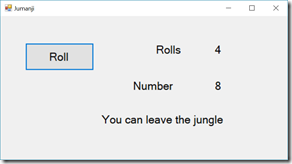
Cultural references (term used loosely) can make projects and exercises more interesting for students. Now that there is an updated version of the movie Jumanji out I decided to use that reference again for working with while loops.

If you remember the movie, you will probably remember that people playing the game can be forced to wait in the jungle until another player rolls a 5 or an 8. There are several ways you can use this in an exercise. You can “roll” dice once and use an if statement to report if the person can leave the jungle or not. OK but boring. Or you can simulate rolls to see how many “moves” it takes to get someone out of the jungle. That’s what we did.

There are several things I like about this exercise. We start by asking if the loop should check at the top or the bottom. Of course you can write it either way but the discussion is the valuable part.

Next we take on how the Boolean expression is formed. Finally we talk about the code inside the loop. One die with a range of 1 to 12 or two die with a range of 1 to 6? Which one better simulates real game play and why? Finally we talk about how to do the counting inside the loop.

image

All in all I find it a helpful exercise. As a demo it is simple enough to show the basics but involved enough to have some good conversations about how and why we do things different ways. And it is relatable to things outside of school.

Tuesday, February 13, 2018

Quotes About Programming and Computer Science

While looking for a quote that was mostly remembered except for who to credit with it I found a couple of fun sites with quote collections in them. Some of these I already share with students. I think I may print out some more of these quotes for my bulletin board.

This first site is a single (longish) page with some of the best. One of my favorites is:

When debugging, novices insert corrective code; experts remove defective code. ~Richard Pattis

image

This next list is collected by Rich Pattis who is very quotable himself as you can see above. His list covers more than just programming. I love this one:

Those who know, do. Those who understand, teach. - Aristotle

image

This next one shows you a quote of the day and has a long list of sources in a menu on the side of the page. Lots of great people to check out. I like this quote by Bill Gates:

"Measuring programming progress by lines of code is like measuring aircraft building progress by weight."
- Bill Gates
Read more: http://www.softwarequotes.com/showquotes.aspx?id=579&name=Bill Gates#ixzz570txjSqE

image

This one has two pages of quotes. Some are more interesting than others to me but I did like this one:

“That's the thing about people who think they hate computers. What they really hate is lousy programmers.”
Larry Niven

image

Do you have a favorite source for computer science quotes? Or a favorite quote that you don’t find on one of these lists?

Monday, February 12, 2018

Teaching Diversity in Computing

One of the important topics in computing these days is diversity. Why? Well there are things like concern about equal opportunity. (Why Can’t Silicon Valley Solve Its Diversity Problem?) and that is part of it. It’s often hard to make people understand why that lack of diversity is a problem. People are only starting to understand how bias creeps into software. It creeps in because we all have biases – some more subtle than others. And that influences how we write software.

Here are a couple of issues that have come up based on race for example.

It should be obvious that something like facial recognition should be tested with a wide variety of people with different faces and skin tones. Right? Well apparently it is not so obvious.

Some early color computer monitors used a mix of red and blue colored letters. This is actually a problem because there are a surprising number of people with red/blue color blindness. No one on the design team had the problem of course so it slipped by until the product was released.

There is a story, I haven’t been able to verify it but it is a good example, that early models of the Apple Newton had a very good handwriting reader. Well until they handed it to a left handed person and it could not read their handwriting.

I’ve been talking about testing and debugging with my students lately. It seems like a logical place to talk about algorithmic bias and the need for testing with a diverse population. We talk about how different viewpoints also contribute to more and different ways of looking at problems.

I feel like this is an important topic to cover. Having a more diverse population in computing is clearly an issue of fairness and that is enough of a reason to promote it. But I don’t think it hurts to point out that diversity also results in better software which benefits all of us. If we don’t explain this and teach it than I don’t think all of our students will understand this on their own. Some will of course but it is too important a topic to leave to chance.

ajllogo_wetnmgBTW there is a regular Twitter chat on ethics and computing using the #EthicalCS hashtag. Highly recommended.

For more on the topic of bias in algorithms you  may want to visit the Algorithmic Justice League.

Friday, February 09, 2018

Priming the Computing Teacher Pump

Where are computer science teachers going to come from? That’s the big question. OK it is one of the big questions about Computer Science for All. Increasingly CS is moving to younger and younger grades and a lot of people are asking where those teachers will come from. Many teachers who teach computer science now don’t think of themselves as computer science teachers by the way. In elementary schools most teachers appear to think of themselves as grade level teachers. The generally teach most everything.

I believe we want computer science integrated in the elementary school curriculum and not just a subject taught by specialists. I was a computer specialist in a couple of elementary schools many years ago and while it was fun I think it would have been a lot more effective as a more integrated subject.

But anyway, back to the question, how and where and when are these teachers going to learn to teach computer science? There has long been some discussion about getting schools of education involved. Not much progress and most of the talk seems to have been among computer science education people.

Earlier I saw this post on Mark Guzdial’s blog - Finding a home for computing education in US Schools of Education: Priming the Computing Teacher Pump

So of course I visited the related website  - http://www.computingteacher.org/ – to learn more. Some of the most amazing people in CS education are involved. I hope a lot of schools of education take notice and get involved. We need teachers prepared to prepare all students.


Priming the Computing Teacher Pump: Integrating Computing Education into Schools of Education

This report focuses on Schools of Education rather than Departments or Colleges of Computer Science/Computing for setting up CS teacher education.


We challenge US teacher education programs to innovate and integrate a new discipline into their programs. What we propose is nothing less than a change to the American Education canon. Such enormous change will require innovating in different ways, using different models and strategies, before we find models that work. The report, Priming the Pump, will highlight examples of integration from across the United States, and provide concrete recommendations for discussion.


With the expansion of computing education in mainstream K-12 schools, the current training mechanisms for teachers quickly will fall short of supporting a sustainable pipeline of teachers for the scale many cities and states have committed to.

The Struggle To Keep Programs Simple

Debugging code is hard. Really hard. The more complicated the code the harder it is to debug. Brian Kernighan said it well.

debugging

But oh do my students write clever code. Well, they think it is clever code. If nothing else it is complicated. It’s not really their fault though. Not completely.

Looking at student code the other day I realized that their tool set is limited. They don’t always have the tools to write code simply. I’ve blogged about this a bit before (The Complex Question of Complexity in Programming ) but it is something I keep struggling with. Many problems, like the Lights Out project in that referenced blog post, can be written in far fewer lines of code if you know about arrays. Without arrays it takes many lines of code and there are many places things go wrong. On the other hand the many lines are simple lines while the array version is more complex and has to be thought about a lot more.

Which way is better? Well that is open to debate. Plus it depends on the experience of the programmer.

It’s more than tools though. My students have been writing a project that involves a lot of if statements. They are doing the Ski Lift Ticket Project that I have blogged about before. There  are a lot of ways of constructing this solution. Some are more complicated than others. It always seems like some students want to make it very complicated. Why? I’m trying to figure that out but my working theory is planning. That and working in stages.

Some students try to handle both the age range and the resort status at the same time. For an experienced programmer this is not a big deal. For a raw beginner this can be a bridge too far. Students who first think about the age ranges and test that and then look at the resort status tend to do better. Better as in finish first and have less complicated solutions.

Too often beginners just start writing code without planning. Rather than being that fast way this is the long way. It also tends to result in more complicated code as line after line is added to handle situations that were not thought of in advance. Obviously I talk about planning all the time. And I try to model it when we work though exercises as a class. But well, kids in high school, know better. Just ask them – they’ll tell you.

I keep trying though. I also try to show them code and point out the design steps and the simplicity that makes it easier to follow. And I give them more tools as well. A lot of times a light goes off and a student says “I could have done this other thing a lot easier if I had known about that.” Yep, so keep learning new tools!

Thursday, February 08, 2018

Is that a trick question?

For me at least writing test/quiz questions for programming students is hard. Most of what I assign and grade are projects but sometimes I like to toss out a quiz to see if I can figure out what students really know.  And frankly, some students are more comfortable with traditional quizzes and tests so it feels like a good thing to do. But as I said, writing questions is hard. I tell my students I can write a hard quiz really quickly but an easy one takes longer. I think that is true for a lot of teachers. Either way students like to second guess teachers on the questions they are asked. You’ve all heard it (and maybe said it yourself – is this a trick question?

Now this is a trick question:

What is the value of x after this code executes:

int age = 21;
int x = 15;
if (age >= 21)
     x = 15;
     age = age + 1;
     x = age;

It’s a trick question, in my opinion anyway, because it uses tabs to make it look like three statements are executed if the if statement is true. And that may be the case in some languages but in C-family languages like C, C++. Java, and in my case C# it’s not. I want students to realize that without curly braces x is going to be 22 no matter what else goes on. There is some extra code in there just to confuse things. Is that a good question? Arguably not but students never complain about it. What to they stress over and question me on? The freebee question I tossed in to make the quiz an even number of questions.

Enter the letter A as the answer to this question

I want to fix the first question BTW. I’ve never liked it but I was in a hurry one day. The second one I think I’ll leave as is.

I want more questions that require students to read code. The thing I struggle with is how to write good code reading questions without using poor coding practice. The AP CS A test has some and I toy with borrowing some of them and making adjustments for various programming languages but  so far I spend more of my time trying to come up with projects.

I’ve also used Code Hunt with some classes with mixed results. I may tackle that again soon. It can be tricky to set up your own questions though.

I have been reading about questions that ask students to put lines of code into the correct sequence. (Parson's Problems) That seems like a good idea. I wish I had a good tool for both writing them and having students work them out online. Any one know of such? (Looking at one in the comments.)

What sorts of questions do you ask programming students? What tools do you use to ask coding questions?


Monday, February 05, 2018

Does Anyone Read the Error Messages?

I suspect most if not every Computer Science teacher has had this conversation:

Student: Hey, I’m getting an error.
Teacher: What error are you getting?
Student: I don’t know.

Often they have dismissed the message without reading it. Even if they have it on the screen they may still not have looked at it. Why? I have no idea. So the teacher goes to the computer, looks at the message, and asks the student what it says. The student reads the message and then asks “what does it mean?”

Today I was thinking that maybe I should write up a longer explanation of the most common error and warning messages my students get. Will they read that document? Maybe. Maybe not. Ultimately though the problem is that they give up too soon. They don’t spend enough time reading the message and trying to determine what it means.

It’s not just a problem for beginners though. Years ago I was at a computer company supporting professional developers at a very technical company that built very sophisticated systems. One of the most common parts of my job at times was explaining error messages. Often I was explaining messages I had never seen before but was able to at least parse some meaning out of them.

Now it is easy to blame the people who write the error messages but many of them seem very clear to me. Is that because I have so much experience making errors? Perhaps but I don’t think so. More often, especially with beginners, one is so close to the code and so sure that it is right that is seems incongruent that there is an error message. Many is the time a student has told me “I am doing everything right and still getting an error message.”

In the long run, students can learn a lot from their errors. They can learn about the code obviously but perhaps more importantly they can learn the value of critical thinking and close reading. We as educators have to be careful about finding the thin line between giving clues and giving fast answers.

Thursday, January 25, 2018

Thinking About CS Textbooks

There are a lot of subjects where I found textbooks to be very valuable when I was a student. History for example. One of my degrees is in Sociology where I read all the textbooks cover to cover. In Computer Science I tended to use textbooks more as a reference – a place to look things up – more than as something to read cover to cover. I’m sure that is the same for some but very different for others.

I’ve never really figured how to get the most out of a text book while teaching computer science. For the most part I haven’t used them at all. I do have a lot of materials I make available to my students though. They have copies of all my PowerPoint presentations for example. Lots of them have information in the speaker notes. I also link to videos online. Some I’ve recorded and some by other people. Code.Org has some great ones for example. (https://code.org/educate/resources/videos) I also write up some “how to” for things I don’t necessarily cover in class. This seems to work ok but lately I have been thinking I need more.

As I see it one of the problems with textbooks is that students don’t read them. Flipped classroom (read this at home or watch this at home and we’ll talk about it in class) seems to work for some people but I’m still skeptical. I’ve heard students complain about having to read 150 page books over a months time and wonder how likely they really are to be reading a textbook assignment. Even if they do, what do I have them read?

What I have decided to do is to write my own book. Now I have written traditional textbooks before. I’ve even gotten some good reviews on them. But for now I wanted something different. I want something short and to the point. Something as a reference or a “catch up” for missed lectures. So not pages worth of step by step hand holding. No pages of summary questions or exercises to assign. Just short explanations of concepts with some sample code to read.

I’m starting with my freshmen class. About a third of a semester is spent on learning some basic Visual Basic programming. We don’t got very deep or cover too many concepts. Variables, if statements, and loops – that’s about it. Including title, table of contents and index I’m at about 45 pages. I think that is about right.  Of and about a third of that is stuff I don’t lecture on because they are not core CS concepts but things students can use in their projects to make them more interesting. That way when I get the usual “Mr. Thompson how do I use a timer?” or “Mr. Thompson I want to use images in my user interface” question I can send them to the book. I have half a semester before I can try it out so I can tune it a bit.

For my honors programming class (we use C# there)  I am shooting for between 75 and 100 pages. That is a full semester and we cover a lot more material. Once again I see this as a backup and not my main teaching tool. I’ve got the topics for the first quarter just about finished so maybe I can use that this semester as well.

Now I am wondering how others use textbooks. It’s not a conversation I hear much about. Maybe I would have learned that if I had gone to school for education and not computer science? One of these days I want to attend a birds of a feather discussion about using textbooks.

Monday, January 08, 2018

How Hard Is That Programming Problem?

A recent blog post by Mark Guzdial (Learning Computer Science is Different than Learning Other STEM Disciplines) has my mind going in a bunch of different directions between the post itself and the comments people are making in  various places. I see a bunch of posts in my near future but I’m going to start with asking the question “How hard are the programming assignments we give students?” and “Do we really know?”

Mark Talks about the “Rainfall Problem” that started with Elliot Soloway. (I link to a couple of papers on the subject below)

Design a program called rainfall that consumes a list of numbers representing daily rainfall amounts as entered by a user. The list may contain the number -999 indicating the end of the data of interest. Produce the average of the non-negative values in the list up to the first -999 (if it shows up). There may be negative numbers other than -999 in the list.

If you are anything like me, your first assumption will be that it is easy. A piece of cake. Surely my students will solve that in no time. And yet the research shows that this is a very difficult problem for first year CS students. How can that be? I’m not sure we really know. Of course I will have to assign it to students first chance I get.

A famous interview question is FIzzBuzz.

Write a program that prints the numbers from 1 to 100. But for multiples of three print “Fizz” instead of the number and for the multiples of five print “Buzz”. For numbers which are multiples of both three and five print “FizzBuzz”.

Apparently that is a difficult problem for a lot of CS students as well (Why Can't Programmers.. Program? and Using FizzBuzz to find developers who grok coding) I assign that to my students and tell them in advance that is is hard. Most of them solve it pretty quickly. Am I a great teacher or do I have exceptional students or is something else at play here? Do we even know? Probably not.

In general I find it difficult to estimate how hard a programming project will be for beginning students. Let’s face it, I’ve been programming for 45 years so anything I am likely to come up with for first year CS students in high school is going to be pretty trivial for me to code. After assigning a project a couple of times one gets a sense of course but the variation between classes can be huge.

So if a problem takes too long or too short to complete who is to blame or credit?

Kathi Fisler from WPI said in a recent Facebook comment “From what I've read as I dig deeper into this, a huge factor in whether novices can solve _any_ programming problem is how closely it connects to problems and code patterns that they have seen before.”

That makes a lot of sense to me. DO my students do well with FizzBuzz because they have seen similar patterns in my class? Maybe because of the way my mind works and because of my experience both programming and teaching programming. If so, that raises a new concern. We can’t teach every possible pattern. We don’t even know every possible pattern. So how will our students do when they are exposed to something outside their experience?

My last set of questions, which I am struggling with today, are we teaching to the problem? In other words, do we teach in specific ways to prepare them for the problems we know we will assign? Is that good or bad? If bad, how do we do better? This teaching computer programming is hard!

Rainfall related academic papers

Monday, January 01, 2018

Computer Science Education Things I'm Watching in 2018

This time of year I like to think about what might happen in the year ahead. 2018 looks to be an interesting year for computer science education. There is a lot of momentum going and we'll see how it continues or not. A few specific things I am interested in though.

Advanced Placement Computer Science - Wow! did AP CS principles take off in 2017. Will that growth continue or was there just a lot of pent up demand? What is APCS P going to do to enrollment in APCS A?  I'm not sure anyone really knows. Chances are that both will see increased enrollment this year. How much is the question. AP CS is driving a lot  in high school CS education. It has credibility (deserved or not - a separate question) and that makes it easy to push into schools passed principals and school boards. In a sense it is a path of least resistance.

K-8 Computer Science Education -  This is the exciting place in CS education. APCS is boring. Sorry but it is. We're teaching high school CS the way we've always taught it. In K-8 we have a lot of people who don't have a lot of history teaching CS. They are teaching something new to them in many cases. They are looking to teach CS more like they teach other courses. Plus they are looking to make teaching and learning CS interesting for themselves and their students. This is where I expect to see teaching innovation. This is where we'll see teachers using robots, micro:bits, Android, and more hardware devices.
I've been following the #CSK8 twitter chat during the last year. There is a lot of excitement and interest in doing fun things in CS education at the lower grade levels. That twitter chat is a must participate event if you are interested in CS in the younger grades. BTW as I write this the next #CSK8 twitter chat is about physical computing and will happen on 3 January 2018 at 5pm PT and 8PM eastern US time.

State Standards - More states are writing state-wide standards all the time. The trickle in 2017 may turn into a flood in 2018. How will that play out I wonder? What will the K-8 standards look like especially. Will the make CS required for all or just offered to all? I suspect different states will take different paths. It's going to be a lot to watch. My home state of New Hampshire is working on standards and I'll be taking part in that effort. I hope all the states continue to involve classroom teachers in this important work.

So what do others think will be the interesting things to watch in 2018 regarding computer science education?

Friday, December 22, 2017

Looking Back on Computer Science Education in 2017

Time to look back on the past year I think. I wrote a post in January about what I was watching (Computer Science Education Things I’m Watching in 2017) so I think a wrap up is called  for. So what was I watching and what did I see?

Computer Science for Everyone – I think we’ve seen a lot of progress here. States continue to write standards and develop plans for teacher certification. My own home state of New Hampshire had certification requirements approved for example. Now we’re working on K-12 standards. We’re ahead of some states and behind others. I think we’ll all be looking at the leading edge states going forward. There is still some discussion over if “for all” means it is offered to all of if it means everyone has to take it. We’ll see that continue to shake out this coming year I think.

Advanced Placement Computer Science Principles – I think the number of students who took this last May surprised a lot of people. I know it was even more than I expected. I have been teaching it this fall (I’m using the code.org curriculum but there are other excellent ones available). My students seem to be enjoying the course and learning a lot. While I am curious to see how they do on the exam I am more curious to see what they think of the course a couple of years down the line. That is the real judge of a course in my opinion.

Enrolment in APCS A is down in my school but I am not sure if that is a result of the APCS P course (some of my APCS P students already took APCS A) or some other factor. This is something else to watch going forward.

Expanding CS Education Before High School – The #CSk8 twitter chat continues growing by leaps and bounds. My feeling is that we saw a lot more K-8 CS people at the CSTA conference this past summer as well. I think in some regards we’ve seeing faster growth here than we are at the high school level though I don’t have actual data. code.org and organizations affiliated with the CS for All Consortium have done a lot of training.  The CS for All Consortium says they have worked with 5% of all the schools in the country. That is huge for year one.

Making and CS – I haven’t seen as much here as I had hoped. Where I do see it most is in K-8 though. I think that makes sense as K-8 CS curriculum is starting from a much smaller base and has a lot less inertia from existing CS curriculum to work around. Plus younger students are used to making things in school.

There are some curriculum resources using making but they tend to cover the range of grades 6 through 9 (or maybe 10). That’s good as far as it goes but I’d really like to see an advanced CS course involving the Internet of Things or serious making that is different from robotics. The AP courses may be more of a barrier than a help there though.

What Else? Looking back I see that government interest in CS education continues to grow. Even the Trump administration seems in favor of it. They may not be pushing it as hard as the Obama administration but they are doing more than just not getting in the way. Real progress requires work at the state and local levels and that support seems as strong as ever.

What were the highs and lows of computer science education that you observed in 2017? And what should I be watching in 2018? That blog post comes out after the first of the year.

Monday, December 18, 2017

What Do You Do Besides Write Code?

A bunch of years ago I read an op-ed piece in one of the news magazines. I forget the one but the piece itself has stuck with me for years. The Op-ed was written by a guy who was critical of software people. He was in construction and built things. And on the weekend he built more things. Software people just wrote code and didn’t, in his view, do useful things with their free time. At least they didn’t do construction type things on their own houses.

My first reaction was, clearly he wasn’t watching me as I built a large deck for my house or any of the other projects I’d done around the house. He clearly didn’t know my friend Philip who is building his own house. Yes, with his own hands. The man is an amazing carpenter who is also quite the software person. And he doesn’t know my friend Clint whose projects over the years have amazed with with their creativity and complicated construction. Or many of the others I know who build things with their hands and make their homes or cars truly their own.

My second thought was, the man wants me to be impressed that he does the something on weekends as he does for work? That’s crazy. He should be doing something else to stretch himself. If he really wanted to impress me he should tell me about the code he writes in his down time. People need something other than what they do for a living to keep them really grounded.

An article in Medium (“Every Computer Scientist Should Have A Creative Hobby” by Yash Tulsiani https://medium.com/@ytulsi/im-a-computer-science-major-interning-at-a-creative-agency-325bee27ed09 ) got me thinking about this again today.

Generally the best technical people, especially computer science people, I have known have had some sort of other creative outlet. Some music, some wood working (amazing how many CS people love power tools), and some write fiction. A bunch of them are seriously into photography.  

Computing used to be something that stayed locked into environment controlled glass rooms that people might be able to see into but not interact with. The opposite is true today. While once upon a time you could get away with esoteric and complex user interfaces or boring simple ones – card readers anyone? Today we talk to our computers and expect them to talk back. Today we want it all to be easy – swipe left, swipe right, swipe down.

Today computer science is never in isolation Today it’s “computer science and …” where the “and” is anything and everything. People who can’t see past the computer and not very useful. People who are not creative and innovative are not the idea computer scientist today.

One of the things that creative hobbies have in common with computing is that they force one to look at things. To look closely at times, to look from far away at other times, and generally to look differently. A person who only has code as a tool and programming as a way of looking at problems is as bad as the carpenter who only has a hammer and sees all problems as nails.

As a teacher I occasionally see students who get totally immersed in one thing. It may be sports, it may be their music or art, sometimes it is computing, sometimes it is in some other academic subject. What ever it is I worry that they lose sight of the big picture. That can be a fatal trap in a future where most people will have multiple careers.

So you can code? Great! What other creative outlets do you enjoy?

Tuesday, December 05, 2017

Some Thoughts on Drag and Drop Block Programming

I’ve toyed with drag and drop or block based programming for a bunch of years now. I even keep a list of block programming platforms. But this year I am really using them a lot with students. It’s been a real learning experience for me and my students. I’m using AppInventor with my mobile application programming students and code.org’s AppLab with my APCS Principles students. Now the AP class is using AppLab with JavaScript now but we started with the blocks and the interface is still very much drag and drop related.

I’m thinking about this in two ways. One as for my own projects and one as a teaching tool. I’m old school – started programming with punch cards and FORTRAN – so I confess that I am still most comfortable doing my own programming in traditional languages (mostly in C# these days with some Visual basic depending on my mood0. For for students things are different.

First the good. In many ways my mobile apps students are doing more advanced things than my Honors Programming students (C# there). For example connecting to Amazon’s API is a snap in AppInventor. Setting up things like nested code is also very easy. Syntax problems are pretty much not an issue. So we are covering a lot of concepts. That’s all great. I wonder how it will translate for learning text based languages. My AP students all have previous (to applab) experience with text based languages so they are not a control group for me.

One the down side, debugging block based code is different for me. I’m used to traditional debuggers and I haven’t figured out how (or if) that can be done in AppInventor. So of course I go old school with taking code out or adding messages in different places. Error messages in AppInventor are an area where I am facing a learning curve. The idiom is different and I’m teaching myself so it can be slow at times. Next time I teach this it will be better though as my students are showing me a lot of bugs learning opportunities. Still I have had the AppInventor emulator crash with no usable error message and that is a problem. I want to see if I can get some cheap devices to use next year. I think that will make some things better.

UI formatting is an other area I am struggling with. I think this is both a lack of experience and practice with the tool combined with different limitations on a mobile device screen. I am less than happy with my UI for my Windows Phone app which I wrote in C# and Visual Studio which suggests I need help with small screen UI design anyway.

In any case the students in my mobile app class are learning a lot (I think) and enjoying the course (I think) which are good indicators of success. I’m pretty happy with that. I’ll use AppInventor for future sections of Mobile App Programming.

I still feel like blocks are best for small apps and for beginners. Yes, I know people make some pretty sophisticated programs with them but I struggle to wrap my head about that being as easy as text based languages. Maybe 45 years of experience writing text based code is a learning disability for me. Or maybe I just need the right teacher? I’m taking blame here and trying not to blame the tools.

Today block programming languages seem to be mostly designed as teaching tools and they are good at that. I think a lot more has to be done to really make them usable as general purpose languages for more complicated large projects. I do think they can get there even if the path isn’t obvious to me.

Thursday, November 30, 2017

CS Educator Interview: Sheena Vaidyanathan

Sheena is a wonderful innovative teacher who I have know for several years. We also served on the CSTA Board together. She works across grad levels (K-8) at a school district in California. She’s doing some very cool things. I am so grateful that she agreed to do this interview. I think you’ll find it interesting.

WHERE DO YOU TEACH? WHAT SORT OF SCHOOL IS IT?

I teach in the Los Altos School District, in the San Francisco Bay Area, California. It is a K-8 public school district with approximately 4500 students.  We have seven elementary schools that are K-6, and two Jr High schools (grades 7 and 8).

HOW DID YOU GET STARTED TEACHING COMPUTER SCIENCE?

My background is in computer science. After working for several years in Silicon Valley,  I decided to take a break and go to college to learn art.  During that time, I had an opportunity to volunteer in the local art docent program, and  discovered I loved teaching. I became the art teacher for one of the schools in the district and along with watercolor, clay etc, I showed the kids how to create on the computer . When the art teacher position went away, my administrator suggested I teach those digital art lessons across the district. I used Scratch programming as a tool for  the art program in the district in 2009, just a couple of years after Scratch was launched. Later this digital art class was converted into a CS program for sixth graders, and then expanded to all other grades. Today, every child in the district learns computer science.

DESCRIBE THE COMPUTER SCIENCE CURRICULUM AT YOUR SCHOOL. WHAT COURSES DO YOU HAVE AND WHAT ARE THE FOCUSES OF EACH?

Currently I am the computer science integration specialist for the district. This means that besides teaching I work on curriculum, PD and integration across the district. Every one of our seven elementary schools has a STEM teacher and this teacher integrates computer science in K-5 STEM lessons. I work with this STEM team, introducing new tools, and doing PD when needed. The sixth graders have the same required CS program that I started, and it includes units in Scratch, JavaScript/Processing, and Arduino. I currently teach this 6th grade program in one of the schools.  I also teach a Python based CS elective in 7th and 8 grade at both Jr High schools. I also work with the 7th and 8th grade Science teachers to integrate CS into the Science classes.   See more details on our CS programs at https://www.lasdschools.org/District/Portal/Computer-Science

WHAT IS YOUR OVERALL TEACHING PHILOSOPHY? PROJECT BASED LEARNING? FLIPPED CLASSROOM? IN SHORT, WHAT MAKES YOUR CS PROGRAM “YOUR CS PROGRAM?”

If I had to pick one overall philosophy, it would be ‘CREATIVITY’.  My CS program was created from an art program, where the focus was on creating something that was personally relevant and where programming was just one more medium to express your creativity.  I use mini projects to teach specific content, with challenges to differentiate instruction, and with as much flexibility as possible. The focus is to get students to work passionately on projects they care about.

WHAT IS THE BIGGEST CHALLENGE IN TEACHING CS AT YOUR SCHOOL?

Differentiation. After teaching CS for several years ,we now have students  at widely different levels in our classes and we must differentiate in many ways to make sure we keep all students engaged. After taking the required CS classes at our schools, some students continue to work on coding projects at home, and even enroll in summer camps/clubs and more, while others have only done what is done in class (or have forgotten it!) . In our classes today, we work continuously on the challenge of  creating a comfortable environment where each student can move at their pace. 

WHAT IS ADMINISTRATION’S SUPPORT (OR LACK OF SUPPORT) LIKE AT YOUR SCHOOL?

Our administrators are very supportive of the programs. In 2009, when very few public schools were doing any CS (there was no code.org or much advocacy material 8 years back!), the Los Altos school administration showed that they were early adopters and innovative . They launched a district wide computer science program because they believed in the idea that this would encourage creativity and help students see computers in a different way. At every step during the last 8+ years, they have encouraged computer science in our district. We are constrained by the number of dedicated teachers available to teach CS, else we would have moved even faster than where we are today.

HOW DO YOU MEASURE SUCCESS FOR YOUR PROGRAM? FOR YOUR STUDENTS?

Success is measured by just one factor - ‘Do they want to do more?’. The answer is yes for all grades. The K-5 students love STEM time and welcome any open coding time. The sixth graders often tell us it is their favorite class and at their end of year showcase, we have a packed room of students showing their final projects. Our 7th/8th grade CS elective is over subscribed. Kids are using code in other classes on their own. A Chemistry or English teacher for example will sometime sends me a Scratch or Python project that was submitted to show learning in their class. Our students are not afraid of coding, and are always ready to learn more. 

WHAT IS THE ONE THING YOU LIKE TO TALK ABOUT REGARDING YOUR PROGRAM THAT I HAVEN’T ALREADY ASKED?

Students are curious, creative and eager to learn.  It is so much fun watching them discover the magic of coding. Hearing that shout of joy, when a student fixes a bug can keep you going for hours even when you are tired.  Computer science education is moving at a fast pace, and I am always learning new ideas, experimenting with new tools and looking for ways to improve our CS programs.

TELL ME ABOUT YOUR ONLINE PRESENCE (IF ANY)

See also Computer Science Educator Interview Series Index (2017) for other CS educator interviews.