Wednesday, June 27, 2018

Teach Me How to Teach NOT What to Teach

Today is the last day of ISTE and I’m not there. I am following a lot of conversation from there on Twitter though. One thing that is coming up is that a lot of the computer science related professional development there is for beginners and/or for K-8 teachers. Now this is wonderful but it is not what I need.

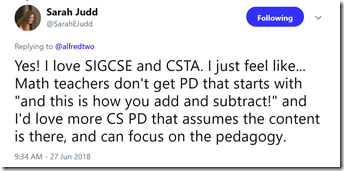
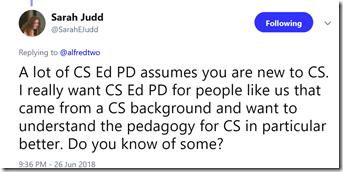
Sarah Judd had a couple of wonderful tweets that sum things up for me.
image

image

Some of us have a lot of content knowledge. This is especially true for career changers from industry such as myself. It is equally true for many teachers who have been teaching for some number of years. What many of us need is more about how to teach. In a word pedagogy.

I don’t mean “here is this robot and here are some example projects and code” and that sort of thing. I mean that is nice and all but it is usually a lot more about the tool and not the pedagogy. We are finally seeing some real research in how to teach computer science better. I’ve personally learned a lot from papers submitted to the SIGCSE conference and I’d really like to attend in person again.

The problem with SIGCSE for a lot of teachers is it at a tough time to get away for a lot of us. And there is that whole perception (not 100% wrong) that it is for higher education educators.

ISTE is going to be highly focused on beginners for some time to come. I don’t have a problem with that. I think ISTE can have a large impact on generating awareness among school administrators and technology integrators and teachers who are really serious about preparing students for a modern world that includes computers.

CSTA is the group I think should really increase their focus on training teachers how to teach. I would love to see a pedagogy track at the 2019 conference. 

Let’s hear about people using Parsons Problems, sub goal labeling, and other techniques. (BTW maybe take a look at How To Teach Computer Science where I talk about some of this) How about some case studies of project based learning? Not with a focus on the projects but with a focus on evaluation, maintaining student progress, and what does and doesn’t work about them?

I am reminded of a conversation with a peer when I was an undergraduate. Someone asked him why he was a business major when he grew up on a farm and planned to stay in the family business. Why not agriculture? He replied that he knew how to farm. Modern farming is also a business and that is the peace he didn’t learn growing up. Those of us who “grew up” in the computer science field know about computer science. Now we need help becoming bettor teachers.

Tuesday, June 26, 2018

Facial Recognition, Augmented Reality, and Teaching

Summer is a time of reflection and learning for me. I really want to be a better teacher and summer give me a chance to read more and to think more. This week I have been thinking a lot about facial recognition and augmented reality. One of the things that I know from experience and from research is that knowing students, especially their names, is a powerful thing for a teacher. Faces are hard for me. I don’t know if it is the way my brain is wired (there is a thing called prosopagnosia or face blindness that I would like to blame) or if I am just not working hard enough at it (as my son who knows every student in his elementary school – he’s the principal – suggests) but I would really love augmented reality that would let me know each student’s name.

I also think “wouldn’t if be nice if a computer scanned the class room and took attendance for me?” On the other hand if we take that to a (perhaps) logical conclusion were get computers that track every student’s face to see who is paying attention. They are trying that in China (link below) and that scares me. It especially scares me if it gets tied into a ‘social credit’ ranking system like China is setting up. (Link below or search for China social credit) Oh boy! I can’t see a lot of students liking that one! Below you will find a link to an article about the CEO of a company that develops facial recognition who warns about how ready it is – or is not! Are we really ready to have it judge people? I think I’d rather see people doing the evaluations.

BTW, there are schools experimenting with tracking students with RFID chips. Does using facial recognition take this to a new level or is it just a logical next step? Do we really want to normalize this level of tracking? I’m a little uneasy with the idea. Maybe more than a little.

But to keep this positive and closer to education and making teaching better, Vicki Davis is seeing a lot of artificial reality and augmented reality at the ISTE conference (link to her recent post below) and seeing some positive things. As well as some risks. Could artificial intelligence replace teachers? Maybe the bad ones but what about the good ones? She doesn’t talk about the costs of teachers vs AI though. You and I know that some people would rather have poor to average “teacher” who are inexpensive than spend more money for the best.

I see artificial reality and augmented reality as being very different. Later this week I am getting a demo of the VR system my wife’s school has installed. I may blog about that after. But for now, augmented reality.

Things that lead to more and better interaction between students and teachers is a good thing. Imagine if every teacher in the school could address every student by name the first time they saw them. My gut tells me that is a good thing. Students want to be known and a name is a powerful part of that.

What if a student showed up at my desk and asked me what they got on the recent test? They do that you know. Somehow they think you remember every grade for every one of their students. A AR system could pop that information up for a teacher. That would be good. Right? Potential for abuse? Sure. There is a fine line between deciding to call or not call on a student based on their grades as a good thing or a bad thing. A reminder that a student is on a concussion protocol might be a good thing though.

So both risk and benefit to facial recognition and AR. How we balance that determines if we use it to improve education and learning or just become control freaks who limit student options. Do we use it to build relationships or to hand off everything to computers? Do we use it to share excitement and new ideas or do we just use it to make education inexpensive at the cost of quality?

So much to think about!


Recommended reading

Thursday, June 21, 2018

Autonomy, Motivation, and Teaching Computer Science

Of the several courses I teach, my favorite course is call Honors Programming. Its a one semester course that is the first real programing course for my students. Its my favorite course because it is the one I have the most autonomy teaching and because I am very prepared to teach it. I extend this autonomy to my students as much as possible. I find that the end of year semester wrap up project is the best learning experience of the course. In large part that is because the students select their own projects and seem very motivated to learn what ever they need (and somehow missed during the semester) to get their projects to work.

My biggest frustration with the course is that students get a solid base, do one pretty interesting proj3ect and then they are done. At least for a while. Many take Advanced Placement CS (some AP CS A and some AP CS Principles) but both of those courses tend to be pretty constrained. They don't really allow for really big projects that as self selected.

What I really want to do is teach a follow on course that is purely project based. I want students to pick a major project that they are really interested in and commit to learning, on their own, the things they need to know to complete it. Yes, I want a whole classroom full of students learning different things and working on different projects. I've seen amazing projects come out of classrooms run this way over the years. I am tired of grading simple easy to create programs that are only mildly challenging.

I'm working on a proposal for this sort of course. My friend Doug Bergman runs some serious project based courses and is partly the inspiration for this. As are a couple of other teachers I have learned from over the years. It seems that students really get motivated to work on big projects, even scary projects, when those projects are meaningful to them. A motivated student will really put in a lot of work. They also pay attention when a teacher points them in a direction.

One plus about Doug is that he has written the book on this sort of thing. I'm learning a lot from Computer Science K-12: Imagining the possibilities!: Bringing creative and innovative Computer Science to your school  It really has me excited. (I recommend Doug's book BTW for anyone looking to create or expand a computer science program. Lots of good stuff there.

I'm looking for more ideas as well. Grading is a concern especially for administrators and parents. Doug has some stuff on that in his book but I'm always open to more ideas. I know that giving students too much autonomy scares some people. Keeping them on task and making steady progress can be an issue. Students often think they can goof off now or change priorities for what they think will be temporary needs and still get everything done at the end. They often guess incorrectly so keeping track is important.

In the long run, I think that this sort of opportunity with motivated and interested students can result in a lot of learning. It can also help build interest in computer science, help students learn to learn, and result in benefits for all concerned.

BTW, earlier today I heard an interesting, and I think related, report on NPR. A Lost Secret: How To Get Kids To Pay Attention

One key quote.

“Many studies have shown that when teachers foster autonomy, it stimulates kids' motivation to learn, tackle challenges and pay attention, Deci says. “

That’s what I am talking about!

Saturday, June 16, 2018

Congressional App Challenge 2018

One of my students won for her district last year. She found it a very valuable experience. I highly support this challenge. Share it with high school students you know.


What is the Congressional App Challenge?

The Congressional App Challenge (CAC) is a congressional effort to encourage high school students to learn how to code. Last year, 200+ Members of U.S. Congress in 42 states conducted an App Challenge in their respective districts. Nationally, the contest inspired 4,956 students to code in 2017, and over 8,800 students cumulative in past 3 years.

Students (in teams of up to 4) code applications for the chance to:

  • get recognition from their Member of Congress,
  • win prizes,
  • display their app in the Capitol Building in Washington, DC.

How can your students get in on it?

Here's a 3-minute "explainer" video:
https://youtu.be/cnM-Bb3TmCU

We would love to see a diverse range of students shine on the national stage!

Website: www.CongressionalAppChallenge.us

In the first 3 years of the Congressional App Challenge, the program has yielded 605 App Challenges across 42 states. Over 2,400 apps have been created by nearly 9,000 students, and participant demographics surpass all industry diversity metrics, with young women representing 30% of all competitors. This year, the CAC initiative aims to reach even more constituents.

Tuesday, June 12, 2018

Reflections on Programming and Teaching

Mark Guzdial has an interesting post called Reflections of a CS Professor and an End-User Programmer in which he compares end-user programming and professional programming and how.if/what we teach for the two. I started a comment but decided it didn’t really fit there.

I'm pretty much in the same boat Mark is in. While I have been a professional programmer, these days I mostly write code to use as examples or to solve my own little problems.

I like to think that I bring some of what I learned and did as a professional into my little projects but it's hard sometimes. I was talking to another teacher today about a program that he wrote that we both use to track our course schedules. He gave me a new version and said to let him know if I  found anything weird because he was so used to it that he probably subconsciously ignores some things. That is why a lot of end user programs are only usable by the programmer. I know that some of my projects are the same -  not usable by anyone but me.

I'm starting to think that is a problem. But do I really want to spend the time to make them usable by others when the problems they solve are so personal and individual? Perhaps the best I can hope for is that they don't embarrass me too much if someone else sees the code.

I teach beginners. Real beginners who usually have no prior programming experience. I am not turning out professional developers. Oh sure some of them go on to internships with what they learn in my classes but I would not call them profession ready. I can’t teach them all that in a semester or even three semesters of high school. That doesn’t mean I can afford to teach them to be sloppy.

The basics I can deal with. Good naming, planning ahead, top down design, breaking down problems into small, manageable chunks, and some good error handling. I’m pretty careful about the code I show them. Some of my personal code I wouldn’t show them while others I would. I remember showing a game I was working on to some students once. One of the students remarked to the other “look at that! He’s already coding preparation for expansion.” That I can teach.

So where do I come down on this? Well, I think I can lead by example if I am careful. And maybe I should take my own code more seriously.

Monday, June 11, 2018

School Year is Over, Time to Get Ready for Next Year

It is teacher wrap up day at Bishop Guertin. The warning bell for homeroom just rang but of course the students were done on Friday so there are no students coming into my room. It feels a bit off.

I started planning for next year already. Over the weekend I got about half way through creating my day by day schedule for Advanced Placement computer science principles. Oh who am I kidding. I got a lot of it done but probably not half way. And I'll spend a lot more time reading through all the lesson plans and will probably make more adjustments. I learned so much teaching it this past year.

I've got to do the same for Mobile Application Programming and I have less to start with there. At least I have last year’s experience to build on. I didn’t really have that last summer.

Honors Programming is probably the easiest to plan for but I have work there. I have already organized a lot of that but want to write some new things. This is my favorite course to teach so I may leave working on it as my reward for finishing the others.

I feel like I have plans better laid for my summer organization than ever before. We'll see if I can follow the plan. I really want next year to be the best year of teaching ever.


Friday, June 08, 2018

Thoughts on Textbooks in Progress

My first published book, Microsoft Visual Basic FUNdamentals, came out 18 years ago. It was for Visual Basic version 6 and what I did was to take what and how I taught and turn it into a textbook. It was a good book. It didn’t sell a ton of books but I was able to take my wife out to dinner a couple of times.

I wrote several others after that. Both of them were new editions of a book someone else first wrote. But they were good books and I am proud of that work. Honestly though I haven’t used textbooks in class for a number of years now. They just don’t fit my style of teaching. What I have done is supply students with  copies of my PowerPoints (with speaker notes) and some short one or two page documents on various language features. Plus the occasional video presentation.

I've been working on a couple of reference books to use in my programming classes since the first of the year. They're getting close to done. I decided to bring home a real C# textbook to look at as I work.

There are 17 chapters and over 700 pages. I cover things from about 9 of them in my one semester course. This might be a good book if I were teaching university students. Maybe. For high school and the limited time I have no way.

Obviously it has a lot of depth and that is great. The problem is that I really need to make projects interesting to hold student attention. So I teach things like simple file handling, timers, adding images dynamically, collision detection (essential for a lot of games), and a few other things that are in my books under "Fun Stuff." I find very little of that in the real textbook. What I do find is hard to find and it is not obvious how they lead to fun stuff.

And then there is that whole 700 pages thing. Your average high school student is going to put that in their locker and never look at it unless you assign questions from the book.

Well forget that! Homework sucks! Besides I can come up with my own quizzes, projects, tests, and other evaluative instruments and they will be far more tailored to the needs of my course.

My VB book is currently at 76 pages including table of contents and index. My C# book at 80 pages. They're not going to get much longer either. They've got everything I cover in class and more for the real go getters. Short and to the point and things are explained in context and directed at high school kids.

They're designed to be a reference, a study guide, and something like advanced notes. That is really all most students really need. They should not have to dig though 700 pages to get what they need in a very first programming course.

Students seemed to get real value from the drafts I gave them this year. I don't know if they'll work for anyone else. The work is worth it if it helps my students.

Computer Science Teacher as Unicorn

imageThe t-shirt image here showed up on my Facebook feed the other day.  My first thought was “Yes, computer teachers are the coolest.” Of course I know a lot of teachers who teach other subjects who are every bit as exciting as any computer science teacher but there is another thought here.

Unicorns are both magical and rare. I would argue that all good teachers have a bit of magic to them. Computer science teachers are more rare though. And frankly, computer science feels a lot like magic to a lot of people.

Today is the last day with students at my school and what I’m thinking about is “did I make magic this year?” and “how can I make more magic next year?” Maybe being the unicorn is the goal.

Wednesday, June 06, 2018

Looking Back At APCS Principles–My First Year

During a conversation with my dean, he said it takes about three years to really get teaching an Advanced Placement course down pat. I don't know if that is the right number but it is surely more than one. This past school year I taught APCS Principles using the curriculum from Code.Org. It was a life saver. I had four preps this year and two of them were first time for me. Well one of them wasn't completely first time but I was doing a complete starting from zero rewrite of it. So there was a lot of work to do.

The tools supplied online were really quite good. The simulators were amazing and let me do some things I could not have done without them. Code's videos, some of which I used in other courses as well, are just outstanding. High production values, outstanding and diverse presenters, and just the right length to not lose kids. In all honesty, a properly motivated students could probably use it as a self-passed course. They would not get as much out of it as being part of a class but they would do ok.

We had some great discussions in class which I think were very valuable. I had three students from China which made talking about issues like censorship and government control of the internet, among other things, extra interesting.

There are a few things I know I need to do differently next year though. The performance tasks are a big part of what I need to do differently. I gave the Explore task in the start of the second semester. That has to get moved to first semester. That will give me some more flexibility in the second part of the year.

Like a lot of people I made the Create task due at the official “drop dead” date set by the College Board. Huge mistake as panic set in and only an extension owing to system glitches on the College Board site made it possible for all the students to submit. Next year, we’re doing it earlier. No midnight deadlines on a system that will be overloaded.

I also need to work on making sure the students understand the requirements on the performance tasks better. Now I had to be teaching to the test and that is what I’d be doing. At the same time they REALLY need to learn to read and follow requirements. That is an important lesson. That makes me feel better about it.

My students all come in with previous programming experience but what I found this year was that was somewhat uneven. I have to be more aware of the students who are not as into coding as others. APCSP is about a lot more than programming but I don’t want students to miss out on that piece. I may reorder some things in the course around that as well. I need to get more programming in before I assign the Create Task I think.

I still have a bunch of processing to do and I hope to talk to other teachers at the CSTA Conference next month. I figure that knowing I have to do things differently is half the battle though. If you taught APCSP, with the code.org curriculum or with something else, I hope you’ll share what you learned about teaching it in the comments. 

Tuesday, June 05, 2018

Programming Projects–The good, the bad, and the ugly

End of the semester project time for me. All of my programming students have been finishing up[ their self-selected projects and I have been grading. It’s always an interesting ex3ercise. None of the students have much experience designing and writing programs. One thing that is clear is that they don’t always spend enough time planning before they start.

Students often seem to think in small steps without thinking about what steps will follow. Sometimes this results in user interfaces that look great and are fairly sophisticated. Unfortunately, they often haven’t thought about how to implement more of the code behind the user interface. Other times they do think further but not far enough. In either case they run into road blocks because the initial design is just not complete. As ugly as these designs can get it is interesting and challenging to try to develop workaround for them. I’ve learned a few tricks over the years. I only wish we had time to restart from scratch and redesign the programs.

Some of the mort popular projects are easy enough to design and code but can be tedious with the limited background in programming the students have. These designs require a lot of code. That takes time to write and to debug but is usually manageable. What concerns me this year is the number of my advanced students who don’t use language or features that they have taught and should know to use that they don’t use.

No matter how many times I tell students that a list of variables that are differentiated only by a number should probably be an array some students take what they think is a short cut. They are almost always wrong about that. I’ve got  to work on that next year.

On the plus side, some of my students take it upon themselves to learn features, methods, and functions that we don’t have time to cover in class. this year students found a couple I didn’t know about. Modern programming libraries have far too many features for anyone to know all of them. Some of these features will get covered next year as they are more efficient than what I have been using. Others I have to think about how or if I cover them. Sometimes features make things easier for programming but harder for a teacher to instill an understanding of concepts.

Students seems to learn a lot from this end of semester projects. That is great. It’s a real plus when I can learn things from them as well.

Friday, June 01, 2018

Micro:Bits and Teaching Networking

This year i taught advanced Placement Computer Science Principles with a mix of high school juniors and seniors. Because of the schedule I had the juniors for several days after the seniors were done. The challenge was to come up with something useful and interesting to keep them busy and learning.  I looked at the classroom set of BBC Micro:bits and thought – networking! Obvious right? OK maybe not but I had been thinking about the ability of these little devices to communicate using radio signs and this seemed like a good opportunity for some experimentation.

I broke the students in to groups of two and three and asked them to create an app that used communication between two of the devices. Other than pointing them to the MakeCode for Micro:bit app for Windows (in beta - requires Windows 10 though there are also iOS and Android versions) and the MakeCode web site I didn’t give them more instructions. Hey, it’s an AP course!

A few students decided to use the Python editor from the Micro:bit web site but most used MakeCode. The MakeCode students used a mix of the block editing and the JavaScript editing. I think having options was a plus as students worked with what they were most comfortable using.

On one hand the students didn’t quite get to the level of application I had hoped for. I wasn’t any help there so I think I need to dig deeper into this myself over the summer. Time was an issue as well since the end of the year brings a lot of interruptions.

On the other hand, they did learn a lot. Several students told me they learned more sending between actual devices than using a software simulator. The Code.org APCS P resources I used have an outstanding simulator which the students did use. The devices made it more real, dare I say solid, to the students. One student suggested starting with the simulator and moving on to the devices for deeper learning.

As I listened to them talk about their projects under development they discussed things like throughput and bandwidth as well as how to encode information. These are all topics we had discussed during the year of course. Here though was a practical application and visuals that really brought things home. There is something about pressing buttons and seeing lights on another device light up that brings extra meaning.

My thinking now is that I will be bringing these little devices out earlier next year. We’ll do some networking with them for sure. Maybe some other projects as well. They seem motivating and interesting. Finding thinks that students want to use, want to learn more about, and which reinforce concepts is a wonderful thing.

Monday, May 28, 2018

Assumptions, Misunderstandings, and Programming Decisions

My beginning students have big problems with writing decision statements. Boolean expressions are a real problem. Most of the time it is because they expect the syntax of a programming language to be close to how they express things in English.

For example, in English one can say “give me a number between one and 10” and it is pretty clear. When they try to say the same thing in programming language they write something like:


if index >= 1 and <= 10 then
or
if index = 1 - 10 then

Of course neither of the work as students expect. The first gives a syntax error and the second compares index to -9 with is probably never going to happen. Try as I might, there are always some students who get this wrong. It just isn't logical in their minds. They are used to making certain assumptions and filling in some blanks or ambiguities and they expect the computer to do the same. I'm running out of ideas on how to get this across.

The opposite end of the spectrum is when students think something is necessary when it is not. For example, if there are only two options than a simple if/else will work. You do not need and if/else if. I see all sorts of unnecessary comparisons from beginners. Many students get this right away. A few, more than I would like, struggle with this. Generally this sort of code does actually work so it is hard to get students to realize that here is a better way. "But it works!" is all that matters. For someone like me who worked in a time when programmers counted comparisons and had a ready handle on instruction speeds for optimization of memory and performance this is a painful observation.

In some of my classes I have enough time to get into the nitty gritty of this. With my freshmen for whom programming is only part of a quarter it is harder. One of my goals for this summer as I review all of my curriculum is to try to find some more/better/different ways to work on these misconceptions. Parsons Problems may be part of the answer. I have experimented a little with them this year and they seem to help. Maybe some animations will work if I can figure out have to make them. I've already written more specifically about these issues in the book I have been writing for my classes.

I could still use ideas. Surely someone out there has solutions to this issue. Any suggestions?

Friday, May 25, 2018

Can We Get there (#CSforAll) From Here?

When I was in high school (I graduated in 1971 so this was a while ago) there was a computer in the building. If you got an A in Calculous as a junior you could take the computer class as a senior. With 5,000 students in the school and only one computer teaching computer science to everyone was not an option. We’ve come a long way since then and lack of computers is seldom the problem. And yet, not every high school student takes or even has the option to take computer science. The obstacles today are different.

Some of the problems are the old chicken and egg problem. Not enough teachers so we can’t offer the courses. Not enough courses so there is no incentive to prepare teachers to teach it.

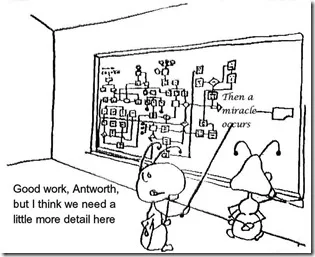
Some of the problems are perceptual. Administrators don’t see the need or the demand. Other people see a need for other things first. Or don’t see the need at all. There are assumptions that may or may not be correct about “room in the schedule” or “it costs too much.” We see all of those things debated over and over again. Sometimes the path to getting computer science education for everyone feels like this:

thenamiracleoccurs

We as a computer science education community are taking several paths. Cities like New York City are moving to put CS education as an option in all schools. Not quite the same as everyone taking it but access is an important first step. It is coming with in-service professional development as well. It’s all great.

Several states are moving in the same direction at the state level. Kudos to Arkansas which is doing outstanding work for example.

The questions then include two important ones: What is the step from CS for many to CS for all? What is the sustainability path?

There are a lot of ideas out there. One is that if we get more universities to require CS for there students CS will move down to more high schools the way things like calculous have in the past. That could help a lot.

The teachers who are being trained now as in-service will be retiring. Some soon, some not so soon. Those teachers will have to be replaced and there is no guarantee that the funding we as seeing today will be around in the future. Perhaps legislatures will declare victory and move on to other things. Clearly we need pre-service education for teachers to be the CS educators of tomorrow.

We’re starting to see some interest in actually doing pre-service CS education but we’ve got a long way to go. And don’t forget the shortage of schools who want/need to hire CS educators. Is there enough pull from schools or push from requirements that schools offer CS to make this preparation worth the interest of schools of education? I hope so but you never know.

Let’s not forget the looming teacher shortage in general either. While teachers in many states are actively pushing for better compensation and other changes to make teaching a better (for various definitions of better) experience the field has a bad rap in many quarters. There is a lot to be said for taking ones CS knowledge and going into industry.

I’m still optimistic. Some days VERY optimistic. My own state of New Hampshire is slowly but surely moving in the right direction. We’ll get to CS for many in the next few years. CS for all is still going to be a big step.

Thursday, May 24, 2018

Why Don’t Universities Require Computer Science?

We talk a lot about requiring computer science as a high school graduation requirement. It is an issue that is not without controversy. (Should Palo Alto students be required to study computer science?) While discussing that article in a Facebook group Mark Guzdial asked an interesting question.

Why are we talking about making CS a high school grad requirement when it’s not yet an undergrad requirement at most schools. Why is it so important at the high school level but not at all at the undergrad level?

It’s a fair question. Shouldn’t colleges and universities require some computer science as part of their general education requirements? If it is important for all high school students, and I think it is, isn’t it even more important for university students? At the university level, students should be able to learn even more and go deeper as well.

This might also have a side benefit of driving more K-12 computer science as school work to prepare students for something they know they have to study in post secondary education.

Wednesday, May 23, 2018

Teaching Through Stories

This time of year I think a lot about how I teach. There is something about the end of the year and evaluating how much my students have (or have not) learned that causes me to think about how much of what they learn (or don’t) is my responsibility. I look at the projects I assigned, the quizzes I gave, the lectures I presented, and every other aspect of teaching. The last few days have been about the stories I tell.

Brett Becker wrote Computing history in the classroom: The cereal box toy that was an early hacking device, and nuclear weapons systems that depend on floppy disks In part, this made me think of my own post on teaching computer history but it also make me think deeper about the how we teach history. History is not taught well as a mere recitation of facts and dates and names. It is better taught as stories. The authors of “Made to Stick: Why Some Ideas Survive and Others Die” write convincingly about the importance of stores for getting information that "sticks" in people's minds.

Teaching computer science is a lot more than just history though. If we want to teach concepts and have them stick shouldn’t we also be finding stories to explore the concepts? I think so. This can be harder than it seems though. The best and most convincing stories involve projects that are harder and more complex than the ones we can assign in a first programming course.

When we talk about avoiding hard coded “magic numbers” and replacing them with concepts I have a good story. Picture a team of four people working for a year on a software package that will spread across 16 computers. They use the number 15 in hundreds of places among thousands of lines of code. One day their boss tells them they need to account for 32 systems not 16. Hilarity ensues. OK hilarity is not the right word. A month or two of editing and testing ensues. This time the team gets smart and uses a defined constant rather than a magic number. Six months later when they are told that 32 is no longer the number but 128 is they change a single line of code and everything works fine.

I think that is a story that works. Well, as much as anything does with high school students.

I use smaller stories all the time but lately I have been wondering if there are longer more meaningful stories I can use for other concepts. They don’t always just come to me spontaneously though. One of the things I’d like to do is collect other stores. After all the smart people learn from other people’s mistakes and not only their own. Wouldn't a collection of teaching stores be a wonderful aid to teachers?

What stories do you tell to make concepts real to students?

Monday, May 21, 2018

Teaching the History of Computing

History is important. We’ve all heard, if not quoted, the adage that “those who do not learn from history are doomed to repeat it.” Mark Guzdial has a blog post (Computer science education is far bigger than maker education) that is almost as much a history lesson as it is an argument for the maker movement as covering only a subset of computer science. In his post, he talks about the big ideas developed by Alan Turing , Ada Byron, Lady Lovelace, and Grace Hopper.
“What Lovelace and Hopper did mattered, and we demonstrate that it mattered by teaching it and explaining why it’s important.”
One of the things we talk about in the course we teach freshmen at my school is the history of computing. Names like Turing , Lovelace, and Hopper come up along with many others. That is good as far as it goes but lately I have been thinking we need to talk history in more courses. How did we get to where we are and how and why?

Erik Meijer, the Dutch computer scientist, told me once that if I wanted to know what the next big thing in computing is going to be I should look at what  was the big thing in computing 20 years in the past. It’s true. Things in computing do move in cycles. I look at the way we do screen/form design now and see ideas I first saw in the Trax operating system in 1978. Cloud based computing is similar to the days when we had remote terminals connected to large mainframes. The whole idea of client/server applications keeps getting reinvented and redeveloped.

The past is a good place to look for new ideas and we forget that are our peril. My students once asked me how I “learned all this stuff” after a history lesson. I replied that I didn’t learn it – I lived it. A lot has happened in the 45 years since my first computer science class as a university student. I’ve gotten to meet and talk to some important people in the development of CS over those years.

But what about new teachers? How will they learn the history of computing? Is it taught in university? I suspect not much of it is being taught. What ideas will be missed because of a lack of historical knowledge and perspective? Am I the only one worried about this?

[Now get off my grass.]

Thursday, May 17, 2018

Can I Plan For Next Year Yet?

My school has a couple of weeks left but it’s getting close. My Advanced Placement Computer Science Principles students have taken their AP exam. My own exam for them is next week. My underclassmen have a bit more to do and I still have some topics to teach them. Soon the underclassmen will be starting their semester summative projects. So other than grading my workload is lessening. Not gone but at least I have some time to think. Thank about what?

While things are still fresh in my mind I am starting to plan for next year. This was my first time teaching APCS Principles so I learned a lot about pacing and scheduling. I need to modify my plan for next year. I want to move the explore task into the first semester I think. The Create Task should be earlier in the second semester because it was much too stressful to have it due right at the “drop dead” deadline with the College Board. I’ve got some work to figure out how to make that happen. I’d like to incorporate some small device programming as well. I want to explore the possibility of teaching networking using Micro:bit which can communicate with each other. I need some time to work on that.

My mobile app development course went well using AppInventor but it was also the first year teaching that course with that tool. I’ve got to clean up the pacing for that as well as thinking about more or better projects for students.  If they release a version that supports iPhones I have to borrow my wife’s iPhone and test it out.

My Honors Programming course has gone very well and I am really pleased with pacing and projects. My collection of resources is a mess though so I need to organize that. I’ve already been filtering through duplicated PowerPoint presentations and trying to build the perfect ones. No doubt I will continue to modify each one after every time I use them but at least I will not have to search through to find the current ones. I want to organize all of my resources by topic unit. If I have time, I want to record short videos on most topics as well.

I wrote a reference guide to C# in the middle of the year and gave it to my students. Now I need to fix all the problems that they found and modify explanations based on what confused students this time around.

Our freshmen course is taught by two other teachers so the pacing and much of the rest is determined as a team. It’s in good shape but I still want to look at organizing the materials a little. And we teach Visual Basic there so I am created a reference book for that using as well. That draft needs review and corrections.

It’s going to be a busy summer. And that is not even including attending the CSTA Conference in July. (Hope to see some of you there.)

Sunday, May 13, 2018

Does It Matter What Programming Languages We Teach in High School

I’m tempted to just leave this post blank and see what sort of comments it gets. But I am incapable of that. Sorry.

Assuming we are preparing high school students for university and other advanced education and not for jobs right out of high school, what difference does it make what languages we teach? After all, concepts are what really matters. It is hard to pick what languages our students will be expected to learn when they get to higher education.

Universities are using C++, Java, Python, Scheme, and who knows what else as their first programming language.Can we teach them all? Not hardly. Often we only have students for a semester or two. If we’re lucky three or four semesters. A few students in a few schools will have more. But still there is an awful lot we could and probably should be teaching them. Overloading the languages is not likely to be helpful.

There is some indication that the second programming language is the hardest to learn so maybe we try to teach two and not worry too much about which two. At least they will be well situated to learn what ever their university professors throw at them.

On the other hand some would argue that with limited time we should go all in on just one. One or two the question becomes which one or two? Does it matter as long as the basic concepts are taught?

Friday, May 11, 2018

Academically rigorous is incomplete without computer science

Mark Guzdial linked to this post on his blog - Feeling disadvantaged in CS courses at University of XXX – Original post at Minimal exposure

Interesting line from the original post: "Although my high school was academically rigorous, we didn’t have any computer science courses."

Maybe we need to decide that calling a high school “academically rigorous” is incompatible with saying there are no computer science courses?

Wednesday, May 09, 2018

Programming is easy. Debugging is hard.

I may be in a minority in this but in some ways the most fun part of my job is debugging student code. Students are very clever at wring code that doesn’t work in obscure ways. Some how they manage to create errors that look like they are in one place but are really in a completely different place.

The end of the year involves a lot of debugging. Students know more ways to do things wrong than every before. It’s a lot of fun. No, really it is.

Now I know that letting students struggle with logic errors is sometimes (often? mostly?) a good thing. On the other hand they usually lack the experience to see the possibilities. In general I find that struggling students are focused on the wrong part of their code. At some point a teacher has to step in and help out a little.

Today I had a student working on a Pong program and it was not recognizing when the ball hit a paddle. He was looking at the speed of the ball, the arrangement of the code, the working of the if statements and generally focused on a lot of different code. The problem could not be with the IntersectsWith method of the rectangle class. That is part of the system library so it must work. Right?

Maybe we are not updating the location of the rectangle in the right place and time? Maybe we’re checking in the wrong place in the code? Maybe it is a timing problem?

In the end it turns out that all of the code was correct EXCEPT that he was updating the height and width when he should have been updating the width and height. Yes, the order of the parameters matters. I’m kicking myself that I didn’t check that first but at least I did think of it eventually. Next time I will check that first.

And to think I posted a somewhat related post last week (My Code is the Same as Yours But Mine Doesn’t work ) Sigh! I should have known better.