Friday, March 04, 2022

SIGCSE 2022 Day 2

The morning keynote was by Barbara Ericson. She talked about a lot of her early work including some of her online books CSAwesome and her work with the free online CS textbooks at Runestone Academy. I need to look at these some more https://runestone.academy/runestone/books/index She also talked a lot about Parsons Problems - a subject I am really interested in. One project is Sisters Rise Up which provides mentorship for women taking AP courses. She’s got a lot going now as well. She is an inspiration.

First Paper Session:Trends in CS Teacher Professional Development: A Report from the CSTA PD Committee. A lot of CS teachers are experienced teachers but not experienced in CS. Teachers want PD but it can be hard to find. The PD committee is evaluating and accrediting CS Ed professional development. You can see their efforts at the CSTA web site

Next up was Detecting Struggling Students from Interactive eBooks Data: A Case Study Using CSAwesome This talk was by Barbara Ericson and was about data from ebooks on Runestone and CSAwesome. Barb was able to collect a lot of data.  Students don’t watch videos to completion a lot which doesn’t surprise me that much. A lot of information in this talk. I recommend reading the actual paper. (Available for free for a limited time) I really need to look at these ebooks and see if they are something I can/want to try and create myself.

Last of my morning papers was Who Belongs in Computer Science? This study looked at middle school students to see what their perception was of computer scientists and how that impacted their feeling of belonging. In brief, boys and girls had the same perceptions but girls didn’t see themselves in what they perceived as being a computer scientist.

I took advantage of the “hallway track” to talk to Aman Yadav (author of the paper above) about the importance of CS teachers talking about race and computing. We need students to understand how bias works its way, usually unintentionally, into software. Both white and non-white students need to know about this. We clearly need a diversity of involvement in computing if we are going to have a chance as software that is fair to all.

After lunch, a GitHub Supporter Session: Scale your classroom with GitHub Classroom and Codespaces. A tough decision as there was also a panel I was interested in attending. I was curious about GitHub though so … The features of GitHub classroom including connections to LMSs, automated assignment distributing, auto grading and more seem pretty exciting. I also like the idea that students will create GitHub repositories that can act as a portfolio. The demo was great. I have set up a GitHub Classroom but I need to play around and try some things before I feel like I can use it. I think I need to create a “student account” as well. We’ll see how much time I can put to it.

Next up was a Microsoft Supporter Session: Core developer tools for your computer science classroom because I wanted to  see what Microsoft was promoting for educators to use for teaching CS. That was once my job.

They started with talking about VS Code and VS Code Coding packs are a tool to make it easy for students to set up a development environment. They are available to set up VS Code for Java, Python, and .NET. The packs for .NET and Java are available for both Windows and MacOS.

Next up was Development Containers and VSCode.dev which is a web past development environment so no installation is needed. This combination makes it easy to ensure that all students have the same development environment. This looks pretty cool for bring your own devices schools. There was a lot presented in a short period of time. I need to dig into some of these things on my own.

Over all a great day for me. I have some things to look through tonight.

Thursday, March 03, 2022

SIGCSE 2022 Day 1

SIGCSE 2022 is my first in-person conference in over 2.5 years. It’s my first SIGCSE in a lot longer than that. It looks to be a great conference . There are 1518 people registered in total with 780 attending in person. I HAD to come in person. Honestly, I missed people and a lot of people I know in CS Education and CS Ed research are here. There is a lot to learn here as well.

The opening keynote was Barbara Liskov. This was a fascinating talk that covered a lot of the history of her work. She started publishing and researching what became object oriented programming while I was in the early stages of my career. Several papers she studied and referenced were published the year I got my undergraduate degree. I remember clearly many of the issues she discussed and problems she was looking to solve back then. I hope we can get access to her talk and show it to students.

My first session of the day was a panel discussion of should AP CS A switch to Python from Java. Needless to say, the room was full. The stick with Java people had two main issues. One was the work involved in changing – new resources, teaching aids, test questions, and the like. The second was that while there is a slight edge in universities using Python over Java for CS1, Java and C++ are FAR more widely used in CS2 courses. The current course results in students who do very well in CS2 and that is important.

The argument for Python is multiple. One is that it opens the door wider for using APIs for making more interesting projects. Another is that there is less syntactic “cruft” in Python which reduces cognitive load. A third is that Python is increasingly used in disciplines that are not computer science. For example the Physics and Chemistry departments are Stanford want their students to take a Python based CS1 course. FWIW, the school I retired from added Python in part because the Physics teachers encouraged it. I am finding the arguments for Python more convincing than I expected.

After lunch, It Seemed Like a Good Idea At The Time (COVID-19 Edition). The session opened with examples from the past: see if you can hack the department mail server; open book exams without a time limit; exponential time examples are actually cubic. Victoria Hong shared a study she did where she asked one section to write questions for the final exam. The cohort that wrote questions did worse on the final than the cohort that didn’t write questions. The opposite of what was expected. Ellen Spertus talked about a course without deadlines. This set off a lot of discussion about deadlines and the different ways to allow or not extensions. Some have tokens that students can use for an extension. I hope this was recorded because I can’t do the discussion justice here.

Next up for me was another panel: Advancing Opportunities for CS Teachers: How To Best Support Professional Development for Experienced Teachers in K-12 CS Education This session was hybrid which means that most of the panel was remote and not physically at the conference. More on that later perhaps.

Most professional development for CS teachers is focused on new and early career CS educators. We have a good number of experienced teachers (10+ years of teaching CS) and their needs and backgrounds tend to be different from new  CS teachers. A lot of the initial presentations was stating the problem.

Don’t tell anyone but I jumped out early and dropped in on a Special Session: K-12 Computing Education and Education Research Resources. Colleen Lewis talked about Computer Science Teaching Tips (csteachingtips.org) and a Teaching Practices Game. This can help teach about microaggressions. Briana Morrison introduced Engage CSEDU: www.engage-csedu.org which has a searchable database of CS Ed resources. Davina Pruitt-Mentle introduced NATIONAL INITIATIVE FOR CYBERSECURITY EDUCATION (NICE) which has a lot of resources for teaching and learning about cybersecurity. More information can be found at Cyberseek.

Got some dinner skipping the Birds of a Feather but I’ll go back for the reception. Overall, a very good day for me. Learned some things and connected with a bunch of great people. More tomorrow I expect. If you are reading this and at SIGCSE please look me up and say “hello.”

Thursday, February 24, 2022

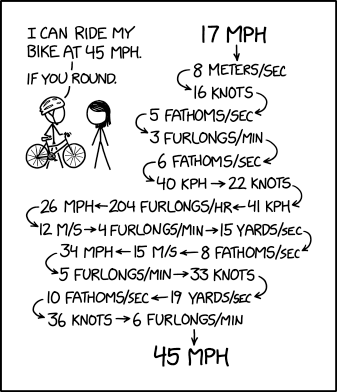
Fun With Rounding Errors

I love xkcd cartoons. I came across this one thing morning that shows the benefits(?) or rounding up.

My immediate idea was “what a great programming project!”  One of the first “hello world” type of exercises I often assign is simple conversations. Fahrenheit to centigrade, miles to kilometers, etc. This is a step beyond that but with a difference. The difference is rounding up and its effect on accuracy.

This is a good program to use to introduce rounding in general but to also talk about how rounding errors can have a large impact when they occur over and over again.

This example uses velocity but I can imaging there are interesting results with weights, simple distances, and almost anything else that normally requires better than integer accuracy. Currency anyone? I’m thinking about trying that one because it involves money.

It might be interesting and educational to try the difference between rounding normally, always rounding up, and always rounding down.

What do you think? Anyone doing something like this? Would it be useful?

Wednesday, February 16, 2022

Troubles with Error Messages

Error messages, in theory, are there to help programmers. Of course there are problems with then in practice. With students, the biggest problem is that  they don’t read the messages. I’ve long ago lost count of the times a student told me they had an error but can’t tell me what it is (or was) because they closed it without reading it.  Getting students to read the message and to try to work out the problem themselves can be a struggle but one we have to attempt.

Even if they do read the message, messages are not always clear. Have you seen this poem?

Roses are red
Violets are blue
Missing {
at Line 32

Seems simple enough but that can be deceiving. Often the message doesn’t actually give the right line. The reasons for this can be complicated for a beginner, or even an experienced programmer, to understand. It is a constant source of frustration.  At least one knows that a missing curly brace is (probably) the problem even if we are not really sure where it is missing from.

Other messages are less helpful because the programmer lacks knowledge to understand the words being used.  Or the message just does a poor job of explaining the problem.

Why are error messages less than helpful? Many reasons. One is that error messages are not fun and interesting to write. There are also strict limitations on the number of characters allowed. Still another is that the person writing the message is often so familiar with the software and the error that they write something that, while meaningful to them, is somewhat opaque to people newer to the software.

Reading error messages is not just a problem for students of course. When I was doing technical support for professional developers I would regularly get calls asking to explain an error message. A little secret here – a good explanation could often be found in the documentation! More than once I just looked up a message and read from the documentation. Even the explanation in the documentation needs a little help sometimes but it is a great place to start.

When teaching beginners we don’t often spend a lot of time on error handling which means we don’t spend much time talking about writing good error messages.  We do ask students to write messages in programs about games over and winning and losing. Occasionally we have to suggest rather strongly that an error message that calls the user “an idiot” is perhaps not appropriate.

Perhaps we should spend a bit more time on error handling and as part of that talk about good error messages. Maybe if we had beginners talking about the error messages they see from their systems and how they could do better we;d get better error messages later when (if) they turn professional?

Regardless, I think error messages should be a bigger part of the conversation. Reading them, researching what they mean, and thinking about how they could be done better.

Thursday, January 27, 2022

What Do Computer Science Teachers Need For Professional Development

Mike Zamansky had a great post called Trends In Professional Development in CS - it's not all good. We’re still at a very interesting place in the development of computer science education.  The shortage of qualified CS teachers is becoming more acute and more and more schools and school systems attempt to expand CS education. Professional development is also growing as well As Mike reports a lot of it is from content providers who have a vested interest in promoting their content.

What do CS teachers really need for professional development? Learning about tools and established curriculum is helpful for sure. Increasingly though, we are seeing teachers without a strong CS background being asked to teach CS classes. Few would ask teachers who could not speak Spanish to teach AP Spanish but that doesn’t mean that teachers who don’t know a lot of CS aren’t asked to teach AP CS courses. Weird isn’t it?

So clearly a lot of teachers need content knowledge. Learning along with students using canned curriculum sort of works I suppose but to be that feels like everyone is going to get shortchanged.  We are starting to see more pre-service programs for CS teachers. The program Mike Zamansky is helping to build at Hunter College for example. And there is usually the option, time consuming and possibly expensive, of taking regular university CS courses. The key thing is that school systems have to be supportive (with time and money) for teachers to get this training. A week or two in the summer is not going to cut it for CS content anymore than a week or two is enough to prepare is Physics or Chemistry teacher.

The other thing CS teachers need to know is how to teach CS. Content alone isn’t enough. As someone who entered teaching with lots of CS knowledge but nothing more than having been a student in terms of how to teach. That’s not as much as some might think! Teaching CS is different from a lot of other subjects. Similar in some ways for sure but also different. Learning how to use specific curriculum is helpful and I have learned a lot from content providers over the years. We could do more. While pre-service programs are starting to come online and include this sort of thing there is still a shortage of such education for in-service teachers.

We’re starting to see more “how to teach” sessions in conferences like CSTA. The one I lead in 2020 was very well attended which suggests that there is demand. Books are starting to come out as well. Computer Science in K-12: An A-to-Z Handbook on Teaching Programming edited by Shuchi Grover is my favorite and one I recommend highly.

We still need a lot of research on how to teach computer science. That looks like it is increasing as well. That’s great especially if researchers share their results in ways that are accusable to teachers. Not all K-12 teachers have access to papers that are behind paywalls. I’m sure hoping to see more research based teaching techniques at CSTA this summer.

What do you want to see in CS teacher professional development? Who is doing it well? Any other books to recommend? Feel free to add in the comments.

Tuesday, January 25, 2022

Writing The Wordle Clone

Kelly Powers posted a Wordle project document on the AP CS A Teachers Facebook page. It’s solid as one would expect from Kelly who is just awesome. It inspired me to write my own Wordle clone to better understand what is involved from a student project perspective. Of course I did it my way.

A Wordle project must consist of several parts:

  • Pick a word
  • Accept a guess from the player
  • Analyze the player’s guess
    • Look for letters in the right place in the work
    • Look for letters in the word but not in the right place
    • Look for letters not in the target word
  • Give the player feedback
  • Repeat accept and analyze until player finds the work or had 6 tries
  • Report on end of game

Most of this is platform and language independent. The exception is giving the player feedback. I’ll get back to that.

Picking a word can be easy (a hard coded selection – great for debugging) or a little more involved (picking randomly from a list). The list can be a small array or a large one that involved reading from a file. Which you select depends mostly on where students are with regards to reading from files and filling arrays or array lists. I have links to two large lists of 5 letter words at the end of the post. The first is one that I use and is on my web page. The other is a larger list on GitHub.

Accepting the player guess can be as easy as reading a work from a line. Analyzing the word is the first place where students have to think things our. String methods like SubString for looking at individual letters, IndexOf for locating specific letters in a string, and others are very handy here. Once can create new arrays of a) letters that are in the right place b) letters in the word but not the right place, and c) letters not in the word at all can be useful. I’ve sure there are lots of other ways as well. Much will depend on how you display the results to the player.

Feedback! One can reprint the player’s guess with letters that are in the correct place in UPPERCASE, letters in the word but the wrong place in lowercase, and empty spaces for letters that are not in the word at all. That’s probably a great way if you are totally text based. If you are graphically minded, you can try to duplicate how the web based game displays results.

There are lost of graphic libraries that will let programmers display things graphically. Swing in Java, Processing (for Java or Python), as well as many online drag and drop tools will all do this. I worry that for most of them students spend more time on the graphics than on the nuts and bolts of the rest of the program.

I’ve gotten a bit, ok maybe more than a bit, spoiled using Visual Studio and Windows Form projects in Visual Basic or C#. That is what I used to program my solution (image right). I have 6 arrays of label boxes. Yes, I should have used a two dimensional array. That would have made some things easier but I was not trying to make the best version ever. A lot of beginning programming classes skip multi-dimension arrays as well so I wanted to see how it would be done without them.

As each letter of a guess was entered on the keyboard it was entered in a label box. After all 5 letters for a guess was entered I checked all the letters against the Wordle word and the back color of the box was changed appropriately. The result was pleasing.

Checking for a winner was a matter of checking the state of all 5 label boxes in the row array. This would be similar in a text based display as well.

All in all a very doable project for many programming classes. And it is current which I see as a plus. Additionally students will probably be very happy to play help debug their peer’s programs.

Monday, January 17, 2022

Computer Science for the sake of ?

My grandson in kindergarten has a class in reading. It makes sense as he is just learning how to read. Over time, school spends less time teaching how to read and a lot more time using using reading to support learning. For many years, I have been saying that computer science and its tools should be the same.

Early on I thought of things like using spreadsheets to look at data. More and more I see programming as a learning tool as well. But coming back to data. I recently watched a TEDx talk by Emmanuel Schanzer titled Four Ingredients for K-12 Data Science. Watch it. It’s cool. In any case, it is clear that Bootstrap Data Science takes things I used to think about to a whole new level.  I saw a presentation on this by students at a conference in the before times and was impressed with what students had learned.

Now Bootstrap is probably best known for their mix of computer science and algebra but they are moving into more areas of the curriculum and I think that is a great thing.

I’ve also mentioned Mark Guzdial’s work in teaspoon languages. (task-specific programming => TSP => Teaspoon) Mark’s work involves “adding a teaspoon of computing into other subjects.” It’s still some early days on this effort but it looks very promising.

Last spring, while I was teaching at a new (to me) school I spend some time with a teacher of astronomy. He was having his students write Python programs to solve astrophysics problems. Faster and more accurate than the slide rule stuff back in my day.

In many ways, I think the CS 4 All movement has been a bit too focused on stand alone computer science classes. Those have a role for sure and some great value. But ultimately, computer science is used in just about every discipline we have today. Teaching it in those various contexts and using CS to help learn those other areas of knowledge is were CS education can have its greatest impact. And greatest relevance. Finding more ways to do that should be a priority. Not just for CS bot for all areas of teaching and learning.

Wednesday, January 12, 2022

Planning Before Coding

After all these years one would think I would know better. But it turns out that when coding for fun I don’t always do the planning that I should. It always comes back to hurt me. If you have been reading this blog lately you know that I have been playing with a Wordle solver. It’s going well. But ..

I started well. I identified several thins my solver should look for:

  • Words that include letters I know are in the word
  • Words that don’t include letters I know are not in the word.
  • Words where a letter (or letters) are in specific positions
  • Words that include required letters that are not in positions I know they don't  belong

I coded up the first two options first and a partial implementation of the third option. So far so good. The problem came when I wanted to add an implementation of the fourth option and a more complete implementation of the third. The problem is that I had neglected to plan for where in the code I would do those checks. I tried tossing them in to the existing method but it was a mess. I had to change a good bit of the code around filtering words to make it both work and be more understandable.

In hindsight, I think I would have been better off creating stub methods for all the options and filling them in one by one. It’s a technique I recommend to students all the time so I should have thought of it myself. This would have given me a stronger framework from the beginning and made my life easier.

In any case, this exercise was a reminder not to start coding before enough of the planning has been done. I know the mod these days is to write fast and break things with a lot of rewriting. I find that to be less than ideal for me though.

Tuesday, January 11, 2022

How Do You Define a Computer Scientist

The last few days have seem some social media discussion about requirements for a computer scientist. Is Calculus a requirement? Is Assembly/machine language a requirement? Among the “yes” and “no” answers there are requests for a definition of a computer scientist. I doubt we could get agreement on a single definition. The mental image people have of a computer scientist is closely related to what knowledge they think a computer scientist should have.

In K-12 education I think we should be very careful and drawing too narrow a definition of a computer scientist. If truth there are many kinds of computer scientist and each kind has its own requirements.

Someone exploring the science of compiler design and code optimization probably does need a solid understanding of machine language. Someone whose focus is on machine learning probably doesn’t as their tools will be at a higher level than the machine. Computer cryptography could probably use a good dose of Calculus. As could some other focuses. Does someone studying user interface? Maybe not.

Should students focus on a special area while in (or before) high school? I don’t think so. They'll have more opportunity to find a focus later. Is Calculus useful? Sure, and for more than just computer science. But there isn’t much that students will do in your average HS CS course that requires it.

The same is true of assembly language. Assembly language clearly gives students greater understanding of the machine below. Some exposure to it is good for programmers and computer scientists. Should it be required? Again, probably not at any depth unless there is a specific need to it.

Back when I was learning CS we had a computer without the memory for an operating system. Programming in assembly language was required. I had to learn how to program subtraction, division, and multiplication on a machine that lacked built-in instructions for those operations. A great learning experience but not one I found much use for later in my (almost 50 year) career. I did work on some projects that required a firm knowledge of the execution speed of different instructions. And knowledge of assembly language helped there. But we don’t see that sort of need except in rare cases these days.

What was required knowledge 50 years ago may not be the same as required knowledge today.  We have to avoid the blind assumption that what we learned and the way we learned “back in the day” is the way things have to be today.

Friday, January 07, 2022

Wordle Solving For Fun and Coding

After my post the other day (Is Wordle A Project To Assign Students to Program?) I got thinking about solver help for Wordle. I happen to have a huge word list I got some somewhere some time ago. For various reasons I had written a program to make sub list files of words of a specific length. So of course I have a list of 5 letter words – something over 8,000 of them. So that is a start.

Phase one of my program was to find all the words that had a specific letter in a specific location. That narrows things down a bit was not near enough. Phase two was to ignore words that had specific letters which I knew were not in the correct answer. That was very helpful.

If I don’t know where any letters were I was not getting close enough. So I added a method to include all words that had specific letters in any position while ignoring words with specific other letters.

You would be surprised at how many 5 letter words have the same five letters but in different position by the way. On the other hand if you get enough information about what letters to exclude, what letters to include, and one or more letters with a specific location than finding the answer is pretty easy.

This was a fun (for me anyway) coding exercise. Will it be fun for students? I have no idea. Let me know if you have an opinion or try it with students.

Tuesday, January 04, 2022

Is Wordle A Project To Assign Students to Program?

Seems like a lot of people are playing Wordle on social media these days. Have you tried it? It’s a word/letter version of old Mastermind game The idea is that you enter a five letter word and the game tells you if you have a letter from the word in the correct place (green highlight), a letter from the word in the wrong place (gold highlight), or a letter that isn’t in the word (grey highlight). You have 6 attempts to get it right.

You can read more about the game many places but I read about it here.

It’s a fun game to play especially if word puzzles are your thing. I’ve had students program Mastermind in the past. It goes pretty well. This might be a fun variation for students as well. The current tie in with social media may be a plus as well.

Oh, wait, can we program the computer to solve Wordles?

Friday, December 31, 2021

Looking Back on Computer Science Education in 2021

I’ve never felt less prepared to write a look back on CS education than I do today. I’ve been retired from most of the year and the world has been changed a bit because of COVID. I have noticed some things have clearly happened. One is the increase in online development tools which I talked about a year ago. The other is an apparent growth in cyber security education.

I’ve also noticed some increase in virtual reality programming courses as well. How that will go is anyone’s guess. There are two barriers. One is that VR hardware is still expensive. It’s not just devices like the Oculus but also computers capable enough to support VR and its development. A lack of training is also a barrier. Most teachers seem to be learning on their own with help from documentation and videos from companies. That and some support through social media from other teachers.

The Unity Teach Community has well over 2,000 members and is very active. I highly recommend it if you are looking to get involved in teaching VR.

Online teaching and programming tools have really taken off. The code.org courses support this sort of thing but they are far from the only option. CodeHS for example shows up a lot in social media discussions. As does Coding Rooms. And repl.it. I should probably collect a list of them for a future post. Perhaps you could add your favorites as comments and help me out?

Cyber security has also seen a lot of growth. Cyber.org has a lot of materials and provide cyber security professional development. Social media support for teachers coming from teachers has also been growing. I recommend the Cybersecurity Educators Facebook group. Over 1,000 members and active and growing. This field is going to boom as security gets more attention all the time.

Every year I expect  the Internet of Things to take off but it never really does. The pandemic has made doing any sort of physical computing more difficult. But I keep hoping.

Machine learning and artificial intelligence didn’t seem to pick up a great deal but it is growing. AI 4 K12 has a lot of useful resources from teachers and I recommend checking them out. Most of what I see in K-12 AI is units in existing courses and not specific full courses. That’s probably best at the K-12 level. The math and coding involved in creating AI from scratch is intense. Learning how to use existing tools is both useful and age appropriate.

So progress has been made and that’s a good thing. 2022 should be interesting. Hopefully, in a good way.

Monday, December 06, 2021

Computer Science Education Week 2021

Well, its CS Ed Week again. Still no cards in the Hallmark store for it. I’ll get back to that in a moment. CS Ed Week has long been a time to introduce more students to computer science. When it started there were only small percentage of schools that offered any computer science education at all. We’ve made a lot of progress. There is still a long way to go though as even though more schools offer CS the number of students taking it are still very low.

There is no shortage of ways to introduce students to computer science during CS Ed Week. Hour of Code is probably the best known and widest platform in use. And it is a great one.Miles Berry has several activates in his blog post Five (out of twenty) things to do with a computer with more information about using Turtles one another blog post - Make a Turtle!

I never made a big deal of CS Ed Week when I was teaching for the very simple reason that the school I was teaching at required a full year (or two semesters) of computer science as a graduation requirement. Getting students to take courses was not an issue. We spent more time trying to make the course interesting, relevant, and even fun while being rigorous.

In hind sight, perhaps I missed an opportunity to have students celebrate what they were doing though.  There are some activates not involving code that we could have done. Maybe you want to try them as well.

Grace Hopper – The timing of CS Ed Week is the week that includes Grace Hopper’s birthday – December 9th. So it is a good time to talk about her and other women in computing. Women have played a huge and often underrecognized role in computing. Maybe younger students would like to make Grace Hopper birthday cards?

CSTA ran a number of contests for student for CS Ed Week some years ago. They make good activities. For example, filming a PSA video to promote computer science in general or specific courses. Posters to promote taking a CS course might be fun. In fact, have students create posters for a specific course that might be over looked. That may help fill courses that students don’t understand from a course description in a program of studies.

Speaking of programs of studies, ask students to write their own description of the course they are or have taken. You may gain insights into how students view the course that help you make the course better.

About that greeting cards, what would a CS Ed Week greeting card look like? Ask students to create some. Let’s make is have a celebratory feel!

Friday, December 03, 2021

First - Understand the Problem

Things are different for me being retired. I don’t get the blogging inspiration the way I used to. Today a post by Mike Zamansky (Work through the example!!!!!) got me thinking. I used to talk to students about problem solving and one of the things I tried to highlight was the need to understand the problem as completely as possible.

All too often students read or listen to instructions lightly and make assumptions that are not really supported by what has been presented to them. It is often tempting to skim and assume with the idea that it will save time. It works often enough, for simple enough problems, to help people to fall into the trap of thinking they are smart enough to do this always. Until it doesn’t work.

It’s hard to get students to focus on understanding the problem completely. Honestly, it can be hard for more experienced people to do this as well. The urge to jump into the coding is strong. I have been known to start coding too early myself. The more important the project/problem the more important it is to make sure you really understand the problem.

In what seems like a different life I was a developer in an operating system group. The sub team I was on was writing a new print/batch subsystem from scratch. The three of us spent weeks looking at what features should be there and how they should be set up. We spent more weeks designing the code. All before we wrote a line of code. Honestly, the groups leadership was on our case to start coding before we were done understanding and planning. Long story short, we finished on-time without having to work crazy overtime hours. Planning paid off.

It’s a story I told regularly to students over the years. It may or may not have helped but I tried.

Monday, November 08, 2021

Money is Hard in Programming

Last week I wrote about the making change for a dollar project. It got me thinking about how hard dealing with money in programming really is. The problem with money is that 1/10 is an infinitely repeating fraction in Binary.If one adds 1/10

Take the following C$ code.

double penny = 1.0 / 10.0;
double dime = 0.0;
Console.WriteLine(penny);  
for (int I = 0; I < 100; I++)
{
     dime += penny;
}
if (dime == 10.0) Console.WriteLine("Dime");
Console.WriteLine(dime);

One might expect that the word “dime” would be printed but it’s not. What this code actually prints is the following.

0.1
9.99999999999998

The 0.1 is expected but as you can see, adding the 0.1 100 times doesn’t give exactly 10.0. The problem often doesn’t show up right away. This sort of thing often confuses beginners because the programming language “helpfully” hides the issue. When I had the program display the value of “dime” after every addition the discrepancy don’t show up until around 6.0.

5.8
5.9
5.99999999999999

It’s not only beginners who struggle with this issue. It’s a pretty common issue and some languages support a currency data type for that reason. The currency data type adds some overhead to operations and not everyone is a fan of using it. A different alternative is to use integers and insert a decimal point on display.

One of the first programming languages I used for business related software, called DIBOL, didn’t support floating point numbers at all. It supported 18 digits of integer accuracy. It was an interesting language. Using it did make it easier for me to think about using integers for money later in my career though. Most beginners don’t have that sort of a helpful start. They are used to thinking in digital rather than binary. To my way of thinking this reinforces my thinking that learning binary is an important part of computer science education.

Thursday, November 04, 2021

How Many Ways to Make a Dollar

I ran into a reminder of an interesting programming problem the other day. One I meant to use with students but never did. Other teachers I know do use it. Simply pot, how many possible combinations of coins are there that add up to a dollar. It’s easily solved with a set of nested loops like the ones below.

int count = 0;

for (int halves = 0; halves <= 2; halves++)
{
     for (int quarter = 0; quarter <= 4; quarter++)
     {
         for (int dimes = 0; dimes <= 10; dimes++)
         {
             for (int nickels = 0; nickels <= 20; nickels++)
             {
                 for (int penny = 0; penny <= 100; penny++)
                 {
                     int value = halves * 50 + quarter * 25 + dimes * 10 + nickels * 5 + penny;
                     if (value == 100)
                     {
                         count++;
                     }
                 }
             }
         }
     }
}
Console.WriteLine(count);

It’s pretty straight forward. The key thing is understanding what coins there are and what their value it. The code above doesn’t include a dollar coin. Should it? Probably but it depends on the way the problem is specified. Also these are the coins currently being minted. Over the history of the country there have been a number of other coins in circulation

US TREASURY: What denominations of coins are no longer being produced?

There are quite a few denominations of coins that the United States Mint does not produce any longer for general circulation. They are the half-cent coin, the two-cent coin, the three-cent coin, the half-dime coin (although it was replaced by the five-cent coin), a twenty-cent coins, and the various denominations of gold coins. Although the Mint does produce a series of gold bullion coins, these are not intended for circulation.

The problem would be more interesting if some of these were allowed. I keep thinking that there must be another way to solve the problem though. I just can’t think of what it might be.

[Edit] Jeremiah Simmons shared information about solving this problem using Dynamic Programming. It's more complicated but scales better. Take a look. Understanding The Coin Change Problem With Dynamic Programming

It is so sawesome when educators share ideas with each other.

Thursday, September 30, 2021

Define Learn To Code

I saw an interesting question today on Twitter:

My first response is that there is no definitive answer to that question. I thought about it for a while. One can learn to program by hooking a Raspberry Pi to a monitor, keyboard, and mouse and firing up Thonny and learn Python. One can use any number of online IDEs and a Chrome book. The last classes I taught had a mix of students running Eclipse and Processing on Mac and PC laptops with no appreciable difference. In short, does the computer even matter?

Maybe there is a question that has to be asked and answered before discussing the right or best laptop to use. That question is “what does it mean to “learn how to code?” I suspect we could have quite a long discussion on that question alone.

To me it boils down to:

  • What problem are you trying to solve – how do you define “learning to code”
  • What software helps you best learn to code by your definition
  • What hardware runs the software you want to run

Picking the hardware should almost always be the last thing one picks. Now I have to go think about what it means to “learn how to code.”

Sunday, September 26, 2021

Phun With Phone Numbers

Among the programming projects I ran into recently was one to calculate all of the combinations of letters one could make from a phone number. Companies do this sort of thing all the time. They generate the combinations and then look for words related to their business so they can use it as a mnemonic and help people remember their phone number. Probably a bigger deal before domain names than now but still useful.

How many possible combinations are there? Well, that depends. It can be a low or 2187 (3 to the 7th power) and a high of 16384 (4 to the 7th power). The highest number is for phone numbers with all 7s and/or 9s.

I’m trying to write small bits of code to keep my mind active and solving interesting (to me) little programs. Initially I didn’t care to write this program (though eventually I did) so was thinking around the problem from other directions. What if I took a word and had a program generate a phone number? That was fun. And pretty easy. So I thought about the logical (to me anyway) next step. What if I had a list of 7 letter words and generated a file with the phone numbers that matched each word?

It turns out I have a small word list with just under 114,000 words in it. Step one was building a new file with only the seven letter words in it. A nice little project that is simple even for beginners.

I borrowed the code from the earlier program that turned a word into a number. A handy thing that shows the value of methods and reusable code. I used that to create the file with a list of seven letter words and phone numbers. A list of just over 22,000 for what its worth.

When I did write the program to create all the possible combinations of characters for a phone number I had a nice data file to use to check my work. That was surprisingly helpful.

Anyone out there assigning the program to create all the combinations of letters for a phone number? What interesting solutions are students coming up with?

Friday, September 24, 2021

An AI Tutor for CS Education

Recently I came across a Microsoft Research project called AI for Programming Education. The project “goal is to build a personalized and autonomous intelligent teaching assistant (an AI Tutor) for programming education, enabling on-demand education.”

It’s an intriguing and I think ambiguous idea. I tend to be skeptical of AI tutors as a general idea. A half dozen years or so ago I attended a workshop at Microsoft Research dealing with hinting systems. In other words, how can the computer give hints to beginners. I wrote about hinting systems and the workshop here.

The tl;dr is that it is a hard problem. No surprise to teachers of course. Knowing when to hint and how much to hint is a tough problem for human teachers. For a computer AI it is going to be harder still. That’s just one part of what an AI tutor would have to be able to do.

I don’t know any more about the project than what I read on the web page (link above) and that they are looking for a CS Education researcher to help with pedagogy. CS Education/Pedagogy Research Internship Opportunity at Microsoft (AI-driven Program Synthesis in the PROSE team) That is an encouraging move.

With more and more of education moving to the cloud, more and more online curriculum being developed, and systems that are getting smarter about helping programmers to write code (IntelliCode Completion In Visual Studio (Preview) 2022), creating an AI tutor seems like a logical project to take on. I assume papers will be published. I look forward to reading more about this project over time.

Monday, September 20, 2021

Book Review–System Error: Where Big Tech Went Wrong and How We Can Reboot

System Error: Where Big Tech Went Wrong and How We Can Reboot is what you get when a top philosopher, a top political scientist, and a top computer scientist get together to think deeply about technology and society and write a book.  It’s not a book for just one group. It’s not a dry textbook or academic paper but a clearly written explanation of the issues. It’s a book for everyone.

The book talks a lot about both artificial intelligence and social computing which are more connected to each other than may be obvious at times. The social and political impacts of these topics and others are covered in a clear and understandable way without hyperbola, scaremongering, or blatant cheerleading. This is one more thing that makes it stand out from many other books on these topics.

Yes, there are parts that are scary. Yes, there are parts that are optimistic. All in all though it is as fair and open minded a book as one can get. The book askes questions that have to be asked. There is enough data and sets of facts to give one a lot to think about. In fact, I found several times that I had to put the book down to think about what I had read. It’s that sort of book.

Were I teaching Advanced Placement Computer Science today, especially Principles but also APCS A, I would assign reading from it and have class discussions. If I could not get a class set I would at least have some copies in the library put on reserve. But I’d really like my students to read it all.

This is a book that should be on some required reading lists. Computer scientists really do need to think about the “should we do this” question as much as the “can we do this” question. This is the book to start thinking that way. But policymakers need this books as well. So do business people. So give it to the polysci and business majors you know.  A lot of social scientists should read it as well – sociology, psychology, social work. Probably more. It will help one understand what people are dealing with in today’s world.

Technology is impacting society, and our democracy, in many ways. Some are obvious and some are not. If we want to have a civil society we need to think deeply about the impact of technology on individuals and organizations This book is a great way to start.

Friday, September 17, 2021

Debugging–Slow is Smooth and Smooth is Fast

Mike Zamansky had an interesting post called  What They Used To Know that got me thinking about the old days. Now Mike is a youngster and didn’t really start in computers until the 1980s.  I started in the 1970s with punch cards and batch processing. That meant that there was no instant gratification seeing your program run.

With batch, one handed their cards to an operator and some time later, hours or maybe a day, one got their cards back with a listing that showed the results. Results usually meaning a list of errors that kept the program from running.

Desk checking, studying the listing and trying to fix as many errors as possible before trying again was a bit of an art form. To this day I will often print out a program to look at the big picture in a way that still doesn’t feel effective on a screen. It’s tempting to see that as a way to go – limited opportunities to have the computer check ones code.

There are downsides to this sort of thing though. Specifically, having limited runs or at least long waits between runs encourages writing large amounts of code at a time and discourages writing and testing small pieces of code regularly.

Being able to hit “compile” every other minute though tends to encourage, or at least support, the beginner tendency to “throw some code in and see what happens.” This wastes time in the long run and often leads to ugly, hard to maintain, and inefficient code.

The military has a saying that “slow is smooth and smooth is fast” that some what applies. Slowing down to really analyze code, think smoothly, generally leads to a faster result. Tossing code in on a wing and a prayer is not smooth but chaotic. Slowing down to really look at what is happening is smooth and looks slow to the casual viewer but leads to faster results.

As I was thinking tonight and asking, “what if we limited people to some limited number of compiles a day?” It seemed like a good idea until I thought of the possible problems. That’s when I realized that external controls on speed are not the answer. Rather the answer is for developers to regulate themselves. To slow down and focus in ordered to make faster progress.

Tuesday, September 07, 2021

Some Simple Early Programming Projects

If you are not on Twitter you may be missing a lot of good things. For example, the other day Kelly Lougheed (@kellylougheed ) tweeted out a bunch of simple labs that only require user input and mathematical operations. I have copied them below because I want to be able to find them again later.

I’ve used unit conversion for years but it gets old. Fahrenheit to Celsius, miles to kilometers, grams to tons, you get the idea. It gets boring. Kelly has some great ideas. There is an idea from Neil Plotnick (@NeilPlotnick)  below Kelly’s ideas.

Have any more? Add them to the comments for future readers! And be sure to follow @kellylougheed and @NeilPlotnick on Twitter.


Kelly Lougheed (@kellylougheed )

Programming activities that involve ONLY user input and mathematical operations:

  • Program to calculate the tip
  • Program to calculate cost per person when dining out
  • Program to convert units (made-up units like Harry Potter currency okay) What else?

Also just wrote this silly lab where the user can input their age and be told their future in 10/20/30 years ("When you are X years old, you will retire to a desert island", etc.)

0.3 Fortune Teller Lab

Fortune Teller Lab Directions: Where do you see yourself in 10 years? Have the user type in their age, and tell them their future at various ages (which you calculate by adding years to their current…

docs.google.com

And for extensions, I love little math challenges that involve Ss printing out the result of mathematical expressions (getting practice with operators!). For example, there is the Four 4's Challenge, and also this 1996 Challenge:

0.3 1996 Lab

1996 Lab Directions: Use the numerals 1, 9, 9 and 6 exactly in that order to make a mathematical expression that prints the following numbers: 28, 32, 35, 38, 72, 73, 76, 77, 100 and 1000. You can…

docs.google.com


Neil Plotnick replying to @kellylougheed

I have my students code algebra equations like the distance formula. Also stuff for geometry such as area and volume measurements. Ohms law for physics. Ideal gas laws in chemistry.

Saturday, September 04, 2021

Are You Assigning Projects or Recipes?

Chris Lehmann, the amazing principal of Science Leadership Academy in Philadelphia,  says “If you assign a project and get back 30 of the same thing, that’s not a project, that is a recipe.”  Now recipes have their place for sure.  They often make a good start. I see programming as a creative thing (art/craft/skill/science/what ever) and I want to see creativity from my students.

For me this starts with day one. In my introduction to my classes I tell students that I want to see creativity. I want them to make projects their own. This can be a difficult thing for some students. There are teachers out there who do want to see the same thing from every student. It makes things easy to grade I guess. Or something.

Very often in early projects is is hard to be creative. There are only so many ways to calculate degrees Fahrenheit to Celsius. On the other hand you can ask students to find two measurements they like and convert one of them to the other. You’ll be amazed at the combinations students come up with. Sure you’ll get the simple conversion using degrees Kelvin but someone will do miles to furlongs.

Even simple programs can get creative with tools that make graphics easy. C# and Visual Basic both have the Windows Forms libraries to use but Processing can make using Java or Python colorful and graphic as well. To say nothing of a lot of block programming systems.

Of course, students getting bogged down in how a program looks can be an issue at times but that can be dealt with though conversation.

An even better way is often letting students choose their own projects. I always finish up a semester with a larger project that students select themselves. Student get very creative with those projects. The Advanced Placement Computer Science Principles course requires a Create project which serves a similar purpose.

For smaller projects it can take a bit more to encourage creativity. After all if there is known input and expected output that’s going to be the same. Here is where you want students to be creative in their code. Let students decide if they want to use a for loop, a while loop, or even a foreach loop. Decision structures can also be done in different ways. Having students turn in code that looks different is a great learning/teaching opportunity. I love showing students the different solutions that students turn in. This both encourages them to try to be different and lets them see different solutions. The idea is to open their minds to looking at problems in different ways.

The most important thing is to encourage creativity. Celebrate it!

Thursday, August 26, 2021

IntelliCode Completion In Visual Studio (Preview) 2022

There is a preview out for Visual Studio 2022 available and since I a) love to try new things and b) am not limited to by what is on the student computers I have been trying it out. Normally, I don’t see a lot in new versions of Visual Studio that impact me personally or me as a teacher. That is not the case with this new version of VS. The new feature is called IntelliCode Completion. (you can read more about it here)

Basically what it does is try to help you write code faster and with less typing.

IntelliCode now predicts the next chunk of code based on your current context, and presents it as an inline suggestion to the right of your cursor. If you like it, just hit tab-tab to accept it; otherwise simply keep on typing to adjust the completion further.

Take the following code for example. I have a string array declared. In my btnGet_Click method I typed “foreach (“ and Visual Studio showed my the code in gray as a guess of what I wanted to write. In this case, it was right and by hitting the tab key the code was in place. Continuing to type would have replaces the suggestion.

For me this has been awesome. It's helped me start all sorts of loops and even helped build Boolean expressions. What does it mean for the classroom and beginners? That is the big question for teachers.

I know that teachers are divided on Intellisence which helps with understanding and suggestions with variables and methods. I suspect that if you don’t want your students using that sort of predictive information you’re going to really hate IntelliCode. Even if you like Intellisence, as I do, you may have concerns about IntelliCode. I admit to having some concern myself.

My first impression was that it could prevent a lot of typos and badly formed code. It does have that potential. On the other hand, will students put too much faith in the AI and assume code it suggests is correct for their particular program? That could be a big problem. I have had students blame to tools for their own mistakes for years.

Teachers can use this for a good discussion of artificial intelligence. What do you think of the information was used to train the AI? (Spoiler – lots of code in GitHub) How well does the AI really understand the context of a specific student project?

Clearly, students need to be prepared for using this feature. Students need to know that it is not prefect and that they need to be careful what suggestions they accept.

It does look like this feature can be turned off by specific area of help. Maybe there will be a way to turn it completely off easily on release. It’s on by default right now. So what do you think? A helpful feature for beginners or more potential for harm than help?

Monday, August 23, 2021

Hexapawn–An Interesting Programming Project

I'm cleaning up and finding interesting things. Well, actually, interesting books. One find is called "A Collection of Programming Problems and Techniques." Copyright 1972  So obviously, continued cleaning up is on pause while I code up solutions to some of the problems.

One of the problems in the book is Hexapawn (Hexapawn on Wikipedia) I remember this being a sort of challenge program when I was an undergraduate student. I didn’t take it on back then and forgot about it until running into it the other day.

I decided to take this on. I think it will be a good project for students. As did my old professor.

Hexapawn is played on a grid, often a 3 by 3 grid, with “pawns” on the top and bottom rows. Pawns, as in Chess, can move one square forward or diagonally right or diagonally left to capture pieces belonging to the other player.


A player wins by advancing their pawn to the opposite side of the grid or by preventing the other team from making a legal move.

It’s a simple game to play but takes some work to program.

One of the issues is that there are some tricky edge cases to be aware of. While pawns in the center column need to check for three possible moves, pawns in the left and right columns only have two possible moves. That can be a lot of special casing. It gets even worse if one uses larger boards. Trying to check for a move to the left for the left most pawn will create an error in many cases.

Years ago I ran into a boundary condition like this and a member of my team made a suggestion that I have used many times since. She suggested boxes outside the visible grid that, along with not showing, were marked as illegal moves. This means that one can check for straight, left, and right moves for all pawns without getting a subscript out of range error.

An other project I have used this technique is with the lights out game. In that game there are four squares that have to be checked in interior squares, three for edge squares, and only two for corner squares.

Using an outline of invisible squares outside the main set of squares allows the same code to be used for all squares.

I wrote a bit about the Lights Out project some years ago at The Complex Question of Complexity in Programming by the way.

I’m not quite done with my Hexapawn project but I am really understanding how it makes for a good programming project. One can set student requirements low or high. One can assign a two player game or ask students to write an artificial intelligence to play against a computer. It’s a game that lends itself to creating a heuristic program (think machine learning) for more advanced students. Low floor, high ceiling.

Friday, August 20, 2021

Playing With Code–Recursion

Recursion was never a big part of my toolbox but I am starting to appreciate it more recently. Regular readers know that I have been writing about and writing code for some older, simpler cryptography systems. For one of them I needed a list of letter in the alphabet without duplicating previous letters.

I needed to take a letter from the alphabet (I had a string of it) and see if it was in a list of used letters. If the letter was used already I wanted to check the next letter. It’s pretty straight forward if you can assume that not two letters in a row are used in the previous string. There is probably a decent iterative way to do this but I was coming up blank. Until it occurred to me that a recursive solution might be just what I needed.

I came up with the following code. It checks of the letter at location k in the alphabet list is in the string to check. If it has not been used it returns the index of the letter to use. If it has been use the same function is called again looking at the next letter index. This continues until we find an unused letter.

private int getNext(int k, string check)
{
     if (check.IndexOf(alpha.Substring(k, 1)) < 0)
         return k;
     else
         return getNext(k + 1, check);
}

I really like this solution because it emulates the way I think about the task. It’s also easy to understand. Recursion is not always hard and confusing. Sometimes it really makes things easier.

Program note: The nice people at Feedspot have compiled a Top 20 Computer Science Blogs list. Yes, I made the list but there are a lot of very good blogs on that list. They cover computer science more broadly and many will be worth a follow.

In cryptography news, the NSA Codebreaker Challenge 2021 is now open.

While you are here, I have been regularly updating my Tiny Book of Simple Cryptography. The current list includes:

Caesar Cipher
Vigenère cipher
One Time Pad
Polybius Square
PigPen Cipher
Columnar Transposition Cipher
Keyword Columnar Transposition Cipher
Random Block Transposition Cipher
Steganography
Bacon’s Cipher

Monday, August 02, 2021

IoT, Python, and Raspberry Pi–Oh My

Trying learn too many things can be a risky proposition. But sometimes it feels like the way to go. Regular readers of this blog know that I have been trying to learn Python and that I have been experimenting with the Internet of Things with Phidget devices. Mixing the two is a pretty obvious step but since I really want to set up some autonomous systems without tying down my laptop, it seems like the Raspberry Pis I have accumulated would be the way to go. So mixing a new programming language (Python), with a new development domain (IoT) with a new operating system (the Raspberry Pi OS is built on Linux) seemed like something I should give a try.

Fortunately for me, the Raspberry Pi OS installation comes with the Thonny, Python IDE for beginners and the Phidgets software has downloads and installation instructions for the Pi and Thonny. I had a little trouble getting the Phidgets library to install at first but the Thonny IDE had the ability to get the library and install it for me which was a big help.

Thonny feels like a very nice IDE for beginners BTW. I am surprised I hadn’t already known about it. It installs in Windows, Mac OS, and Linux. And it is free which is also nice. Visual Studio Code also installs on Raspberry Pi so if you are using that on other platforms it could be an easy move on the Pi.

My experiment involved using the Phidget Plant Kit because water and electronics go so well together. Seriously though I like the idea of having a computer controlled watering system for plants. That’s something I have wanted to do for a while. Plus it is something that lends itself to cross curricula work in schools.

Initially I plugged in a monitor, mouse, and keyboard. Not a bad desktop if a little slower than I am used to but fine for what I am needing. Next step was connecting over the network with VNC (Virtual Network Computing). This is the step I need for setting the Pi up without tying up my monitor, keyboard, and mouse.

Well, I have some more experimenting to do. More posts when I have some projects fully completed.  I’d love to hear what other people are doing with Raspberry Pi and IoT as well as where you like to go for connectable hardware.

Thursday, July 29, 2021

Playing with Bacon's Cipher

Bacon's cipher is a fairly well-known and simple cipher. Its considered a form of steganography. Unlike most steganography, the code is hidden in the text and not an image. The format is a 5-bit binary encoding where each letter of the plaintext is replaced by a group of five of the letters 'A' or 'B'. This binary code has A as 00000 or "aaaaa" and Z is 11010 or "bbaba". There are variations and the original version used the same codes for the letters "I" and "J" and for "U" and "V". The usual implementation is to use one type face for "a" and a different type face for "b".

Often this is done with a serif and a sans serif font. Other options, and the first one I use below, uses italics and non-italics.

thequickbrownfoxesjumpedoverthelazy

One other option I have used is mixing upper and lower case letters.

The QUicK brOwn FoXes JUmPed ovER tHe lAZy

The big disadvantage of using mixed case letters is that it is not very subtle. It’s almost obvious that there is something special going on. Italics is less noticeable. Serif and Sans Serif are even more subtle.

One semi-famous example of the use of serif and Sans Serif fonts is the Cipher on the William and Elizebeth Friedman tombstone. The biography of Elizebeth Friedman,The Woman Who Smashed Codes: A True Story of Love, Spies, and the Unlikely Heroine Who Outwitted America's Enemies,is a seriously recommended read BTW.

I’ve been experimenting with coding and decoding using this method using a computer program. The upper/lower case combination is pretty easy both to encode and decode. C# has a nice Char.IsUpper method that was very handy for decoding. Encoding with different font faces was trickier for me. I finally used HTML for output.

Parsing an HTML file is not to bad, though I haven’t coded that at this time. The obviousness of this method still rules this out as a serious method for me. If fact just making a raw HTML file available, no matter what sort of type facing one uses, just feels to obvious for me. I suppose that getting an image of the message and posting that would work pretty well. It doesn’t lend itself to computerized decoding however. Maybe some AI pattern recognition would work well?

Speaking of images, there are examples of using this encoding in pictures of groups of people. Some people facing straight ahead and some turned to the side. Just about any possibility of two different options would work. Its a pretty flexible system.

This is not the sort of encryption that holds up to serious attack but I had some fun playing with it.

I have updated my Tiny Book of Simple Cryptography with a chapter on Bacon's Cipher. This is the seventh chapter with a simple cryptography technique.

Monday, July 19, 2021

Pluses and Minuses of the Unary increment Operator

There has been a conversation on Twitter about the unary increment operator (++) and related (+=, –, etc.). I tend to gloss over these when teaching beginners. Especially those in a first programming course. A friend of mine disagrees. It started with:

Would you ever write, or teach a beginner, a = a + 1 if your language supports a += 1 If so, why?

Now obviously professional programming and beginner programming are not exactly apples and apples but we should probably be teaching best practices. Right? On the other hand, there is thing called cognitive load. There are really  at least four ways (in most C-style languages) to ad one to a variable.

  1. a = a + 1
  2. a += 1
  3. a++
  4. ++a

I generally teach options 1 and 3. I mention the others but don’t really expect students in a first class to use them all. Cognitive load. It’s enough for students to remember two ways to do something and they don’t need all four.

The first one has an advantage that it follows a general form. A value is added to a variable and saved in the original variable. This works for a lot more than adding one. Now arguably a += 1  does the same thing but the other format is a building block for more complicated  assignments with out the complexity of figuring out where += fits into the order of operations.

Now the pre and post increment (and decrement) operators are sort of special. It makes a difference which one you use;

foo = bar[I++] and foo = bar[++I] give very different results.

Personally I don’t want beginners using either except as a standalone statement. So I teach it for incrementing loop control values but don’t talk much about using it other places. Now obviously there are cases when using these operators in other places is a good idea. But I think beginners have enough trouble as it is without adding some unneeded complexity.

As time goes on and students become more comfortable with the language and the art of programming, by all means, show them the cool stuff. But remember that code should be readable by people as well as computers. When I was doing code reviews as a professional developer I always looked to readable and easy to maintain code. That’s how I want my students thinking as well.

Agree? Disagree? Jump in in the comments below.

Friday, July 16, 2021

Observations on #CSTA2021 Virtual Conference

The CSTA 2021 Virtual Conference is in the books. I really did enjoy it and I learned a lot. Virtual conferences are different from in-person conferences and I plan a post on that. But for now I want to talk about this year.

First off, the conference program was pretty awesome if I can say that as part of the conference committee that selected them. Not only was content good but the presentations were very well done. At  least the ones I sat in on were. I wonder if the experience of teaching online as so many have had to do played a role in preparing teachers to present at a virtual conference. Thoughts on that?

Secondly, the chat feature in Hopin got a lot of use. As one person pointed out, yelling things out in a live presentation is rude but adding questions, comments, or additional resources in a chat windows is not. More than that it adds to the value of the presentation.

Sessions for grades younger than high school are growing in number. This is hugely important in my opinion. This year, Nifty Lessons had a lesson for the very young grades. There were not many teachers of those grades to hear it though. I would love to see more nifty lessons for younger grades. Elementary school and middle school teachers are doing amazing things and we need to share them.

I ran two monitors during the conference. One monitor was on the conference itself while the second was split screen between the Slack channel the conference staff and committee used to handle things behinds the scenes. The other window was following the #CSTA2021 Twitter hashtag. I don’t have data but it felt like the Twitter stream was less busy than most years. I suspect two causes. One the aforementioned chat activity in Hopin and the other the fact that computers and phones were occupied with attending the conference rather than social media. Is this god, bad, indifferent? I don’t know. Being virtual we had many more people AT THE CONFERENCE so maybe we don’t need as many Tweeting for the people not there?

There was a clear theme of equity in CS education in this year’s conference. Given the last few years, equity is and will continue to be an awfully important topic. The keynotes were all on that topic and at the risk of taking criticism, was that necessary? I love people talking about how they bring equity into the teaching. I will listen to Amy Ko again in a heartbeat for example. The last keynote at CSTA 2021 had some inspiring stories. It was great to hear the success of students from students. We can probably all do even more to bring equity to teaching CS. I would just have liked a little more variety in the keynotes.

I have been thinking about what else I would like to see in keynotes for next year.

One is talk about the need for ethics in CS education. I am not sure what form this keynote should be given or who should give it but ethics in computing is a critical topic in my eyes.  We’re seeing ransomware and cracking into systems all the time. We need to make sure we are bringing ethical thinking into our teaching. Students need to ask “should I?” as often as they ask “can I?”

The second thing I would like to see is pure inspiration. At this point in the year teachers are tired, drained  and most of us could use some excitement. The future of technology is amazing and hearing about the possibilities and ideas that we can share with students to encourage them would be a great thing. Again, I am not sure who is the person to bring it but I want to hear a positive and exciting message about the future. I want energy!

So what do you think? How was the conference for you? What was great or not so great? What do you want to see next year?


BTW, my daily notes on the conference are at:

Notes on Day Three of #CSTA2021

No morning help desk duty for me today so I watches the whole “Morning Java” session. For those of you not at CSTA, Moring Java was an introduction to the day with our conference chairs and guests. Today.Michelle Lippoli, Senior Operations Manager (Events and Membership) for CSTA, talked about all the work that goes into running a conference like this one. And it is a lot of work! Next year CSTA will be in-person in Chicago. There is a lot of excitement about being able to meet in-person but I hope we have the virtual option as it makes the conference possible for so many more people.

First session of the day for me was Nifty Assignments. Though I was tempted by Python and Micro:bit…on a Calculator? and I will look for the video in the future. Nifty is a conference favorite. The idea started at SIGCSE (See more on that here) and I have used projects from previous sessions at CSTA and SIGCSE.

Michele Lombardi - Unplug the Internet!  9-12
Review internet vocabulary, how messages are sent, and introduce potential cyber attacks using this unplugged internet simulation.

I’ve done something similar but I love the forms she uses and the other information about things to do.

Cindy Gonzalez - Bring your 3D world to life!  K-5
Design a 3D design in Tinkercad, upload your design to Cospace, code your design & enter your 3D world using the DoInk Green Screen app

Talk about making students creators and not just consumers. I love the cross curriculum opportunities.

Roger Jaffe - RSA Encryption Without the Math  9-12
How to teach RSA encryption without having to teach the math

I struggle with teaching public key encryption so this set of resources looks very exciting to me. I can see using this lesson in Advanced Placement Computer Science Principles.

Learn more about CSTA Nifty Assignments at: https://sites.google.com/site/cstaniftyassignments/

After Nifty Assignments, I attended Teach Cybersecurity. Change the Future/ (Slide deck here) Did you know that there are guidelines for what to teach about cyber security? There was a lot of discussion about teaching cyber security in the chat. A lot of teachers are, not unreasonably I think, worried about students misusing the knowledge. The Teach Cyber program, and every other program I have looked at, included ethical thinking integrated into the curriculum. This is a curriculum worth looking into if you are thinking about adding a cyber security course.

Last mini session of the day for me was My CSP Experiment – teaching Advanced Placement CS Principles with two different programming languages at the same time (JavaScript/AppLab and Python) This teacher developed a detailed scope and sequence with dates and time and then mapped the concepts to unites from different curriculum programs (code.org, CodeHS and others) Concepts were taught largely with pseudo code and unplugged activities. That was a lot of work. I really admire her skills. (Slides are here)

Well, that’s a wrap for me. It’s been a great conference and I learned a lot. I’m glad I don’t have to travel for hours to get home.

Thursday, July 15, 2021

Notes on Day Two of #CSTA2021

Today started, for me, with help desk duty. While I was there no one needed any help which I suppose says good thi8ngs about the HopIn platform CSTA is using. The other committee member on duty, the amazing Myra Deister, and I spend most of the time catching up. We’ve known each other through CSTA for a long time. It was just like a “hallway track” time for us. I’d love to see tools specifically for that sort of thing.

First session of the morning I was bad. Well, fidgety I guess. I hoped in and out of a number of sessions the whole time.

I started with Misconceptions as Learning Opportunities (slides here) and learned some good things about assessment. An area I frankly need to learn more about. I will be watching the whole session when the videos are available.
I next hopped in to Introduction to Micro:bit with MakeCode just to see what they were presenting. I did pick up a couple of links to related research that I  read later.

https://aka.ms/MakeCodeResearch ,https://aka.ms/PhysicalComp, https://microbit.org/research
Release notes: https://makecode.com/blog/microbit/2021-release

BirdBrain Technologies dropped in to the session to say that they “ loved the micro:bit so much that [they] based the newest version of [their] products on it! US educators can try a free demo of [their]micro:bit based robots: at https://www.birdbraintechnologies.com/demo

I spend most of the rest of the time at Block-Based Machine Learning and AI with mBlock  “ mBlock is a powerful programming environment that combines the familiarity of Scratch with cutting-edge technologies like Google’s Teachable Machine and Microsoft’s Azure Cognitive Services.” (Slides here) I should have started here and I will definitely be watching the full video when available. BTW,
If you are looking for resources about teaching AI check out https://ai-4-all.org

Next up was the keynote by Dr. Amy Ko. I have been familiar with her work from both social media and published papers so I was really looking forward to hearing her speak. Follow her on Twitter (https://twitter.com/amyjko) and read her blog posts (https://amyjko.medium.com/) Dr. Ko gave a great talk which showed all of the levels involved in where things can go wrong in encouraging students to take and continue in computer science. Talks like this are a reminded for me of the many forms of diversity that I have to be aware of and how I need to adapt to meet the needs of people who are not like me. Dr. Ko posts her talks on her web site. This one should be there soon if it is not there right away.

Updated: with links to Dr. Ko’s talk:

Video: https://youtube.com/watch?v=p7IzFIDfyKY Slides: https://faculty.washington.edu/ajko/slides/CSTA2021Keynote.pdf

CSTA Keynote

After the keynote, I hopped into Teaching Exciting Computer Science Frontiers in High School for some ideas about advanced courses and students. The talk introduced me to NetsBlox which is a visual programming language and cloud-based environment that enables novice programmers to create networked programs such as multi-player games. Network programming, yeah! The system also connects to a variety of databases online. So a lot of possibilities for data science or cross curricula projects.  I need to look into this a lot more.

Next up was Selecting and Supporting a New CS Teacher. (Slides here) This mini-session was part of the administrator tack. Love that there is an administrator track BTW.  In any case, there was a lot of good information for administrators including some helpful links in the slide deck.

Teaching with YouTube with Oscar Velizin was next for me. Oscar Velizin has a YouTube channel with videos that mix math and CS. No surprise. One of the takeaways for me was the idea of providing access to the code that is demonstrated via GitHub or some other online system.  (Slide deck here) He had some good reasons for using PowerPoint compared to some other presentation tools.  Specifically the ability to screen capture, to rerecord individual slides, the built in Equation editor, and the ability to easy export videos.

Don’t tell anyone but I skipped the Birds of a Feature. Enough screen time and I wanted to be rested for the last keynote of the day.

The afternoon keynote as Zaretta Hammond who talked about Changing the Complexion of Computer Science Education. Yes, equity was a big focus at this year’s conference. I that that was wonderful. As we look at the events of the last few years we can see that a lot of work needs to be done to promote Computer Science for everyone.

A note of process. Yesterday I took notes in a text document. Today I took my notes in Open Live Writer which is my blogging tool. I filled things in during breaks between sessions. That made it easier for me. I like having my notes in blog form both to share with others and to return to for my own follow-up on sessions.

Wednesday, July 14, 2021

Day One–#CSTA2021

Today was the first day of the Computer Science Teachers Association conference. All online of course. It was a pretty cool day. I got myself set up with a two monitor system, headphones, and a notepad for notes. Being on the conference committee I had some specific commitments. The two monitors made that easier. I spend the first hour working the help desk so I missed some of the opening keynote and welcomes. It felt good to be able to help out that.

My first session of the day was AI and Machine Learning with Code.org with Daniel Schneider , a Code.org Curriculum developer. His Slides are at https://bit.ly/csta2021-aiml. One expects a high level of production quality from Code.Org and this program seem to have that. The curriculum can be used several ways as a stand alone or modules can be used in a larger course. If you are looking to teach about artificial intelligence and machine learning this is a great place to look for materials. Code.org AI/ML Curriculum

Next you was Secret Coders Teach Computational Thinking with Dr. Rachelle Haroldson and Dave Ballard Slides at  https://bit.ly/2UUPDUf They started with an introduction to as 6book set of books for younger students called Secret Coders. Now K-5 is not my usual thing but I have a grandson who just finished kindergarten who is already interested in computers so … After introducing the books they presented some good exercises to go along with the stories. Some were offline like the one at Fun-with-Coding.pdf which I can totally see adapting for older students as well. And some were online interactive. Overall, I thought it was a pretty good program for younger students.

The mid-day keynote was from Tim Bell, the man behind CS Unplugged, You know its going to be a good talk when the presenter starts by playing a huge  pipe organ. Dr. Bell is a great presenter. He had a lot of good things to say. For example, "We write programs for people to use. There may be a few people that need that memo."  The big learning for me though was him saying  that Combining unplugged activities with coding activity works better than unplugged along. Having students do an unplugged activity should be followed with some actual coding activity. Makes me think a lot about how I use unplugged activities.

Next up for me was  a session on the Carnegie Mellon University (CMU) CS Academy curriculum  Link to presentation slides. CMU has several courses of different lengths and for different levels of complexity. Course are Python based and have been developed and well tested in actual classrooms. The demos show some great production values with a lot of thought given to teacher tools.Courses start at the middle school level and into high school. Some of the modules will fit nicely into the coding parts of Advanced Computer Science Principles. And its all FREE!

Last session of the day for me was Coding with Scratch Junior in the PreK–2 Years. Looking for ideas for my grandson again. This session provide a slide deck of resources and a Slide deck. Scratch Jr is an Android tablet app that look crazy easy for students in PreK to grade 2. I think my grandson will like it. There are many ways it can be used cross-curriculum as well. Pretty cool stuff.

There were a bunch of sessions I would have liked to attend but one can only be in one place at a time. Thank goodness that all sessions were recorded and I will be able to watch them come August.

Tomorrow I will be back in the Help Desk at 10:30 Eastern US time. I’m looking forward to a bunch of great sessions after that.

Tuesday, July 13, 2021

Learning My nth Programming Language

They say that the second programming language is the hardest to learn. That’s mostly because one learns how to program using their first language but each language has its own idiom.  I was lucky in that before I completed my BS degree I had learned enough of at least six programming language to write usable programs. So when at my first professional programming job they handed me a language reference manual and a functional specification and asked me to develop on a new (to me) operating system I got on fairly well.

I continued to learn new programming languages over the following years and have lost count of them all. But having a project, a good reference manual, and usually some good sample code I had a lot of fun learning.

This spring I had to reconnect with Java and learn the Processing system. To be honest I used the code students had written before I took over the class for some of how I learned Processing. Syntax is new but concepts change a lot slower and experience (in this case with XNA) was very helpful. Having a wide range of experience sure does help. And I used Bing a lot

These days I am attempting to learn Python. I have a number of Python books written for beginners. They look great for beginners but for me they just don’t work. There is to much about how to program in general and finding what I need becomes tedious. Programming language documentation has changed over the years. For the most part that’s probably good. For me, well, let’s just say I miss the old dead tree simple language reference manual.

Finding good sample programs for what I want to learn has been a struggle as well. Search engine AIs are not as good as we need them to be yet. What to do? Well, this is were community comes into play. I asked for samples on the Computer Science Educator group on Facebook. Some brief conversations and Lisa Hines, a CS teacher from Canada, shared two wonderful samples that look like they should give me a real start. The Internet sure has made for some great community building for computer science teachers.

Monday, July 12, 2021

Avoiding Tour De Force Sample Code

Sample code is a wonderful way to teach and learn coding.  The problem with a lot of sample code is that it is just too complicated and to fancy. I call it tour de force code because it seems like the authors are trying to show off how awesome their coding skills are. That’s probably a bit harsh but I feel like using 1,000 lines of code to show off every single feature of a concept/API/Class or what ever is overwhelming. It is the sort of thing that sends beginners a message that things are over their head.

I’ve always tried to avoid over complicated examples that I write for students. Far too many of the samples one finds from major vendors are either too complicated or leave out important information that beginners are not likely to have. Of course most samples on the internet are written for professional developers so that’s understandable. Beginners (students) requirements are far different from those of professional developers.

It doesn’t have to be that way though. The Phidgets website (see my post on Phun with Phidgets for context) has a sample code generator that I really like. (https://www.phidgets.com/?view=code_samples ) There are a number of options depending on how much a developer wants to do themselves and how much they want generated. Any way you do it there will be lots to do to make your final program. The samples are very basic but they do let one test a device and see some of its features. I wish more companies did things like this.

Over the years I have written some code generators myself. In fact, one of my masters degree projects was a simple “compiler” that generated code in multiple languages to work with a user interface library.  It generated very basic code that handled the most repetitious and tedious parts of the code so that a developer could focus on the interesting parts of code. It had the advantage that it used as input the markup language for the documentation system. It’s a shame that commercial systems like that don’t exist today.

I’m starting to think that writing code generators might be an interesting project. Something like a user interface that asks for variable names and things like loop parameters and generates code snippets. Some provisional IDEs, Visual Studio for example. provide help with generated snippets but I think that coding a generator might help students understand the code they use better. It’s just an idea at this point but I want to think more about it.