Showing posts with label Microsoft. Show all posts

Monday, January 19, 2026

Funding for CS Educational Tools

Mark Guzdial posted a link to an interview with Jens Mönig. Jens is the main person behind Snap! which developed out of Scratch (which Jens worked on). It’s a great interview and I recommend it. The story of Snap! is an interesting one. I think it is great that SAP is funding the team behind it. This blog post, which sort of rambles a bit (sorry) was inspired by that interview.

There are basically two and a half ways that software for teaching programming and computer science are funded. One is research funding. Usually by universities but sometimes by research groups that are part of major companies. The later is the half I refer to. The other is commercial products. I.e.. products that actually make money for companies.

The problem with commercial products is that they are really designed for professional software developers. That means a number of things that are great for professionals but harder for beginners. Complexity is one of those issues. Visual Studio, which I use for my own development and used for years in the classroom, using a number of different files for every project for example. That’s just the beginning. Development on professional tools adds features for professionals but often subtracts features that are helpful for beginners. I first ran into this when Visual Basic became Visual Basic .NET and arrays of controls when from intuitive to complex with extra code necessary.

Commercial software often has free versions which is the only way schools can generally afford to use them. Simple versions that work on a school’s limited resources tend to go away over time though. They don’t pay for themselves.

I have seen other cool tools from commercial tools, or tools commercial companies provided for free, disappear over the years. Corporate research projects generally last while the principle investigator remains interested and can keep getting funding. If the research doesn’t wind up in a commercial product that doesn’t help with funding.

App Inventor is an exception. Originally developed at Google, App Inventor had an academic sponsor (It resides at MIT these day) and Google provided some seed money to get the open source version started. It phased easily from corporate research to university research.

MakeCode (largely a Microsoft Research project)  is still going strong. It appears that industry/ academic cooperation is helping keep that going. That combination seems to be key in keeping some projects going.

University research projects tend to last longer than corporate research projects. As long as someone can get grants, usually tied to graduate students coming up with good research topics involving the tool, they keep going. I wonder how well some these will continue when the principle academics lose interest, retire, or pass away. Some projects have depth of involvement which is helpful.
 Alice out of Carnegie Mellon has been going strong for 30 years even though it’s originator, the great Randy Pausch passed away in 2008.  External funding, required for most academic tools has stayed strong for Alice. That takes a lot of work to maintain of course.

Most of the long lasting tools have some level of corporate sponsorship. Oracle helping with Greenfoot and BlueJ are other examples.  There used to be a lot of NSF (US National Science Foundation) money around. Somehow I suspect there is a lot less of it these days. It’s risky to depend on it as well given the rapidly shifting state of US Federal funding.

And then there is Artificial Intelligence to think about. That’s sort of the elephant in the living room these days. If funding agencies (government, non-profit, industry) decide that coding is dead because of AI what happens to funding for the tools educators are using today?

I don’t believe that coding is dead but I know that some people have decided that  it either is or soon will be. Computer science education is going through a change caused by the winds of AI. Industry seems to think that they don’t need inexperienced software developers. Development of developers has to start somewhere though. One can’t go from zero to experiences expert without starting somewhere.

I believe we need good teaching software. I hope we can keep seeing good things supported and developed in the future. We live in interesting times.

Note that Mike Zamansky wrote a riff on this post. Recommended at Funding for CS Educational tools - C’est la Z

Thursday, July 18, 2024

CSTA 2024 Exhibit Hall

The exhibit hall was impressive this year. I believe three are something like 80 exhibitors. Below is a snapshot of s few of them that caught my eye. The usual suspects are here of course. Google, Amazon, and Microsoft. You'd think Apple would be here if you'd never been to an educational technology conference. They are not here. I am surprised that Code.Org doesn't have a booth. Though of course you will see their team showing up in many sessions.

Items for physical computing are everywhere. I highlight a few here. One textbook company has a small booth. I wonder that that means. Thoughts?

I think I counted four universities promoting graduate programs for CS teachers. That gets a post of its own soon.

I'm not so impressed with the Microsoft booth. One expects more from one of the most valuable companies in the world. They have some good programs like MakeCode, Makecode Arcade (see the cool arcade machine they have to demo it?).

New is VS Code for Education which is a web based IDE and learning platform for Python and also web development. The TEALS program is sharing the booth as well.

  • BirdBrain is here again. I think they have been at the conference for ever. Their Finch and other robots show up everywhere.
  • Carnegie Mellon University is here taking about CMU CS Academy. One of the few university exhibits not promoting graduate courses for CS teachers.
  • The Hidden Genius Project is trying to get young Black men into computing. This booth doesn’t seem to be getting enough attention but I feel like it should not be ignored. We can’t ignore young Black men.
  • Koi’s Clan is one of two projects for very young students that I found interesting. I liked the little Kai Bot that is programmed with little graphic cards. Looks like fun and educational.
  • Robotical has Marty the Robot who can be programmed with a graphical (without words) language for very young programmers. Why wait for kids to learn to read? My grandson loved robots long before he was reading.
  • Lego Education had a large booth. A long time exhibitor they have some interesting stuff.

Tuesday, August 16, 2022

Artificial Intelligence and CS Education

It;s seems like artificial intelligence has been “10 years away” for the last 40 years. Back in the mini computer days every computer was custom and configurations were designed by people. I worked for a company that believed that configuring computers was beyond the ability of computer software. From there I went to a different company that was developing rules based artificial intelligence. Using a special language called OPS5 they wrote software that configured computers faster and more accurately than people. Rules based AI was dependent on people to know the rules and properly prognathism. Limitations became apparent.

Today we have machine learning which basically means the computer is developing the rules. Rules is probably not the best definition though. We’re starting to see AI grow into many more areas than ever before. Think self driving cars for example. It’s becoming clear that understanding the world today means understanding something about artificial intelligence. What does that mean for K-12 computer science education?

The AI3K12 project is working on answering questions about teaching AI in K12. They have a lot of resources now and under development.

For now, most of the education is about AI. What it is. How it worse conceptually. What is  it being used for. And, perhaps most importantly, what does AI mean for society and the future. The math and science of creating AI platforms s a bit too much for most high school students let alone younger students. That can wait. Although there are tools that exist that students can use for their own projects which is pretty cool.

I am very concerned about bias in artificial intelligence (Bias in Artificial Intelligence. Inequality, racism and discrimination is just one article you will find from an internet search for “Bias in artificial intelligence) Systems that do not recognize that people of color are actually people is only one example Bias against women or various other groups of people can be baked into AI systems if developers are not VERY careful.

Also, how is AI being used? Facial recognition and privacy have become areas of concern in many areas and applications. 

These are more than just ethical issues, though ethics has got to be a core part of what we teach, as many other problems are unconscious bias or the result of innocent but false assumptions made by people who mean well but lack understanding of their own environment. Its a reason we need a lot more diversity is AI and CS as a whole. We have to teach students to think about these issues and to think beyond their own identities and beyond “the way we have always done it.”

Companies in industry are taking new looks at AI as well. One useful resource is Microsoft's framework for building AI systems responsibly - Microsoft On the Issues. The blog post talks about some issues Microsoft has faced and how they are addressing them. Companies are asking the “should me” question as well as the “can we” question. We need students to think about those questions from the start. The document itself is at Microsoft-Responsible-AI-Standard-v2-General-Requirements-3.pdf and makes interesting reading. It could start some class discussions as well.

Friday, July 15, 2022

My Day Two at #CSTA2022

Day two started off great as I connected with several people from my home CSTA Chapter –CSTA New Hampshire. The CS community in New Hampshire is growing and the CSTA Chapter has been a part of that. I’m planning on getting more involved in chapter stuff  in the future.

My first session of the day was about teaching ethics when teaching artificial intelligence. Jeremy Keeshin (a last minute replacement as I understand it) from CodeHS was the presenter.  Seems like some good small group discussions took place. Maybe I was tired but I didn’t get into it very well. My fault. Wasted opportunity. I did get a copy of Jeremy’s book “Read Write Code” which I look forward to reading.

Next up for me was a session on preparing the future developers of the metaverse.  The presenters were from Carnegie Mellon. First I have heard of XR as a generic term to include Augmented Reality, Virtual Reality, and Modified Reality. We had some really interesting discussion of using virtual worlds in school. One school had a virtual birthday party in Minecraft. Minecraft has moved from pure play to an educational platform.

Students are picking different virtual worlds to play in as they age.It occurs to me that younger kids are building things in games like Minecraft and Roblox but older students, especially boys, and moving to games like Call of Duty which are more destructive. Something to think about.

My number one to look more into is Arena XR – An Augmented Reality Edge Network Architecture.

I really enjoyed this session and had some good interactions and learning with my tablemates. Slides for this session are at CSTA2022 NoStudentLeftBehind.pdf - Google Drive

Lunch break and more time in the exhibit hall. I got a close look at the Jacdac devices for use with a Micro:Bit. I may splurge and buy a starter kit. Note that I posted a brief look at Microsoft and other big companies exhibits at Amazon, Google, Meta, and Microsoft at #CSTA2022

First afternoon session was about writing for Hello World magazine. I was proctor and arrived before it started but after most people entered the room. Watching the clock is important as it is so easy to get distracted with so much going on. Anyway, the slides for this talk are available at CSTA_Writing Workshop Presentation.pptx - Google Slides  A lot of good stuff here. I hope this gets more teachers to write for the magazine.

Next up was a session on cryptography with an exercise in creating a Pringles can Enigma machine. We started the session with an brief introduction to Cyber.org and with an introduction to the Pigpen Cipher. (Note that this is one of the ciphers covered in my (PDF) free Tiny Book of Simple Cryptography)  We had some fun creating our mini Enigma machines and working though how they work. We only used one rotor but I brought home some sheets to make a larger one with a larger can when I get home.

Overall, a pretty good day. Some very good sessions, some good conversations at the exhibit hall, and many amazing face to face conversations with friends. I am exceedingly glad to be here this year.

Friday, September 24, 2021

An AI Tutor for CS Education

Recently I came across a Microsoft Research project called AI for Programming Education. The project “goal is to build a personalized and autonomous intelligent teaching assistant (an AI Tutor) for programming education, enabling on-demand education.”

It’s an intriguing and I think ambiguous idea. I tend to be skeptical of AI tutors as a general idea. A half dozen years or so ago I attended a workshop at Microsoft Research dealing with hinting systems. In other words, how can the computer give hints to beginners. I wrote about hinting systems and the workshop here.

The tl;dr is that it is a hard problem. No surprise to teachers of course. Knowing when to hint and how much to hint is a tough problem for human teachers. For a computer AI it is going to be harder still. That’s just one part of what an AI tutor would have to be able to do.

I don’t know any more about the project than what I read on the web page (link above) and that they are looking for a CS Education researcher to help with pedagogy. CS Education/Pedagogy Research Internship Opportunity at Microsoft (AI-driven Program Synthesis in the PROSE team) That is an encouraging move.

With more and more of education moving to the cloud, more and more online curriculum being developed, and systems that are getting smarter about helping programmers to write code (IntelliCode Completion In Visual Studio (Preview) 2022), creating an AI tutor seems like a logical project to take on. I assume papers will be published. I look forward to reading more about this project over time.

Thursday, July 15, 2021

Notes on Day Two of #CSTA2021

Today started, for me, with help desk duty. While I was there no one needed any help which I suppose says good thi8ngs about the HopIn platform CSTA is using. The other committee member on duty, the amazing Myra Deister, and I spend most of the time catching up. We’ve known each other through CSTA for a long time. It was just like a “hallway track” time for us. I’d love to see tools specifically for that sort of thing.

First session of the morning I was bad. Well, fidgety I guess. I hoped in and out of a number of sessions the whole time.

I started with Misconceptions as Learning Opportunities (slides here) and learned some good things about assessment. An area I frankly need to learn more about. I will be watching the whole session when the videos are available.
I next hopped in to Introduction to Micro:bit with MakeCode just to see what they were presenting. I did pick up a couple of links to related research that I  read later.

https://aka.ms/MakeCodeResearch ,https://aka.ms/PhysicalComp, https://microbit.org/research
Release notes: https://makecode.com/blog/microbit/2021-release

BirdBrain Technologies dropped in to the session to say that they “ loved the micro:bit so much that [they] based the newest version of [their] products on it! US educators can try a free demo of [their]micro:bit based robots: at https://www.birdbraintechnologies.com/demo

I spend most of the rest of the time at Block-Based Machine Learning and AI with mBlock  “ mBlock is a powerful programming environment that combines the familiarity of Scratch with cutting-edge technologies like Google’s Teachable Machine and Microsoft’s Azure Cognitive Services.” (Slides here) I should have started here and I will definitely be watching the full video when available. BTW,
If you are looking for resources about teaching AI check out https://ai-4-all.org

Next up was the keynote by Dr. Amy Ko. I have been familiar with her work from both social media and published papers so I was really looking forward to hearing her speak. Follow her on Twitter (https://twitter.com/amyjko) and read her blog posts (https://amyjko.medium.com/) Dr. Ko gave a great talk which showed all of the levels involved in where things can go wrong in encouraging students to take and continue in computer science. Talks like this are a reminded for me of the many forms of diversity that I have to be aware of and how I need to adapt to meet the needs of people who are not like me. Dr. Ko posts her talks on her web site. This one should be there soon if it is not there right away.

Updated: with links to Dr. Ko’s talk:

Video: https://youtube.com/watch?v=p7IzFIDfyKY Slides: https://faculty.washington.edu/ajko/slides/CSTA2021Keynote.pdf

CSTA Keynote

After the keynote, I hopped into Teaching Exciting Computer Science Frontiers in High School for some ideas about advanced courses and students. The talk introduced me to NetsBlox which is a visual programming language and cloud-based environment that enables novice programmers to create networked programs such as multi-player games. Network programming, yeah! The system also connects to a variety of databases online. So a lot of possibilities for data science or cross curricula projects.  I need to look into this a lot more.

Next up was Selecting and Supporting a New CS Teacher. (Slides here) This mini-session was part of the administrator tack. Love that there is an administrator track BTW.  In any case, there was a lot of good information for administrators including some helpful links in the slide deck.

Teaching with YouTube with Oscar Velizin was next for me. Oscar Velizin has a YouTube channel with videos that mix math and CS. No surprise. One of the takeaways for me was the idea of providing access to the code that is demonstrated via GitHub or some other online system.  (Slide deck here) He had some good reasons for using PowerPoint compared to some other presentation tools.  Specifically the ability to screen capture, to rerecord individual slides, the built in Equation editor, and the ability to easy export videos.

Don’t tell anyone but I skipped the Birds of a Feature. Enough screen time and I wanted to be rested for the last keynote of the day.

The afternoon keynote as Zaretta Hammond who talked about Changing the Complexion of Computer Science Education. Yes, equity was a big focus at this year’s conference. I that that was wonderful. As we look at the events of the last few years we can see that a lot of work needs to be done to promote Computer Science for everyone.

A note of process. Yesterday I took notes in a text document. Today I took my notes in Open Live Writer which is my blogging tool. I filled things in during breaks between sessions. That made it easier for me. I like having my notes in blog form both to share with others and to return to for my own follow-up on sessions.

Friday, June 19, 2020

How Do We Know Who Is Struggling In Learning CS

One of the interesting points Amy Ko makes in her presentation to Microsoft (CS education in higher education) is that “Most faculty have little insight into who is struggling most into their class, because the ones that struggle are most silent.” She goes on to suggest that took could help make struggle visible at scale.

In the high school classroom most teaches try to be aware of what students are doing and notice who is struggling but it’s hard. Students are very good at hiding the fact that they are struggling. Many just don’t want to admit, especially in front of their peers, that they are having trouble in a class. Teaching online makes noticing struggle even harder!

So what sort of tools would be helpful? That’s what I have been thinking about for a bit.

What are the indications of struggle? Idleness in the IDE? Maybe but sometimes students are very active but not making progress. They add stuff, try it, delete it, and try something else. The “lest throw stuff against the wall and see what sticks method.” So to much activity or to little activity? These are both things an educational IDE could track.

What about syntax errors? This is a tough one because sometimes a single character off will generate a great many errors. I have managed to see error lists move from over 100 to 2 or three after changing one line of code. So maybe look at specific errors? We probably need some research on this.

Number of builds? Some people write a lot of code before doing a build while others run a build after every little change. Seems like an unreliable metric.

Total time spent in the IDE? Maybe although how does the automated system know if the amount of time is due to struggle or to an advanced student adding far more than what is required?

As a teacher, one thing I would like to know is that errors are the most common in a class. That would help me adjust how I teach certain things.

If only students would talk to us!

All in all I love the idea of tools to help teachers see who is struggling and what they are struggling with. I just don’t feel like I have a good handle on what metrics would be really helpful.  Commercial IDEs are never going to care about these things though. Might make a good PhD project for some CS education researcher though.

Dr. Ko suggests that one way industry could help is by “should be supporting the hiring of CS education faculty and the creation of CS education classes to prepare effective CS teachers for K-12 and higher education classrooms.” We still have a lot more questions than answers in terms of teaching computer science.

Wednesday, June 17, 2020

Thoughts on an IDE for Teaching CS

Amy Ko posted a slide deck about CS education in higher education from a presentation she made to a group at Microsoft. There is a ton of stuff in there. I need to read it a couple more times actually. I’ll probably blog some more based on other things she brings up. Issues of equity for example. That one I need to think over a bit more as I process the reality of the world today. But for this post I want to focus on some of the ideas she shared for teaching beginners.

Under the heading “Classes move too fast” she writes “Many introductory programming courses now include a 1) professional-grade programming language, 2) a professional-grade IDE, 3) a professional-grade version control system, and 4) a professional-grade test framework.”

This is too much for many students. In my end of year survey most of my students felt that Visual Studio (a professional-grade IDE using a professional-grade programming language) was fine for them. Not to hard. And a lot of teachers are using GitHub – a professional grade version control system. That is still a lot to learn just to get going though. My students may think they are doing just fine but honestly I spend a lot of time fixing projects because it is far to easy to mess them up. I’m finally beginning to face that truth.

Later in the presentation Dr. Ko talks about making tools that make collaboration and working together easier. How do students work together? How do they do it when they are separated by time and space? That is something we have to think about even more these days.

What is the answer? Well, I’d like to see an IDE and language that creates projects that are harder to screw up for one thing. Don’t ever let beginners use Save As in a Visual Studio project. Doing so is almost a guarantee that a beginner will mess up their project in serious ways. Save As as an option for experts? Yep. We don’t want that for beginners. That’s just the start. Students are always closing windows they think they don’t need but later realize that they need them after all.

And collaboration? GitHub works for some. As I said I know a number of teachers use it with their students. I have had students who used it on their own as well. Awfully smart girls those two. But its got some rough edges. It’s really a powerful professional tool that offers more than most students or teachers really need.  And there are so many options and steps! We need something more simple! It needs to be tied in to the IDE fairly transparently as well.

Pair programming remotely? I’ve tried Visual Studio Live Share a bit.and it has some real potential. Not many seem to know about it yet. It does require  that people have a reliable want to share links for sessions. I’m not sure how it would work if a teacher wanted to look at a lot of student sessions are once. And we are still dealing with Visual Studio or VS Code and their projects.

This last semester I used Microsoft Server Manager to work with students online/remotely. Worked great as long as we were on the same virtual machine. It’s not something I want to give students access to though. I would like that functionality in a different tool. Especially if making the connection was as easy as this one was. It was easier than Live Share. So the tool I would want would probably involve some sort of “server” that was attached to a class that let students find their partners and connect with permission from the other student. Wouldn’t that be cool?

So what I want is an IDE that doesn’t let students mess up their projects easily, does easy version control with minimal set up or steps to make happen, and easy sharing of coding sessions. All built in with an easy set up.

A test framework? That’s a topic for another post.

Tuesday, April 14, 2020

Planning For School in the Fall of 2020

This time of year I always start thinking about the next school year. Even though I don’t expect to be teaching (announced my retirement already) I can’t stop thinking about the fall. Will schools be in their buildings or will the start the year teaching remotely. Universities are thinking about a possible school year without students on campus. I don’t think anyone wants that. It’s a worst case situation.

There are some learnings we can use which ever way we go though. As I have written earlier, my school is using virtual machines that students can connect to from home. I really hope this is in place in the fall. It opens the door for so many options, especially but not exclusively, for computer science programs. If I were at VMware or Microsoft I would be working on cookbook solutions for school IT people to work with over the summer.

Other options like servers hosted on Microsoft Azure or Amazon Web Services (AWS) may also be good options. They would have to work on good pricing and easy to follow instructions for IT people, teachers, and students though to make it work.

I know schools using GitHub very effectively as well. That has an advantage of teaching an important industry skill. It has the disadvantage in that students may not have the right software of powerful enough computers at home. Maybe a hybrid solution with GitHub and some virtual machines would help here. Again, none of this scales with training resources for teachers. Not every It person is as good as the one at my school. And even he is constantly learning new things.

Learning Management Systems may have to adapt as well. Can your schools LMS distribute and collect assignments? many can but some cannot. Schools are likely to be looking closely at how well their LMS handles remote teaching.

Our current computer conferencing solutions seem much better suited for industry than for education. Other issues are showing up just because so many more people are using these tools. Poor Zoom has been playing catchup with concerns for the last month. Google Meet has also be changing and improving because of feedback from educators. Microsoft Teams is used by a few (and they mostly like it) but not many seem to know about it. I do expect a lot more online training for Teams aimed at schools to come. There is already a lot. Perhaps all of these companies, if they get a chance to catch their breath, will start looking closely at the needs of educators.

I have already seen surveys from companies asking teachers what problems they have and how they are trying to solve them. Teacher needs have never gotten so much attention from companies large and small. Maybe we’ll see a big jump in functionality for schools and teachers. A man can hope.

Right now we don’t know what will happen in the fall. Will there be enough testing and treatment for families to feel comfortable sending there children into schools which are germ factories in the best of times. Or will we be starting the year teaching and learning remotely? No one really knows. So we plan for the first and hope for the best.

Thursday, March 19, 2020

Teaching From Home–Day 4

I have no idea how long or how consistently I will be writing these posts. I guess when I have something to say. In some ways I think of this as a sort of record of what I am doing for myself and maybe for people who will be going through this themselves.

My students are already wondering how long we will be continuing online. They miss their friends and the face to face contact. I don’t blame them. I doubt we’ll be back before May and even that seems iffy at best. So we continue on.

Today went as smoothly as I could have hoped for. My Programming Honors students have been great. The virtual machine they connect to has handled 21 Visual Studio uses at once brilliantly.  I was worried about that but our IT person has done an outstanding job of support us in this area. I don’t know what I would do without these virtual machines.

I used Zoom for the first time with my APCS Principles class. It worked pretty well. I was using technology to try to solve a people problem and that always has its challenges. Being able to mute students and not let them unmute themselves or mute me has, I’m sorry to say, been a necessary feature..

 Mike Zamansky has a great review of Zoom in his first day of teaching online blog post. It has a lot of good features that Google Meet does not. I feel like after a few more sessions I will have a wish list of what I want in an online classroom. Some of it Google Meet and Zoom already have. Some they don’t. Or I haven’t discovered. I’m doing a lot of just in time learning.

Basically for me Google Meet feels more light weight and easier to use than Zoom. Zoom has more features but is a little more complicated to use. I’ll probably spend some more time experimenting with both. Some schools are using Microsoft Teams and I really should try that out just to see if it has some features or ease of use that I don’t know I need.

This while experience has me thinking about teaching paradigms. I prefer desktop apps to cloud apps for the most part. Maybe because I am set in my ways. I think though that teachers have to give a lot more thought to teaching CS using cloud based development tools. Not strictly web based but hosted in the cloud.

Microsoft and Amazon have options. that look good to me. They are still mostly set up for professional developer organizations and, for education, university CS departments with good professional support. The first one to create an inexpensive (ideally free) cookbook solution that secondary school teachers or part-time IT support in schools can use is going to be a hero.

A cloud hosted solution will solve the problems of student having different kinds of computers at home, installation of software (license issues made easy), and open up learning and projects to expand beyond the computer lab. In my opinion as lot of the web based development/teaching tools are good but that we need to go to a next level of power and flexibility.

Friday, March 13, 2020

Teaching From Home–Day 0

Well it happened. Like so many schools and school districts, Bishop Guertin has decided to close the building because of COVID-19. I say closing the building because we are going to attempt to continue teaching online. Today only teachers reported to school where we worked on learning more about he tools we will be using to replace face to face teaching in real life.

Let me answer the big question first. What about students without computers or Internet at home? Well, to be honest we don’t have many in that category. We may not have any at all in fact. We’re a private Catholic school with a tuition that means that if you can afford to come here you probably have the money for a computer and Internet at home. If families do have an issue our administration will work with them to help out.

Likewise, none of our students are going to miss out on meals as far as I know.

SO what we are trying is clearly not going to work everywhere. I hear that New York City schools have something like 100,000 students who are homeless. Can you imagine? And in America? That needs fixed but that is a topic for a different post.

I will be largely dependent on two pieces of technology. We’re using Google Meet for meeting virtually with our students. Why? well, that is what IT came up with. It’s free and easy to use. Is it Zoom which a lot of schools use? No. But we’ll see how it goes.

The second big tool is a bunch of virtual machines we self-host that students can connect to using VMware Horizons. This will allow students with Macs, PCs, Chromebooks, and Linux boxes to use a setup that looks as if they are logging into a computer in our labs. That means they can using Visual Studio, access our network drives, and any other software we have at school. This should make my life a bit easier.

I’ve been recording presentations for my Programming Honors course for a couple of weeks now. Originally I was doing so so that students who missed school could view them and so that who ever teaches the course next year would have a reference. Now I think that it will be good for students to have access to them for review. I just have to get them into the learning management system and record a couple more. I’m screen recording some of my demos as well. Not quite live coding but at least it will be a resource.

My Advanced Placement Computer Science Principles course (APCS P) uses the code dot org curriculum so we’re largely online already.  I’ll have Google Meet to introduce topics, answer questions, and basically mentor students.

My freshmen explorations course needs some work. I only teach one of those sections and other teachers teach the other five. I’m letting them take the lead on that planning for now. We’ll be doing some programming in Visual Basic in a couple of weeks so the virtual machines will get some use then if we are still closed.

I looked at several options on my own but time was not on my side. I looked at Small Basic Online for my freshmen class but decided I really did not have time to rewrite my curriculum around it. I looked at a bunch of Microsoft Azure related options and honestly they looked really promising. But they are complicated and their student package is designed for university students and a minimum age of 18. Azure Labs looks great but it was also complicated  to set up. The credit card was scary as well. I don’t have experience on how much it would cost to use over an extended period of time. There is Visual Studio and VS Code Online but they also require Azure accounts. Complicated and I didn’t have time to work it all out.

Speaking of VS Code, it has a lot of potential since it runs on PCs, Macs, and Linux boxes. If I could have found a simple tutorial on creating a new C# project using it I might suggest that in the future. Maybe I am old or something but I could not figure it out in the time I wanted to spend.

Lots of Microsoft people on Facebook and Twitter sent me links and suggestions. I do appreciate that but I could have used a nicely packages set of how tos aimed at HS CS teachers. Most of us are not pro developers. Nor do we have a lot of time when we get 24-48 hours to move to something new.

I know that Microsoft is really committed to helping educators at this time of difficulty. The special needs of CS teachers who want to use Microsoft tools and languages are not a priority though. I miss the days when Microsoft had a person dedicated to helping HS CS teachers teach using Microsoft products. Oh well. That’s life.

Wednesday, January 22, 2020

Thinking and Teaching about Technology Policy Issues

What are the top technology issues for the 2020s? Brad Smith, Microsoft President, wrote an interesting post about a month ago called Dawn of a Decade: The Top Ten Tech Policy Issues for the 2020s

His list is:

  1. Sustainability - Tech’s role in the race to address climate change

  2. Defending Democracy - International threats and internal challenges

  3. Journalism - Technology needs to give the news business a boost

  4. Privacy in an AI Era - From the second wave to the third

  5. Data and National Sovereignty - Economics meet geopolitics

  6. Digital Safety - The need to constantly battle evolving threats

  7. Internet Inequality - A world of haves and have-nots

  8. A Tech Cold War - Will we see a digital iron curtain down the Pacific?

  9. Ethics for Artificial Intelligence - Humanity needs to govern machines

  10. Jobs and Income Inequality in an AI Economy - How will the world manage a disruptive decade?

I see a lot to agree with and a lot that requires some serious and deep thought. I wonder, for example,  how to square the concerns in 2, 4,8, and 9 with Microsoft’s businesses in China. It’s a topic well worth discussing.

OF course any of these issues, alone or in conjunction with others, are great topics for discussion in a class. Artificial Intelligence factors in with many, maybe most, of these issues. Are we preparing students for thinking about the reality of a world with AI is a major force in technology and eventually our daily lives?

Any way, I recommend the post.  It is long but worth the read. Maybe read it more than once. I plan to.

Thursday, November 07, 2019

AI-assisted Programming

As I said in yesterday’s blog post,Microsoft has been running their big MSIgnite event this week and making all sorts of announcements. One interesting announcement what improvements to what they call Visual Studio IntelliCode.  The idea is that they are using machine learning to help programmers with writing code. In the latest update are whole line completions and refactoring. Interesting.

I haven’t seen IntelliCode in use before and it is probably because it is not turned on by default. I did some searching and found that it can be turned on as an Extension (I had to search a bit under the Manage Extentions option) and then you can customize aspects of it from Tools –> Options –> IntelliCode. Oh, and you need Visual Studio or VS Code 2019 for this. I am using Visual Studio 2019 Community Edition which is free.

SO far I am not seeing obvious help from it but it may be that I have to do something more complicated in my code or write more code first. It does apparently take context into account for its suggestions and I may not have given it enough yet. But I’ll keep playing. And maybe I should look for some video demos online.

There are other things to think about though regardless of if it has been useful already. What is the training like? The write up I have seen says that it learns from examples on GitHub. Initially that scared me as literally anyone can upload to GitHub. One reference I found said  something about the 500 best repositories on GitHub. What ever that means. And what was the criteria for “500 best?”  What sort of standards will this learning suggest?

Some of the documentation talks about options for using other databases of code to train the system so that businesses can train the AI with their code and standards. As a teacher I wonder if there could be a training set for AP Computer Science A? I think Java is supported with IntelliCode in Visual Studio Code.

No doubt some will complain that it is “too much help” for beginners but I’m not sure about that. You still have to know enough to take or reject suggestions for one thing. And having the computer tell a beginner something like “you should make a method to reduce this redundant code” might be better received than the same comment from a human teacher.

Will this help students learn more or dumb down the process? I’m an optimist and think it will be a good thing. What are your thoughts and concerns?

Wednesday, November 06, 2019

Visual Studio Online–Possibilities for Education?

Microsoft has been running their big MSIgnite event this week and making all sorts of announcements.  One of them was a cloud-based development environment called Visual Studio Online.

OK, that looks interesting and I will probably try it out soon. It may be an answer for people pushed to Chromebooks,  others who are at one to one bring your own device schools, or just want students to wrote programs from home. I wonder how it works on otherwise underpowered older computers?  There is some concern about costs and that is something I need to understand.

Maybe I can find someone with an education focus at Microsoft to explain how it might work cost effectively for schools and students.  Or maybe I can figure it out through all the marketing hype. We’ll see but it sure does look worth looking into in more detail.

Question added later: I wonder if this will let me develop iPhone apps without buying a Mac? Anyone know?

Friday, February 15, 2019

Minecraft Curriculum for Teaching Computer Science

I'm not a Minecraft person. I've had the demos. I know that some kids really get into it but … Well, some teachers love it as much as the students. For them it’s probably a great thing if there was some curriculum to use with it.

So, if you do like it and you think it would be motivating to teach computer science using Minecraft for Education there is new Computer Science Curriculum From Minecraft

Tuesday, September 18, 2018

Deciding What To Include in High School Computer Science

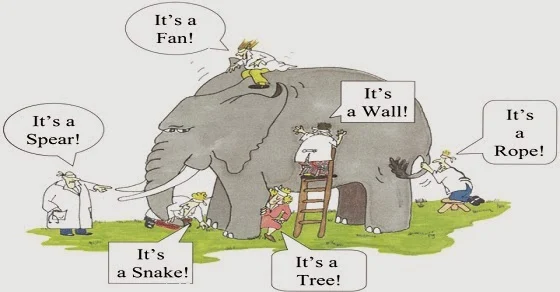
The more I talk to people about what should be included in high school computer science the more I thing of the Indian story of the blind men and the elephant.

blind men and the elephant

I attended an industry advisory meeting for a local career technical school last night. I attend several of these at several schools every year. I hope I provide some value to them from my time in industry and my education experience. I know for sure I get a lot out of these meetings. Industry attendees always have suggestions of what should be included in the curriculum. Usually their suggestions relate to their particular business needs. Hence the elephant story. Computer science is huge as a discipline but the parts we interact with regularly are the parts we think of as important.

When it comes to high school computer science curriculum we do have some standards. The CSTA Standards are really good. In a way though I see them as the floor - the minimum. Even the AP CS courses are not far beyond these standards. They practically read as the AP CS Principles curriculum though one could meet them without the AP CSP course. But what if you want to do more?

The standards are also about concepts and not implementation. That is also great. That is how it should be. It leaves us open to the question of how to implement the teaching of these concepts. This is where the things industry wants us to teach, which is often more about tools than concepts, can be influential. If we want it to be. We don't always want to take those suggestions too far as our students are not ready for everything industry would like us to teach.

What I have been thinking about lately from conversations with industry people are four things:

  • Cloud computing
  • Virtual Reality/Augmented Reality
  • Artificial intelligence
  • Internet of Things

Whoa! That's a lot. And they are all more and more intertwined. It is hard to implement IoT without cloud computing. AI is an important part of VR/AR and the cloud is where a lot of AI is executed. AI, Cloud Computing, and IoT combine for a lot of image recognition. I could go on but if you are a regular reader of this blog you probably know a lot of this.

Which of these is the most important? I think we could get arguments for any of the four as well as various combinations. And while we might like to think we can include a little of each, let’s face it, any of these could be a year long course by itself with bits and pieces of the others to support the main emphasis. So what is a teacher to do? Personally I have totally decided. Actually, just about every day I totally decide on a different one of those four things. Not helpful. Sigh.

Cloud computing looks pretty exciting. Amazon Web Services (AWS) and Microsoft’s Azure both have programs for educators. AWS Educate from Amazon and free Student Azure accounts from Microsoft. Which to choose? I need to spend some serious time looking into both of them I guess. Anyone using either of them in high school want to help me out?

Virtual reality/augmented reality is quite “sexy” and I can see it attracting lots of student interest. David Renton is having his students program VR which is cool. But at $200 a head set funding a classroom set seems daunting.  Still it is cool. And one can teach a lot of concepts to students who are highly motivated to create something awesome.

Where do I start with artificial intelligence?   Microsoft AI School looks like a good place to start learning and using some of their AI tools. OK I’m overwhelmed. I need a face to face course. Somethings are just too much for my old brain.

Internet of Things may be the item that interests me the most. It is a mix of hardware and software and my gut tells me that is as much key to the future of computing as anything. Mix in a little cloud computing for hosting. Perhaps an existing AI took for analysis. Maybe even a little visualization. Not quite VR/AR but interesting non the less. That could be a great course. Now all I need is curriculum or a year of free time to learn it on my own enough to develop curriculum. Sigh (again)

What I’d really like to do is have a class where the students figure all these things out themselves. Have them design and build a major project involving one or more of these technologies while doing the research, experimentation, and learning while I coach. Perhaps connect them with people and documents and videos and the like. Then they can teach me. Now wouldn’t that be great!

Thursday, July 12, 2018

Microsoft Makes Large Commitment to CSTA

One of the big announcements at the recent Computer Science Teachers Association conference was that Microsoft is donating two million dollars to CSTA over the next three years.

This is obviously a big deal. This money is first off a huge help towards building a strong financial base for CSTA to grow and to do more. It will allow more professional development, more help to local chapters for new programs, and generally make some long desired programs to happen. It is also a great vote of confidence in CSTA and its leadership.

I was able to chat with Mary Snapp, Corporate Vice President and Lead for Microsoft Philanthropies, who announced this grant at the conference. She told me that Microsoft strongly believes that CSTA is going to be able to expand and scale operations in a big way over the next few years.

A number of companies I talked to at CSTA told me they are interested in helping build computer science education. They all really need people who understand computing. Not just to hire (though there is some of that) but also the companies they partner with and sell to need more people. And of course a society where people understand computing is a benefit to us all.

So thank you Microsoft. And thank you to the other companies supporting CSTA in various ways.


Tuesday, May 08, 2018

Visual Studio Live Share–Something CS Teachers Can Use?

Microsoft is having their big MS Build event this week. I don’t have time to watch it live but I have been seeing hints of things via social media. Most of what they are talking about it for professional developers and is far more advanced than what I have time to get to with my students. But sometimes there are things I can really use. Visual Studio Live Share looks to be one of those things.

With Visual Studio Live Share two people can actually look at and work on the same code at the same time. Merge that with a Skype call and it is like being there. Think Google Docs for Visual Studio. (Someone will object to that characterization for sure.)

So far I have just tried it locally (two computers next to each other with me operating both) but I can see some educational uses. For one thing I can see sharing code with students and having them work on code I have on the screen from their own desks. I can also see easier pair/team working in rooms that don’t lend themselves to a lot of student movement. My tables don’t move and things can get crowded if people mover around too much.

I can also see using it to help students with their own work. Now in the classroom it may still make more sense to walk over to where the student is working. On the other hand if a student is working from home we now have a great way to work together.

I’ve been thinking about using it to watch students as they code (with their permission and their controlling the share) from time to time. That may give me some insights without being quite as intimidating as literally looking over their shoulder. For those students who pretend to be working this may be just the thing.

There are likely to be more ideas that others come up with. Time will tell. At least for now I have a few ideas worth trying out. What do you think? Do you see some educational potential?

Thursday, April 05, 2018

Thoughts on where CS education tools come from

TouchDevelop is being retired. It’s not the first tool with educational use to be retired by Microsoft. Or from other companies either. While I have used TouchDevelop with my students I was getting ready to move to MakeCode anyway so it is not a fatal move for me by any stretch. I know other teachers who have been using it more extensively who are going to feel some pain though.

I tend to divide CS educational tool sources into four categories.

Professional tools that are useful in education. In this category we see things like Eclipse, Visual Studio, and other development tools that are being used to create real products. These tools are not going anywhere anytime soon. Companies, both those that use them and those who create them, have a vested interest in supporting and improving them.

University developed tools. This includes things like Alice and Scratch but also BlueJ and Snap! and, well, far too many to mention. These are also likely to stay around for quite a while. People tend to build careers around them and use them to attract graduate students who use them, enhance them, and generally want them to be around.

Education companies. Companies like Tynker and Birdbrain are included in this group. As long as these companies can make enough money to keep going their tools will be around.

Industry Research Projects This is often the most state of the art and cool new things. On the other hand they are the least to be around for a long time. AppInventor was originally one such. Fortunately for educators who adopted it, when Google was done with it they were able to hand it off to a major university where it continues. TouchDevelop is another. Hear though, when the researchers moved on to new ideas there was no similar handoff. Both the Touch Develop web app and cloud backend are open source under the MIT license:

There is no indication that anyone is going to take it on though. I always assumed this day would come to be honest. Industry research groups have changing priorities and in some ways that is a good thing. I could argue it is a very good thing in terms of advancing the state of the art in computer science. It’s sad for us in education who aren’t always as quick to adjust as industry is.

As one tool fades another grows. MakeCode is pretty cool and there is a lot there learned from TouchDevelop, the Micro:Bit and educational uses of them both in there. Microsoft is developing a sprite-based game engine for MakeCode and a new course on game programming, in the spirit of CCGA (an interesting curriculum based on TouchDevelop.). One hopes it will be available in some form for teachers to learn it this summer.

I’m not sure where the materials developed by code.org fit into my classifications though. They are a non-profit with industry funding but they are neither industry or academia.  They have some great stuff though. I am using their CS Principles program for example. Chances are I’ll retire before they “go out of business” so I can probably depend on them plenty long enough.

Nothing lasts for ever though and change is the most constant thing in computer science. So we have to learn to adjust and change our tools and our curriculum, probably, a lot more often than educators in other disciplines. At least we’re not going to get bored.

Sunday, June 26, 2016

Microsoft US MIE Forum 2016–Day 2

Day two started with a keynote by Stephen Reid about game playing in education. It was very interesting and he showed samples of a lot of games. He spent the most time on Minecraft. It does seems like some interesting cross curriculum things are going on in classrooms using Minecraft. I’m waiting for them to reopen modding for us in CS classes though.

The rest of the morning was concurrent sessions with teachers talking about how the are using various technology in their schools. I attended one session on Microsoft Classroom. It is a basic learning management system that works well with Office 365 and several student information systems. Well worth looking into if you are in the market for an LMS. It has some very nice features and they are building it up with teacher feedback.

Next I attended a talk by Melanie Wiscount about flipped classrooms. I learned a bunch and she shared her presentation Sway at  Flipped Learning Sway One key take away was that flipping is not always a daily thing. I felt validated in my thoughts of using it occasionally. You can see the lists of tools she uses on that Sway. Sway is pretty cool as well. I need to learn more about using it.

WP_20160626_008I skipped the third breakouts because I got the chance to try out Doug Bergman’s HoloLens. The first picture is a close up of the device on Doug. Its basically a Windows 10 computer with two screens as a wearable device. It feels very light and one almost forgets the are wearing it as they get involved in the experience. WP_20160626_007

In this next picture I am wearing the HoloLens and interacting with a virtual shark floating in space. My mind was racing with ideas for using this in education. Virtual reality looks to be huge and I hope education gets out in front of it and takes advantage of it. It is too powerful to be limited to games and entertainment.

Doug has students writing code for it BTW. It’s fairly advanced programming though so we’ll see where development takes place going forward.

The afternoon started with some classroom hacks – useful suggestions and information from teachers. I saw some really cool things to do with pens on Surfaces. I’ll play with that at home and write more on that. Also cool was how to create custom ribbon tabs for Office applications. I’ve started to create one for myself to make it easier to get to the things I use most. But the suggestion was also made that a teacher could make a simple custom ribbon for students. I can see this being very useful for young students, special needs students, or any student who might be overwhelmed by the full blown ribbons that come standard.

The closing presentation was by Mike Tholfsen who is from the OneNote team at Microsoft. He talked about  OneNote Class Notebooks.  I really need to get my school using Office 365 so I can take full advantage of this tool.

It’s been a great event. Microsoft makes all the teachers feel appreciated and important. I hope I can come to more in the future.

If you are interested in being a part of this program Nominations for the 2016-17 global Microsoft Innovative Educator Expert program are open! Learn more: http://msft.it/6010Btfn8

Here is the group picture from this weekend’s event.

MIE Expert photo

See also Microsoft US MIE Forum 2016–Day 1