Thursday, December 12, 2013

Does Computer Science Count in Your State?

Computer science only counts as a graduation credit (usually in either math or science) in 15 states. In most states a computer science class can be an elective but nothing more. That means that a lot of students who could take computer science don’t take it because they can’t fit it in and still graduate on time. In other places schools don’t even offer computer science because they don’t expect students to want to take it. I found a bunch of online petitions at Change.Org asking various states to correct this problem.
I have listed the ones I found at Make Computer Science Courses Count toward Graduation Credits. If you know of others let me know and I will add them.
If you live in one of these states please sign the petition for your state. Thanks.

Wednesday, December 11, 2013

Why I Write Code

I’ve been programming for about 40 years now. That’s a long time in Internet time. Honestly in some ways it is more fun now then ever and it started off as fun for me. The story starts for me back in college when I took a programming course to avoid taking a math course. Really. I needed two requirements from a selection of math and science and one of the options was an introductory computer science course. I knew I didn’t much like math and had no idea what computer science was all about so why not?

I struggled a bit at first but eventually it “clicked” for me. I had, what at the time was, extraordinary access to the university computer. There was a computer in the computer lab. Yes one computer for the whole university. Used during the day for school related work students had access after 6PM until (in theory) 10PM. I say in theory because some of us were granted after hours access. With this access I started writing code for fun.

The next year the university acquired a PDP-11 computer running the RSTS timesharing OS. More fun and not a little hilarity occurred. There was a lot more computer access time for students now.

As I look back (and forward) there are a lot of reasons to learn to code. Making money is one. Software development earned me a good living for much of my adult life. I was fortunate enough to work for two great computer related companies (Digital Equipment and Microsoft).

Changing the world is an even better reason. Though I think my influence in changing the world is most likely to be a result of the students I have taught over the years rather than any of my own code. I have been fortunate enough to have many outstanding students who have moved far beyond my modest coding accomplishments.

At its heart though, for me, writing code is fun. It is an immensely fulfilling process of discovery, creativity, and accomplishment. It gives me great satisfaction to create some code that makes the computer do something I want (or perhaps need) it to do. Programming is my ultimate brain teaser and creative act rolled up into one activity.

A friend tweeted a quote earlier today that struck me as interesting.

I’m not so sure video games would have been his thing but I have little doubt that a computer would be involved in his life. Can you imagine what a creative mind like his would have done with a computer? Or Leonardo DaVinci?

Programming today remains as much art as science. That is both good news and bad news. The good part is that it remains a creative work that rewards people who think differently. People who may not be aware of the box enough to know they are thinking outside of it.

I write code because it is fun. I write code because it is a wonderful way for me to create things that do something. Writing code is an art of the mind. If you just see it as a way to earn a living you will earn a living. If you just see it as a way to get some task done you will get the task done. If however you see it as creation, innovation and expression you will enjoy yourself a lot more.

Tuesday, December 10, 2013

That Is Not My Name

My first major in college was Sociology.NameTag I did finish it along with a second major in Systems Analysis (few CS majors existed back in the dark ages) and to some extent that sociology background influences how I look at Computer Science concepts. Take for example identifiers. Variable names, method names, class names, and many more items in a computer program have names. Using these names correctly is important.

There are parallels in human interaction. There are cultures where people have two names with one being public and the other being private. Why? Because these cultures believe that knowing someone’s secret or real name gives one power over the person. There is some truth to this in reality. Any teacher can tell you that yelling “hey you stop” at a running student is far less effective than yelling “Michael Robinson stop were you are!” (made up name) Knowing a student’s name gives you more power than not knowing it. Using the wrong name on the other hand is often worse than useless. Trying calling a child by their sibling’s name sometime and see what sort of response you get.

Names, or identifiers if you want to get all technical, are what give us power over the objects/data they represent. When we teach students to program one of the things that we always try to get across is that names should be descriptive. Names should mean something and not be random or arbitrary. They should tell us something about the object in use.  They should also help us use the right object at the right time. Seems easy but some beginners struggle with this.

I’m seeing some of these issues with my beginners. They spell names incorrectly or they use the wrong names in formulas. They sort of expect the computer to know what they are thinking. I repeat the common phrase “computers do what you tell them to do not what you want them to do.” but it sometimes takes a while to sink in. I’m working on finding ways to help them with it. Explaining it doesn’t work so I need some visuals. Any ideas?

Monday, December 09, 2013

Interesting Links 9 December 2013

Today is Grace Hopper’s birthday. An amazing woman I was fortunate hopperenough to meet while in college and hear speak several times during my career. It’s also part of Computer Science Education week and that is no coincidence. The week of Admiral Hopper’s birthday was a natural selection for the celebration of computing education. Through many roles in her career Admiral Hopper always thought of education of the next generation as a key part of her life’s work.

Speaking of CS Ed Week and the signature event of this year – the Hour of Code – the media is starting to pick up the news. For example in this article Cnet discusses the Hour of Code

And there is this Open Challenge for Ellen DeGeneres to try and write as much code as a 4 year old by Thinkersmith

On the CSTA Blog, CSTA executive director Chris Stephenson writes about some Concerns About a Computer-Based AP CS Principles Exam. Not on the curriculum but on the plans to only offer the exam on computers. Take a look and leave your opinion in the comments section there.

Have you never been to the SIGCSE Conference? For the first time there are some travel grants for first timers to attend SIGCSE 2014. Thanks to Henry Walker! http://sigcse.org/travelGrant

Top Ed-Tech Trends of 2013: Coding & "Making"   via @hackeducation Another example of why @audreywatters is a must read

Do you use Alice to teach programming? Did you know that Students Can Create Animations of Garfield the Cat With New Version of Carnegie Mellon's Alice Software? Cool!

Everything Is Becoming a Branch of Computer Science from Innovation Insights at http://Wired.com

Why Teachers Must Have a Digital Footprint What do you think? Are they right?

The Boston Globe covers the Bootstrap program for integrating algebra and computing:

Computer science education - Readings from Thanksgiving Break  by @caitsydney

What’s the difference between college-level and corporate programming? More or less than you thought?

Friday, December 06, 2013

Are you learning fast enough?

Erik Meijer is one of the awesome people I get to meet while I worked at Microsoft. Earlier today he tweeting something that really made me think.

I think in some respects the message here applies to teachers more than ErikMeijerstudents. Sometimes we get to the point where we think we know it all and that we are just “so smart.” It’s times like that when we have to ask ourselves if we are still learning.

Are we learning enough? Are we learning fast enough? Are we really going to be able to help our students be ready for the world if we are complacent in our own knowledge?

BTW yes, Erik is a colorful character. A brilliant mind and a fascinating speaker. If you get the chance to hear him talk take it.

Programming Languages for Middle School

There may be quick questions but are there any quick answers? I had the following Tweet recently.
OK the question was quick and I answered quickly with:
But that left me unsettled. It’s been a while since I taught middle school full-time. I’ve done some workshops for middle school students (Kodu and HTML) but that is not the same. But I know that a lot of people are using Python, Small basic, Alice and Scratch with middle school students. So the answer seemed reasonable.
I decided though to ask some people who are involved with middle school computer science education what they thought. Laura Blankenship was the first reply:
JS would be JavaScript which is a real up and coming language. That she uses different languages with different grades should not come as any surprise. Students to a lot of growing in every way between 6th grade and 8th grade.
Patrice Gans added App Inventor and Kids Ruby to the list of recommendations. 
App Inventor is based on ideas from Scratch and I like it. It might work best if you actually have some devices (Android phones or tablets) to work with. KidsRuby I don’t know much about at all so I guess I’ll have to do some research on that one.
Patrice has a Google Doc with a list of K through 8 computer science education resources BTW. I was reminded of this during a Twitter chat about K8 computer science the other night. You can see a lot of that by looking at the #CSK8 hash tag. I think they may be running these chats regularly so keep an eye of for them.

[edit] Emmanuel Schanzer reminded me on Facebook that some 2000 middle school students are using the Bootstrap curriculum he developed using the Ratchet language. "Bootstrap is a curricular module for students ages 12-16, which teaches algebraic and geometric concepts through computer programming. "

Thursday, December 05, 2013

How Do You Know It Works?

I have been teaching Visual Basic programming to my freshmen this week. It’s part of a course we call Explorations in Computer Science and its new this year. The students are working on a simple program to do temperature conversions – Fahrenheit to Celsius and back again. It’s deliberate fairly simple because the idea is to get them used to the IDE, using assignment statements and simple formulas, and generally get their feet wet. I go around the room helping out here and there, repeating some information again, and of course letting the students who off their working programs. And that is when it gets interesting.software-testing

A student will run the program, type a number into a box, click on the button and a new number will display. My question then is “is that the right answer?” Fairly often the reply is along the lines of “I think so” or even “I don’t know.” I’m sure you are thinking “didn’t you talk to them about test data?” to which I reply “you betcha!” In fact I showed them (several times) some examples of good data – input values for which I (and they) know the correct output.

So why don’t students use that data? Oh how I wish I knew. Somehow beginners like to assume that once the program compiles, runs and displays an answer in the right place that all is good. Often it is not. In fact I accidently posted an incorrect formula which some students copied so answers were decidedly wrong. That showed up the first time a student entered good test data. As soon as the first student showed it to me I realized what I did wrong (cut and paste error). Students who didn’t test well would never have known though.

So obviously this is something I will continue to talk about throughout the course. I may share a story that Eugene Wallingford posted in his blog - AGILE MOMENTS, "WHY WE TEST" EDITION – about someone who surely wished they’d tested more.

Testing is a critical piece of any scientific or engineering endeavor. We need to teach students how to do it correctly from the start.

Wednesday, December 04, 2013

TEALS (Technology Education and Literacy in Schools) Looking for Partner Schools

TEALS is an interesting program started by a Microsoft employee some years ago. It taps the enthusiasm and expertise of industry professionals who work with classroom teachers to bring CS course into schools that would not otherwise have them. The program is looking to expand to more schools across the US.


Logo Linked List

As December nears, TEALS (Technology Education and Literacy in Schools) is starting the process of recruiting new partner schools for the 2014-15 school year. TEALS (www.tealsk12.org) is an industry wide nonprofit program with a proven track record that is hosted within Microsoft YouthSpark.  TEALS helps high schools build a sustainable computer science (CS) program by integrating industry software engineers into the classroom in a co-teaching model with a classroom teacher.

A detailed program description can be found at:
http://www.tealsk12.org/docs/TEALS_Program_Description_2014.pdf

To learn more about how a school can add computer science to its course offerings, please complete the following action items:

  1. Register your interest at: http://tealsk12.org/about/register.php?ref=ops&type=schools so that we can add you to our database of interested schools and notify you as application materials become available
  2. Attend one of two conference call information sessions to learn more about the program and the school application process. The following school representatives are advised to attend, as all of these parties will play a role in the application process and in building a successful computer science program:
    • School administrator
    • District CTE representative
    • Teacher interested in learning and teaching computer science full-time
    • Guidance department representative
    • Diversity engagement representative

      Call #1: December 9, 2013 at 10pm EST/7pm PST
      Join online meeting   
      Join by phone
      +14257063500 (USA - Redmond Campus)       
      Conference ID: 60410873

      Call #2: December 11, 2013 at 7pm EST/4pm PST
      Join online meeting
      Join by Phone
      +19173881000 (USA, New York)         
      Conference ID: 586271907

  3. Read the detailed information packet which includes the official school partnership guide, checklist of requirements, and classroom teacher development plan. It will be made available on December 9, 2013.
  4. Apply! The online application will officially open on December 19, 2013 and applications will be accepted until March 3, 2014.


You can reach out to us via our contact page (http://tealsk12.org/contact/contact.html) if you have any questions.

Thank you and we look forward to your attendance at the information session.
Kevin Wang
kevin@tealsk12.org

Tuesday, December 03, 2013

Announcing DyslexicGamemakers.com

Know any dyslexic students who are interested in creating video games and build some skills? They may find this announcement interesting.

dg logoWe are proud to announce we are teaming up with Dyslexic Advantage to build Dyslexic Gamemakers an online community and virtual club to leverage kids passion for video games to build skills in STEM and Digital Media Arts.

The Plan:

  • December 4 - First Meeting of Dyslexic Gamemakers in Webroom
  • Week of Dec 9-13 - Hour of Code Activities
  • January - Mod a Game
  • February - April - Make a Game - Team or Individual
  • April - Enter STEM Video Game Design Contest and Dyslexic Gamemaker's Contest

Sign Up TODAY

We are open to school age kids of all ages - SIGN UP HERE

Help Us!

We need mentors! Calling all pro-dyslexic game makers, parents of dyslexic kids and those who have passion for this cause. - PLEASESIGN UP HERE

Please forward this email to friends, family, co-workers and community members who you think may have kids who are interested or who may be interested in becoming mentors. We are partially keen to build our network of dyslexic video gamemakers and technology professional.


About Dyslexic Gamemakers

Dyslexic Gamemakers is an official group of the Dyslexic Advantage community. It's a place to learn, play games, and develop game design and programming skills. No programming experience is necessary.

This is a family-friendly network. All members must adhere to a policy of politeness and civility or their membership will be revoked. Feedback on member-created games should always be constructive and helpful. No private messaging of members is permitted.

There is no cost. We are completely supported by the generosity of volunteers and voluntary contributions. You can donate on theDyslexicAdvantage.com website.

About Dyslexic Advantage

Dyslexic Advantage is a 501c3 non-profit charity that seeks to create a world where the strengths and talents of dyslexic people are celebrated and where every dyslexic child and adult can flourish in school, work, and life. Dyslexic Advantage is dedicated toward increasing awareness, education, research into the strengths and talents of dyslexic people.

DyslexicAdvantage.com is one of the World's Largest Online Dyslexia Communities. Please join to connect, share resources, and to watch free webinars. Subscribe to our Videos here.

Drs. Brock and Fernette Eide have written The Dyslexic Advantage about some of the cognitive strengths of being dyslexic. It's also available in audiobook and in the UK.

About Crowded Fiction & Vidya Gamer

Vidya Gamer, LLC was founded by Joe Booth, a Digital Media Executive, Innovator and (aspiring) Social Entrepreneur with broad experience of innovating and bringing consumer digital products and services to market in Video Games, Publishing and eLearning.

Our first title, Crowded Fiction, is a innovative interactive eBook platform that aims to get older kids (9+) as passionate about reading as they are about video games. Read more or download our iPad app at crowdedFiction.com

Booth has 25+ years of proven video game experience on major industry franchises (FIFA, Need For Speed, Ghost Recon, Rollercoaster Tycoon). Over 24m games sold generating $1b of retail revenue with 10 AIAS & BAFTA nominations. More here

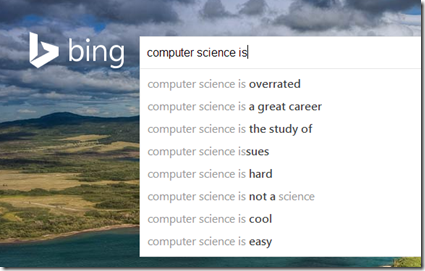
What Is Computer Science According To Search Engines

Inspired by an image I saw from a talk by Dr. Tom Crick (@DrTomCrick) I decided to see what the more popular search engines returned as search aids when a user entered the string “computer science is” and grab some screenshots.

CSbing

CSGoogle

I’m not sure if these mean anything but there are interesting. Especially that “hard” shows up in both – twice in Google. I’m happy that “cool” and “a great career” showed up in Bing though.

Monday, December 02, 2013

Interesting Links 2 December 2013

It was a short work week for me last week. Well as far as school was concerned.chain links Only two days. I spent no time the rest of the week on school work. Not a completely smart thing as I have grading to catch up on. Oh well. I was busy with other things like giving thanks for so many wonderful things in my life. I did spend some time on the Internet and did collect some links to share. I hope you find something useful below.
Students of All Majors Should Study Computer Science I love this line from the end “In addition to attractive career opportunities in information technology, students from all fields want to learn computer science to learn to how to change the world.”
Programming Power? Does Learning to Code Empower Kids? Some things to think about in that article.
Can Kano, a computer anyone can make, get kids coding? A new project built around the Raspberry Pi.
Getting and Keeping Computer Science Teachers in K-12 A look at the issues around retention of goo computer science teachers on the CSTA blog.
Bucket Sorting a new post by Mike Zamansky @zamansky This is pretty much how punch card sorters did things BTW. We do an exercise around this where students sort themselves by making from bucket to bucket. I need to write up something on that.
Check out @khanacademy's Hour Of Code tutorial intro video at http://youtu.be/CYmL-Up_ZNc I love the interdisciplinary references.
Two new posts by Garth Flint last week. Check them out.
Teasing apart the issues of women in computing: Impact of Hollywood by Mark Guzdial @guzdial Mark makes some great points. Things are not as cut and dried as we’d like to think they are.
Spanning the Chasm of the K–12 and Post-Secondary Relationship Chris Stephenson from the CSTA posts on the blog@CACM  We’ve come a long way but I think there is a lot of room for progress yet.
If you want to be a better person... teach from Innovation in the Classroom by Don Wettrick   on Twitter at @donwettrick

Sunday, December 01, 2013

Fun With Meme Generator

Some things are hard to stop once you start. I’ve been having some fun with a site called memegenerator.net A couple of my attempts are below. I first used it for a blog post last week. (How is Computer Science NOT a 21st Century Skill) This could very easily get out of hand. I’ll have to watch it. At the same time it’s got me thinking about a project for students.

I wonder how hard it would be for students to write an application to generate their own captions on images they select? I think I’ll work on that.

real CS

I use VB

Friday, November 29, 2013

How is Computer Science NOT a 21st Century Skill

I had to do this. I really did. I am so tired of schools claiming that they are teaching 21st century skills (what ever that means) but not offering a computer science course. How is that possible?

wwcs

Tuesday, November 26, 2013

Hour of Code Update 26 November 2013

The Hour of Code events for CS Ed Week is shaping up to be really big. Are you involved? Here's an update I got from the founder of code.org this week.

We announced the Hour of Code just weeks ago, and now 3 million students across almost 20,000 schools, in 150 countries have signed up. Wow.

Hour of Code map

This is shaping up to be the largest learning event in history. And we'd love your help to make it even bigger. Join us

Is your school on the list?
If not, tell a teacher you know to visit http://hourofcode.com to make history.

If each person reading this email asks one classroom to teach an Hour of Code, this movement will reach 20 million students.

Every child should learn computer science
Starting Dec. 9, anybody can learn the basics -- from Bill Gates, Mark Zuckerberg and Angry Birds, in over 20 languages. Set aside an hour to learn yourself, too.

Thank you for your support,

Hadi Partovi, founder, Code.org

Monday, November 25, 2013

Interesting Links 25 November 2013

Starting of this post made me realize that we are exactly a month away from Christmas. I need to get going on shopping for my wife’s presents. I’m running out of time. I can’t be like my students sometimes are and leave it all to the last minute. Well, I’ll do that after I share some links with you. Found some good ones again I think.

Sabotage: Teach Debugging By Stealth I love this idea!

There is a new Windows Phone 8 Programming book by Rob Miles @RobMiles available. The ebook with lots of demo code is free. Free is good!

Getting the Most from Conferences Chris Stephenson from the CSTA writes about getting the most out of the annual CSTA conference.

Changing the World One Step at a Time: Introducing CS in the Middle School is new on the CSTA blog. 

Why One PhD Student in Psychology Learned Python via @gailcarmichael

Beyond Teaching Computer Science is an article I wrote over the summer for a different web site. 

@AnthonySalcito explains to @BBCWorld, schools focus too much on buying tech and not thinking enough how to use it. Anthony is the WW VP of Education for Microsoft and he really “gets”  education. It’s nice to have a exec from a tech company who focuses on the problems rather than selling answers in search of questions.

Code.org's Pat @MrYongpradit discusses importance of letting teachers lead via @MicrosoftCitizenship

A new v1 power tool for your Windows Phone Image tasks, the Nokia Imaging SDK 1.0 from Coding 4 Fun on Channel 9 @ch9

A set of top Computer Science Education blogs assembled by Dr. Tom Crick.  I was already following most of these but a couple were new.

Friday, November 22, 2013

Opportunity Matters

I was having a conversation with my friend Ken Royal today. Ken Royal and Alfred Thompson selfieI was sharing with him some of the experiences I was able to have over the last couple of years meeting and visiting with computer science teachers around the country. Students in some of these classes are doing great (surprising to many) things. I told Ken that it was easy to think that the kids were amazing but that in many cases what they had was an amazing opportunity.
I think most students are capable of doing things that are a lot more impressive than we give them credit for. Our expectations are too low. I am guilty of this myself more then I’d like to admit. What great teachers do is provide students with the opportunity to do great things. They don’t limit students to what they (the teacher) knows and they don’t limit students to cubbyhole cookie cutter projects.
This takes some courage. It takes a willingness to let students fail. To let students come up with their own projects and to drive their own learning. This can be hard for teachers. We’re used to being in control. We’re used to knowing what everyone is doing and when and how they will finish. Extraordinary projects don’t often fit into neat cubbyholes.
Traditional projects fit into clear metrics. Extraordinary projects do not. Oh sure if the project succeeds it is easy to shout “A+ project” but what about projects that are not a success in the traditional sense? A student or group of students can learn a tremendous amount that is far beyond normal expectations but for one reason or another the project just doesn’t work when time runs out. How do you grade that? Some subjectivity may be required and the system hates subjectivity.
In the long run though the teachers who provide more opportunity and fewer limits are the ones whose students impress. Those are the ones who learn a lot, create a lot, and enjoy what they are doing a lot. It is tempting to credit the students. It is tempting to credit the teachers. Both deserve some of the credit but it is really the teamwork between teacher and students that is what makes it all work. Teachers to lower boundaries and students who jump at the chance to escape the box and soar. It’s a beautiful thing.

Thursday, November 21, 2013

CSEdWeek poster featuring Susan Wojcicki, Google

Passing this along from the CSTA announcement mailing list. It surprises me that women in the computer field were not more willing to take part in this effort by code.org. And disappoints. Perhaps there is more to it then I know.


Code.org has just released a new CSEdWeek poster featuring Susan Wojcicki, a Senior Vice President at Google. Forbes has called Wojcicki  the most powerful woman in advertising, and among the 20 most powerful women in the world. Although not a CS major, she took intro CS classes in college. Google's first office was in her garage. 

Code.org founder Hadi Partovi says that he decided to release this new poster because it's critical to show female role models to girls to bring them to CS. Showing just images of men isn't enough.  "Our original posters (Mark Zuckerberg, Chris Bosh) lacked a female, despite our best efforts (we asked all the best known women in tech who surprisingly rejected the opportunity)," says Partovi. "Susan  is a fantastic spokesperson for computer science education, because she shows that even if you don't major in CS, even if you don't become a software engineer for life, exposure to the field is important in a world that's increasingly dependent on technology."

You can request a copy of this new poster for your classroom at:
https://docs.google.com/forms/d/1olxoWmlEqx9BrCGkYphhXlFjfHOQnFg1_cskzHjpb6Y/viewform

Wednesday, November 20, 2013

We Need a Grant Program for Teachers to Attend the CSTA Conference

I had a thought spawned by a comment on a recent blog post and some conversations I have had recently. I wish there was a grant program to give attendance funding (basic travel and expenses) for teachers to attend the CSTA Annual Conference
A lot of teachers in poor areas, remote areas, and areas were there is a low density of CS education can't afford to attend a conference like the CSTA Conference. And yet I feel like these are the teaches who could benefit the most for attendance. Especially in some of the remote areas where travel is expensive, school PD funding is limited or non existent, and CS teachers are the most isolated a trip to the CSTA conference could make a big positive difference.
Now there are some teachers (many in fact) who pay their own way to conferences including the CSTA Conference. Good for them. They have the money or at least enough so that they can set that as a priority. Other teachers have schools or districts who set aside enough money to give some sort of help (i.e.. money) to allow teachers to attend conferences and other out of district professional development. That’s even better! But not everyone falls into those two groups.
Many rural schools are hit with a double whammy in that they don’t have much (no where near enough) money to spend on PD (or even salaries) for teachers AND they are far away from anything so that travel is even more costly. For teachers in those districts/schools travel to a big conference can be prohibitively expensive. I don’t think anyone would suggest that those teachers have less need for PD either. In fact since they so seldom have any peers near them they probably need it even more. They also could really benefit with the networking that takes place at a professional conference. For computer science teachers the CSTA conference is unquestionably (in my perhaps biased mind) is the best conference for them.
CSTA doesn’t (as far as I know) have the money for this. Running the conference is hard enough as it is. Now I may get into trouble for this (this is my own personal idea that I haven’t discussed with anyone else  yet) but I would like to see some of the computer industry giants put up some money for this sort of thing. How much would it cost? I’m not sure as I haven’t really worked the numbers but it seem like it would not be too expensive. A relatively small pot of money could be assigned for say 3 to 5 “scholarships that would be awarded based on some sort of criteria. Like what? I have a few ideas.
  • Need based on some funding metric – hard to do in some ways
  • No previous attendance at CSTA conference (or not within some time period)
  • An application that shows a demonstrated willingness to learn and implement new things and personal innovation
  • Stated administrative support though a willingness to allow the teacher to incorporate new ideas – we’re already assuming the school/.district doesn’t have money BTW
  • A willingness to share what they learned in some way (local workshops, video messages, blog posts, some other way)
Obviously the devil is in the details and people putting up the money (perhaps the usual suspects like Microsoft, Google and Intel) but maybe some one else like HP, Dell, or _______ may have some funds to spare. I’m not asking them to send everyone or even a lot of people. But a couple of them a year would be pretty cool.
CSTA Conference image

The Problem With i

I had an interesting problem from a student the other day. He was working his way letter-Ithough an array in a couple of places and one of them was doing something wrong. It was tricky because most of what was happening was correct but sometimes it wasn’t. Drove us both crazy. As you might expect there were a couple of places where values were being changed but it looked consistent so the results should have been constant. But they weren’t. It took me a while to understand what was going on but I finally figured it out.

The index for a change was being calculated using two index values –> n and i. Pretty common stuff. Unfortunately one place was [n + 1] where it should have been [n + i] A lower case i is easy to mistake for a 1. So is an uppercase I or even a lowercase L. In fact there are a lot of numbers and letters that are easy to confuse. Zero and Oh for example. S and 2 for another. One solution is to avoid some letters completely. I know of places that ban the use of some easily confused letters in places where context does not make them stick out clearly.

For indexes in loops though the best answer is probably index control variables that are more than one letter long. Row and Column probably make better variable names than r and c and definitely better than i and n when you are indexing through a grid or a table for example. Index is probably a lot better than I as well. But most of us are lazy so we stick to single letter loop control variables far too often.

It’s not a problem until it is a problem. When it is a problem renaming the loop control variables is probably a good way to make some sorts of errors in logic pop out. Something we’ll be talking about in class this week. I love the teachable moment.

Tuesday, November 19, 2013

CSTA 2014 Board of Directors Nominations Open

CSTApdflogo2 color
Since this past summer I have been a member of the CSTA Board of Directors (thanks again to all of you who voted for me). It’s been an interesting and rewarding experience for me so far. I’ve worked on the Equity Committee and our “Faces of Computing” poster conference for example. And attended two board meetings which have been great experiences largely because of the wonderful people on the board. If you are involved in CSTA and want to get more involved I highly recommend you think about running for the board.
The call for candidates is up on the CSTA blog but I’ve copied relevant information from the CSTA website below.

Nominations are now open for the CSTA 2014 Board of Directors elections. Nominations will be accepted for the following positions:
9–12 Representative (1 position): A 9–12 classroom teacher who is currently teaching computer science at the high school level.
At-Large Representative (1 position): An educator with responsibilities for K–12 CS education.
International Representative (1 position): An international (outside the United States) classroom teacher who is currently teaching or promoting computer science at the pre-collegiate level.
School District Representative (1 position): An administrator whose focus is technology or curriculum across multiple schools.
Teacher Education Representative (1 position): A college- or university-level faculty member who has primary responsibility for the instruction of pre-service and/or in-service teachers of computer science and/or computing disciplines.
University Faculty Representative (1 position): A faculty member from a university computing department offering graduate degrees in computer science.
To apply for one of these positions, please submit your completed application form and your résumé as per the instructions provided on the Call for Nominations.
Click here to download the Call for Nominations.
Click here to download the 2014 Nominations Application Form.
Nominations deadline: February 1, 2014.
Late nominations will not be accepted.

Monday, November 18, 2013

Interesting Links 18 November 2013

I made a quick trip to Tucson AZ over the weekend for the CSTA Board meeting.WP_20131116_008 Beautiful part of the country and I wish I had more time to explore it. But meeting are meetings. Still had a good time as the weekend was filled with lots of great conversations with some great CS educators.Speaking of which, a lot of people have shared some good stuff with me that I want to share with you.

Don Wettrick @DonWettrick is at it again with a new interview with my friend Lou Zulli @lzulli What would happen if your school turned over the IT responsibilities to the students?: Check it out.

The Computer Science Teachers Association is looking for candidates to run for several board seats for next year. See the CSTA blog for more information.

Microsoft’s 3D Builder Comes to Windows 8.1 yet another interesting piece of software for use with 3D printers.   via @windowsblog

Programming Power? Does Learning to Code Empower Kids? Read the article and tell me what you think?

20 Programming Websites for K-8 Options to teaching computer science to younger students seem to be expanding all the time. What do you use?

Latest video from Code.Org  an administrator from LAUSD on the need for Computer Science education

Where is the next generation of coders? - UK Wired News – Where indeed!

Hacking Sessions Week 4 - The challenges of once a week is the latest update from Mike Zamansky @zamansky about his multi-school extra school hacking sessions for NYC HS students.

Thursday, November 14, 2013

Doing Code Right The Second Time

Last week I wrote a program. I wrote about it on this  blog (Making Magic With Software) but only about what was visible to the user. This week I decided to show some of the code behind to my students as part of asking them to write a similar program. As often happens this did not turn out quite like I planned. Basically it turned into “let’s make this program better.” I could pretend that this was on purpose but let’s be honest – it wasn’t. second chance

Having written code for something like 40 years I confess I get a bit cocky about it sometimes. I think I can start writing code without planning it out or even thinking out the whole plan. This usually results in something that works but is not quite what it should be. What did I do wrong this time? A bunch of things.

The most obvious was that I took an application that would be easier to code using a two dimensional array and did it with a one dimensional array. Why? Less typing. Poor reasoning I know.  Now doing this was fairly easy for me (I’ve done similar many many times though usually with a better reason) but it was not going to be easy to explain to students. That’s a sure sign that a better design is needed by the way. So I showed the students how to set things up as a two-dimensional array.

The other thing I did wrong was to have “magic numbers.” That is to say that some values were hard coded and used several times. Why? I knew how many objects I needed and it was never going to change. Famous last words. Showing this to students I realized that the code would be more easy to understand and more reusable if I defined and used constants rather than hard coded numbers. properly named values actually make the program easier to understand. What does “8” mean? Clearly not as obvious as “row.”

So I fixed the program in front of the students and explained the why of each change. Hopefully it made  an impression. Even if it didn’t at least they have a better written sample piece of code to read and learn from. And I reminded myself to take “throwaway code” more seriously. You never know when it is going to pop up again.

Tuesday, November 12, 2013

Google Code-in 2013

This went out to the CSTA Member mailing list tonight. Thought it was worth sharing.


imageBeginning Monday, November 18th, 13-17 year old pre-university students from around the world can register and start competing in Google Code-in 2013. The Google Code-­in is an online contest designed to introduce pre-university students to the world of open source software development. Participants complete “tasks” of their choice from 10 open source software projects (Apertium, BRL­CAD, Copyleft Games Group, Drupal, Haiku, KDE, RTEMS, Sahana Software Foundation, Sugar Labs, and Wikimedia Foundation).

Since open source development is much more than just computer programming, there are lots of different kinds of tasks to choose from, in categories such as coding (in multiple programming languages), documentation, user interface, quality assurance, research and outreach. Students can earn t­-shirts and certificates for their work and 20 dedicated students, 2 chosen by each of the 10 software projects, will win a trip to Google in Mountain View, CA, USA next spring.
During the past 3 years of the contest, over 1200 students from 71 countries completed tasks in the contest. This year we hope to have even more students participate globally. Please help us spread the word and bring more students into the open source family!

Visit google-­melange.com to read our Frequently Asked Questions for all the details on how to participate, important dates and the Contest Rules. Students can start working on tasks for the contest November 18th.  For more information please contact Google Code-in Program Manager, Stephanie Taylor at sttaylor@google.com.

Monday, November 11, 2013

Interesting Links 11 November 2013

It’s Veteran’s Day in the US and most schools are closed.dad young We’re remembering and honoring our nations veterans. I’m remembering my late father who was a combat veteran of World War II and later served for many years as a Navy chaplain. That’s him on the right in a picture from the war. Over last week though I did collect some links to share.

BTW I did an interview with Doug Peterson for his blog over the weekend. It’s posted a An Interview with Alfred Thompson One of the questions Doug asked me was about this weekly links post.

Airlines are figuring out how to use all that customer data they collect This is one of the articles I want to discuss with my students this week.

Why Arts and Social Science Needs Code: Testimonials from a number of people.

Getting Ready for Big Data is a post at the CSTA blog with resources for teaching about data as part of computer science courses.

Love the new @codeorg Hour of Code tutorials! Sound effects and all!

Programming for the Beginning Teacher is a great post about various options written by Garth Flint @gflint 

Partners in Learning Network - MEET THE EXPERT EDUCATORS Several of my friends on this list and are headed to Barcelona. Excited for them.

SIGCSE 2014 a Great Opportunity for Professional Development. I’m really hoping to go this year. How about you?

LEGO MINDSTORM EV3 for Windows (WinRT, Desktop, Phone)  and code is at http://legoev3.codeplex.com/

Computer Science History: How Cloud computing is similar to the earlier move to client/server architectures. This is my most recent post at the CSTA blog. Hope you like it.

Friday, November 08, 2013

CS Teachers–Please help evaluate HoC Tutorials

I'm passing this along for Code.org who I am helping organize tutorials for an Hour of Code during CS education week. We need help evaluating the tutorials we have received to make sure we have high quality projects for people to use. Please help if you can. Thank you!


We've received many submissions of Hour of Code tutorials. We want help in sorting through them, so that the display order is based on feedback of the broader CS community. The final presentation will look something like the list you see at http://csedweek.org/learn2.
Please read the Hour of Code Tutorial Guidelines first: http://bit.ly/hoc2013
Tutorials will be listed higher if they are:

  • high quality
  • self-directed, don’t require too much instruction
  • designed for beginners
  • designed as a ~ 1 hour activity
  • require no signup
  • require no payment
    require no installation
  • work across many OS/device platforms
  • work across multiple languages
  • promote diversity (gender/race-neutral presentation)

We want your help looking at the many submissions we've received, and scoring them 1-5 on each of these attributes.
IMPORTANT NOTE: You don't need to fill out the entire form. Please help us out as much as you can.

Take our survey: https://www.surveymonkey.com/s/PK6WL7H

Thank you,
Pat Yongpradit
Director of Education, Code.org

CS Ed Week logo_text

Hour of Code tutorials are ready to try

Received this update email from Code.org last night. Looks like an Hour of Code for CS Education week is getting real! And of course it is getting close. Now though you can try out some of the exercises people have been preparing. You may find something that will work for your at your school or a school near you.CS Ed Week logo_text


Hour of Code tutorials are ready to try -- with options for every age, every Code org logo whitedevice, and even "unplugged." While this is still a work-in-progress, we invite you to check out the options, and give us feedback.

In particular, Code.org’s own tutorials are ready for preview - learn basic sequencing, repeat loops, and if-then statements from Mark Zuckerberg, Bill Gates, and Angry Birds.

Please check them out and host an Hour of Code for students in your school or community. See all the tutorials

1,500,000 students and growing

We just passed 1.5 million students planning to participate in the Hour of Code across 141 countries! It’s now on track to be the largest online education event in history, proving that the demand for relevant 21st century computer science education knows no boundaries. See every school participating here.

Join now to win laptops or a video chat with Bill Gates.
Odds of winning are still exceptionally high in many states. To qualify:

  1. Register for your entire school to participate in the Hour of Code by Nov. 15.
  2. Then, email us your school’s Hour of Code “logistics plan” to prizes@code.org to enter the running for a class-set of laptops. Details

#HourofCode
With CSEdWeek (Dec. 9-15) only 5 weeks away, please help your students join in on this record-breaking event. Join us now

Hadi Partovi, founder, Code.org

Thursday, November 07, 2013

Making Magic With Software

My friend and fellow teacher Tom Indelicato and I are teaching a new course this year. We are calling to Explorations in Computer Science and it is patterned somewhat after the larger Exploring Computer Science course developed in Las Angeles. One of the activities Tom has been using for a couple of years is from the CS Unplugged materials that involves introducing the idea of parity checking called Card Flip Magic.image

Now in the CS Unplugged site you will see this exercise demonstrated using cards of various types. It works very well that way. My friend Tom is a bit of a geek though and when he first started thinking about using this exercise his thought was “how can I do this easily with the white board in my classroom since the layout of the room doesn’t lend itself to using cards.” Well more or less that is what he thought. So being a software guy he wrote some software. Smile That’s a screen shot of Tom’s program on the right.

The way this works is that the “Click to Begin” button is clicked and the screen is filled with semi-random colors. Green and Gold are our school colors BTW. A student volunteer comes up and with the instructor not looking changes one of the boxes from green to gold or gold to green. The instructor returns and announces which box was changed. This seldom fails to get interesting reactions from the students. It looks like magic. Especially if the students are allowed to set a new random pattern while the teacher is not looking.

The left column and the bottom row are parity digits based on the other 64 values on the form. Knowing this makes finding the changed box fairly easy. The kids love it and we let them spend some time in pairs “solving” the puzzle themselves.  It’s a great way to teach the concept.

Of course I being a software guy myself had to write my own version. image

They’re obviously fairly similar. Although mine uses a menu where his uses a command button. And mine is written in C# and Tom’s is written in Visual Basic. There are other internal (and invisible to the user) differences as well. And thinking about that lead me to my second idea. Wouldn’t this make a great programming exercise/project for my programming students?

Loops, arrays, decision statements and problem solving all in one. And just think how well they will understand parity checking when they are done! I want to see how they decide to solve the problem as well. There have to be some creative ideas out there that I haven’t thought of.

Tuesday, November 05, 2013

CSTA Voice November 2013

If you are a member of the CSTA you should have gotten this update in email. If you didn’t you may want to make sure that CSTA has your email address right. If you teach computer science you should be a member.

CSTA Voice highlights

FEATURE ARTICLES

» CSTA and Teacher-Driven Professional Development

It seems that the hard work of many years and many people is resulting in an unprecedented focus on K-12 CS...What we have come to believe is that CSTA chapters must also take a lead in designing and providing PD for teachers. . . .more

» CSALT

The CSTA leadership cohort has a new name-the Computer Science Advocacy Leadership Team (CSALT). The goal of CSALT is to identify, for each state, teacher leaders passionate about improving K-12 CS education. . . .more

» Running a Successful Computing Camp

Offering a computing summer camp certainly takes time to plan and execute, but a successful camp is very rewarding. ICE at Georgia Tech has years of experience in leading computing camps and offer tips to help you ensure the success of your camp.  . . .more

» Chapter Mini-grants Now Open

Chapters are encouraged to submit a mini-grant proposal to carry out an advocacy initiative that would support the engagement of new stakeholders, the creation of a new resource, or the organization of an advocacy event. . . .more

» Increasing Diversity in Computing

Research from ETR Associates, and from the University of California, Santa Cruz, is providing valuable information about ways in which community colleges can increase women's interest in pursuing computer science. . . .more

COLUMNS

» The 3-Minute Advocate

Advocating for computer science education" sounds like an intimidating activity, but as an educator you are a natural at it. And it doesn't take much time to have a huge impact. Many CSTA members have shared ideas and strategies to pave the way for you. . . .more

» Equity Matters

Results from the NSF funded Tapestry workshops, led by Professors Joanne Cohoon and Jim Cohoon at the University of Virginia show that teachers using active recruitment can make a difference in the gender composition of classes. . . .more

» Meet the Chapters

CSTACNJ - Central New Jersey, is already a vibrant, active CSTA Chapter in this, its first year. They consider enthusiasm, organization, communication, and collaboration the keys for their success.  . . .more

» Chapter Spotlight

A programming competition is a great way to maintain students' interest in computing and to strengthen their programming skills. The Puget Sound CSTA chapter discovered it is a great way for members to work together and collaborate with industry professionals and college faculty. . . .more

CSTA Conference image

Monday, November 04, 2013

Interesting Links 4 November 2013

chain links

The big news were I live last week was the Red Sox winning the World Series. Nothing at all to do with computing. Even with all the excitement I managed to find some interesting links to share.

Journaling in the Computer Science Classroom is a useful post by Rebecca Dovi on Twitter at @SuperCompSci By coincidence Doug Bergman and I took part in a Google Handout with a Google CS Fellow on the same topic last week you can view to recording of our conversation on YouTube CS4HS HOA with CS Fellows- Journaling:

Why are women not pursuing tech jobs? - CBS News Video with a lot of footage and interviews from the Grace Hopper Conference.

Kinect Sign Language Translator includes some good video of Kinect sensors being used to interpret both Chinese and American Sign Language. Very exciting stuff.

CSTA’s Equity Committee is hosting its annual poster competition "We Are the Faces of Computing".  Maybe your students would like to participate?

Hacking Sessions - Week 2 is the latest news on an out of school program that Mike Zamansky @zamansky is running in New York City with students from several high schools.

A theory for why there’s so little CS Ed in the US from Mark Guzdial @guzdial The discussion in the comments (like a lot of Mark’s posts) is also well worth reading.

Julia Steiny writes a good article called Computer Science is Critical Thinking on Steroids that is well worth a read.

Friday, November 01, 2013

Debugging Student Code

debuggingI confess that I love to debug code. I think I’d rather fix broken code and remove bugs than write original code from scratch. All that set up and stuff is tedious but solving the puzzle of why code doesn’t work gets me all fired up.  Someone recently told be that there was no programming and debugging but bugging and debugging. With students that may be more often true than not. So dealing with student code that doesn’t work – for various definitions of doesn’t work – is something I enjoy quite a bit.

Some problems are easy. A student may call out that he is getting such and such a message and I can reply without seeing the code. Off by one errors and syntax errors are examples that often fit into that category. Often with a specific project a student will run into one error that takes a close look to solve and then you look like a real expert when two other students make the same mistake later in the period. This has a side benefit of alerting you as an instructor of something you might want to try to cover better or at least differently next time.

Some errors show up because students in their creativity try to solve a problem in a way that is completely different from any solution the teacher might have come up with. This is not necessarily a bad thing but it does force the debugger to look at things from a different angle.

Obviously I want students to get experience with solving their own problems but at the same time one doesn’t want to see frustration build up to were a student just gives up and starts hating computing. Finding the balance between helping enough and too much can be tricky. Sometimes I try to just give hints. One student was looking for ways to give warning messages for different returns from an openFileDialog box. I suggested that he look (via Intellisense) for different properties to see if that would give him information about the type of file. I like to explain why something isn’t working (usually it is because they don’t understand the option well enough) and so help them look for the right option.

It’s often easy and tempting to just jump in and fix the problem. This may impress the student with how smart the teacher is (good luck with that) but it doesn’t really help the student avoid making the same mistakes over again. Taking advantage of a teaching moment to explain things until they understand what happened pays off in the long run.I confess that this sometimes comes hard especially when all you want is the student to finish the project so you can get grading over with at the end of the marking period. It’s worth the effort though.

The other thing that working with students on debugging a problem is the chance to model debugging tools and techniques. using a debugger or setting up debugging code doesn’t always come easy. Teachers can explain it as a topic or even use it to demo information and that helps some students. Other students learn debugging best when shown how to debug a problem that means something to them personally.

I also try to reassure students that they are not “the only dummy making such a stupid error.” They often think everyone else is getting along just fine when the opposite is too often true. I am honest in sharing with students that I have made similar errors. in 40 years of programming I’ve make a whole lot of errors – many of them “dumb.” Some errors as so common that they have names (off by one errors for example) so I can explain that to them. I don’t want them to get discouraged by errors or to ever feel that they are the only ones who make them.

Occasionally a student runs into something I haven’t seen before. A always thank students for bringing those problems to me. Every problem we work though and learn something is a problem that will be easier to find and fix next time. And that I tell them is a good thing.