Friday, July 15, 2022

Amazon, Google, Meta, and Microsoft at #CSTA2022

I blog about what interests me or stirs my curiosity. One thing that fits that is what are the really big tech companies doing to support CS education. So I am going to write briefly about the presence of Amazon, Google, Meta, and Microsoft (alphabetical order). Anyone else notice that we never see Apple at CSTA?

All of these companies have sessions at their booths and as regular conference sessions to talk about what they offer. If you are at CSTA you should at least stop by and see what they have to offer. It’s a lot.

Amazon and the Amazon Future Engineer Program

Amazon had one of the large end cap booths with a lot of people and materials. Their main emphasis was the Amazon Future Engineers program. This program offers curriculum for all levels of K-12 as well as resources and opportunities for teachers.

Amazon Future Engineer is a comprehensive childhood-to-career program aimed at increasing access to computer science education for children and young adults from underserved and underrepresented communities.

Google and programs' for CS Teachers Another big booth on an end cap. Lots of color and fun graphics. And swings! Also free messages.

The big thing here is Google’s CS First program. This is a great collection of curriculum and supporting resources that can be used during the school day or as an afterschool program

Meta and Meta Engineer for a week. You’re probably not surprised that the link for more information on this is at Facebook. Engineer for the Week | Facebook but also at Engineer for the Week (fb.com) The curriculum has a strong “coding for good” component.

Started in 2018, Meta's Engineer for the Week is a free program that introduces engineering to learners (ages 11-18) historically underrepresented in STEM. Over the course of 15 - 20 hours, learners work alongside adult facilitators to build tech prototypes that address a social issue of their choice.

Microsoft and MakeCode, MakeCode Arcade, and Minecraft

Also a nice sized booth on an end cap. Not as fancy as Google’s it gives the impression it was designed by software people not marketing experts. The emphasis was on writing code, especially with micro:bits, using MakeCode, games with MakeCode Arcade, and teaching CS using Minecraft. Lots of things including Micro:bit powered arcade games to touch and explore.

Thursday, July 14, 2022

Day One #CSTA2022

Well it was day one for me. I know that some people got in yesterday or earlier either because they were taking a workshop today or were part of the Chapter Leadership program. For me, today was about getting settled, meeting with old friend (and making some new ones), and the exhibit hall. Wow! has the exhibit hall grown. The conference as well. Apparently there are about 1700 attendees registered. I remember thinking 300 was big some years ago. Looks like about half the attendees are first timers as well. That is amazing and wonderful

My trip was good. I checked in for my flight with an app. I paid for the El (Chicago’s mass transit trains) with an app, and checked into my hotel with an app. Travel seems to be all about the apps these days.

The exhibit hall was open soon after I arrived at my hotel so I went right in after registration. Proof of vaccination is required to attend and wearing masks is required as well. I’m good with that. I hear a lot of people got COVID at ISTE and these measures make me feel safer. It seemed to work at SIGCSE!

I met many old friends while in the exhibit hall and walking around the conference. Catching up was great. We also talked about CS issues of course. So great to have people who share ideas. I couple of people I have not met in person before but who I know from social media visited with me as well. It is so good to put faces with names and be able to get to know each other. If you are at CSTA and are a blog reader or Twitter follower I would love to chat with you.

I walked through the exhibit hall several times to get a feel for what themes there are. I’ll be blogging for about that as the conference goes on but I’ll share a few first thoughts here now. Physical computing is big in the exhibit hall. Lots of robots but also many other programable gadgets. Cyber security was represented by several exhibitors as well. We really need to teach more of that in the US so I was glad to see thing. Several artificial intelligence programs were being highlighted in the exhibit hall. I want to dig into that more this conference.

Lots of curriculum providers are exhibiting which is not surprise. They’ve all be exhibiting at CSTA for several years. The companies with hardware all have curriculum as well. It’s not like the old days when people dumped some hardware and said “here. Figure out something interesting to do with this.” Progress I think.

Google, Microsoft, Meta, and Amazon have booths as well. There is a set of swings in the Google booth (Pictures tomorrow) I’ll write about their programs as well when its not 11PM my body time after getting up at 6AM and travelling all day.

Today was everything I wanted my first day at in-person CSTA. Still more friends to meet and make and lots more to learn.

Tuesday, July 12, 2022

Dice, Simulations, and Math

My friend Andrew Parsons send me this link to an interesting video The unexpected logic behind rolling multiple dice and picking the highest. Now I love simulating dice on the computer. Creating a Die class is one of my favorite projects for teaching objects and classes in programming classes. I’ve long kept example of dice with other than six sides around to help students think outside the six sided dice box. So this video grabbed my interest.

Basically the presenter is looking at what happens if you roll two dice and pick the higher value of the two. What sort of advantage does it provide?.  So this gets into some probability and some related math. One of the first things he does is to look at the problem through a simulation (His Python code is here) OK now I personally would be happy with the simulation but of course that gives one the “what happens” but doesn’t go into why it happens. The math does that. The math is presented in an interesting way if a bit fast for me. I can see it being useful in an algebra or statistics class though. Lots of good math stuff. (Can I say “math stuff?)

For a computer teacher, the things this goes though are ripe for simulation problems though. What is the result for two dice? For three dice? And what about dice with more sides than six? What do you think? Have students watch the video at home and build their own simulations to compare with the mathematical results?

BTW the dice at the top of the post were made with a laser engraver that I have been playing with. Figured dice in binary would be fun.

Monday, July 11, 2022

Getting Ready for #CSTA2022

The CSTA Annua Conference is only days away. I’m pretty excited about it. It’s my first plane ride since CSTA in Phoenix in 2019. That’s a long time for me. Or was.  The online conferences have been excellent but there is nothing like seeing people in person. Attending SIGCSE this past winter really brought that home to me.

I’ve taken a couple of quick looks at the schedule but I still have to finalize (as much as possible) what sessions I want to attend. I am not doing any workshops this year so I don’t get in until the 14th. But the rest of the conference should be full for me. If not regular sessions, I am hoping for some great conversations in the “Hallway Track.”

Packing is something I will probably not do until the day before I leave but I’m making decisions about what to bring. I got a new phone for example. Battery life on my last on was horrible and my new one will go all day. I’ll bring a laptop as well. I like to take notes for my blog posts and also to Tweet live. Since I am not presenting one should be enough. I tend to bring a backup if I am presenting. I’m loading some books onto my Kindle for reading on the planes. I have charging cables ready for all three of course. And an extension cord with USB plugs as well as standard sockets. Don’t leave home without one!

In previous years I packed extra cables for just about anything I could think of because you never know what someone will need. I’m going light this year. My backpack just got to heavy. Plus I want room for swag. I do plan to come with badge ribbons (Troublemaker and “I follow AlfredTwo”) if I can find them. Probably some business cards. I recommend these if you have them BTW.

I’m looking forward to the exhibit hall as well. I already know some booths that are “must see” for me. I am told that Microsoft will be there with some of their new Jacdac kits and I want to check them out. I am hoping that there will be some booths on cybersecurity (CYBER.ORG is a sponsor so they will probably have a booth). I’m always up for robots and I expect to see some of those as well.

If you’re there I hope you’ll find me and say “hello.” If not, follow the #CSTA2022 hash tag on Twitter and visit my blog for updates along the way.

So are you ready? What are you excited about?

Tuesday, July 05, 2022

Teaching Computer Science–Moving atoms not pixels

On my first visit to the Lifelong Kindergarten Group and the MIT Media Lab, I notices a message on the windows. “Some people would rather move atoms than pixels.” That has stuck with my for years now. And it is quite true. Robots, game controllers, Internet of Things, and more are ways that computer science interacts with physical objects and not just pixels on a screen. These are ways that teachers can bring more students to more interesting (to the student) to get involved with computer science. But where to start?

Recently I posted curriculum resources that are especially good for teaching traditional computing courses. Well, cyber security is a bit new but anyway. Read that post at Welcome New Computer Science Teachers Today I want to provide some resources to bringing physical computing into the classroom.

Starting with a couple of devices that operate as “brains” for deeper involvement.

Raspberry Pi and the Micro:Bit are two of the most popular. Arduino and the Lego ev3 have been around for longer and are in wide use as well. One could get lost exploring all that LEGO Education has to offer. The Arduino Online Shop has a lot of resources as well.

Personally, I am a fan of both the Raspberry Pi and the Micro:Bit. Both the Micro:bit Educational Foundation and the Raspberry Pi Foundation have a lot of resources. Those are great places to start your exploration.

Ok, let’s talk hardware. While the sites for the Pi, Micro:Bit, Arduino, and Lego EV3 have a lot of links to resources there are more places to go depending on your interests.

Two of my favorites are AdaFruit Industries and Kitronik Ltd. They have devices that work with a lot of "brains." They have devices for all sorts of robotics or Internet of Things projects. I can spend hours looking through both getting idees for projects.

Also for the Internet of Things, I have bought a bunch of devices from Phidgets Education. I have been using these sensors and controls with Raspberry Pi in Python but Scratch, MakeCode, and Java are among other language choices. Speaking of MakeCode, that is an awesome platform for programming Micro:Bits.

I recently discovered Jacdac from Microsoft Research. Right now these devices only work with Micro:Bit but Raspberry Pi and a USB connection for laptops/desktops are projected for the future.

I could, and probably should do a post just about robots and robotics. But here are a few places to get started.

I promise a more comprehensive post of robotics soon.

Sunday, July 03, 2022

Welcome New Computer Science Teachers

Spring is an interesting time on social media. I help moderate a couple of CS teacher groups on Facebook and let me tell you, membership is booming! Why? Well, several reasons. For one thing a lot of teachers have been voluntold that they are going to teach computer science in the fall.Some have never taught CS before. Others have some CS background but are being asked to teach a more advanced course. In general, a lot of teachers are looking for help getting ready.

Hopefully, all CS teachers join the Computer Science Teachers Association (CSTA). There are both free and paid levels of membership. I am a paid member (AKA CSTA+) It’s worth it for the extra benefits. You’ll want to join and get active in a local CSTA chapter as well.

A book I highly recommend for anyone teaching computer science is Computer Science in K-12: An A-to-Z Handbook on Teaching Programming I can’t tell you how much I learned from this book.

Instructors are many Advanced Placement Summer Institutes are pointing teachers to Facebook groups. Two favorites for AP CS teachers are:

They're both outstanding resources for teachers of those courses.

Many people also join Computer Science Educators which is a wide ranging group for CS teachers.

Cyber Security is getting huge in schools (which is a good thing) and there is a great Facebook group for that. Cybersecurity Educators

If game development is your thing there is the Unity Teach Community group.

If you’re teaching an advanced placement course, hopefully, someone has pointed you to AP Summer Institutes. Really valuable for first time AP teachers.

There are also some curriculum providers that offer training and resources. A few of them are:

  • code.org – they offer several levels of courses including pre-AP courses as well as AP courses.
  • CMU CS Academy – curriculum, resources, and (I think) training
  • CodeHS – Curriculum and resources
  • CYBER.ORG – Cyber security resources, training, and curriculum
  • Project Lead The Way – curriculum, training
  • Bootstrap – CS with math, physics, or Data Science

I’ll finish off with a couple of blog suggestions

  • Mark Guzdial – He’s currently doing research on teaching other subjects using computer science and what he calls “Teaspoon Languages” but he has a lot to say about how to teach CS.
  • Mike Zamansky – Mike is building a program to teach CS teachers at Hunter College in NYC. Mike shares a lot of good advice and ideas about teaching.
  • Garth Flint – Garth teaches at a small private Catholic school where he wears a lot of hats. He has some interesting takes on things and shares a lot of good ideas.

I’ve only scratched the surface here of course. But they’re a good start with places to ask for more help. Welcome to teaching computer science!

[Edit] if you are interested in using some physical devices in your course check out Teaching Computer Science–Moving atoms not pixels

Monday, May 16, 2022

BINGO Inspired Projects

My son’s school, he’s principal of an elementary school, had a Bingo themed fundraiser yesterday. I can’t help but think about how things are done with any event like this. My first thought was about the Bingo cards themselves.

Typical Bingo cards consists of a five by five grid. The letters B I N G O label the columns and each column has a random number. The center square of the grid is a “free” square and doesn’t have a number. Obviously, generating Bingo grids is a logical project. The numbers in each column must be without a specific range and duplicates are not permitted.

The next obvious project is one to “call” the numbers. The numbers must be identified by number and column where the column is identified by the letter above the column. Drawing duplicate numbers is not permitted so keeping track of numbers drown is important. Keeping track of numbers drawn is also important for verifying Bingos. A program should have a way to do that . This becomes a user interface problem as well as a data storage problem. That may be the most interesting part of the project. At least it is for me.

Now if you really wanted to get complicated, one could design a system where Bingo cards are numbered and their contents stored. One might then be able to use that data with the data of numbers drawn to verify if a Bingo was on the card using only the number of the card. I see this as a group project where individual students would write parts of the program and have them work together. A lot of planning would have to go into this of course.

The Bingo at my son’s school used a traditional ball cag. That seems more fun somehow than drawing the numbers on a computer. That doesn’t mean that software would be a bad way to keep track of numbers drawn and used to verify a Bingo. Another project idea perhaps?

On the other hand, the whole idea opens a discussion of “just because something and be computerized does that mean is should be?” The human factor is an important one. I’d love to have student discuss the pros and cons of computerized Bingo and old fashioned ball cages and physical tracking of drawn balls. Which is more authentic? What does authentic even mean?  That discussion might be just as useful as discussion of what data structures should be used to track Bingo numbers.

Friday, May 13, 2022

Teach CS in K-12? Please Help Gather Data

The Computer Science Teachers Association (CSTA) and the Kapor Center are conducting a survey of K-12 computer science teachers in the United States. The CS education landscape continues to evolve, and we want to hear directly from teachers about your experiences, challenges, and what resources would be most useful to you at this time. Having detailed and current information allows policymakers, curriculum & PD providers, State Departments of Education, membership associations, and other organizations to better understand and meet the needs of teachers. Results will be used to make specific recommendations to improve support for CS teachers.

If you teach K-12 computer science, we need your voice!

We invite you to participate in this national survey, which will take approximately 20 minutes of your time. Responses are confidential and optional.

As thanks for your time, the first 3,000 teachers who complete the survey will receive their choice of a $10 Tremendous gift card. All participants will be entered in a raffle for one of five $200 gift cards.

Please encourage other CS teachers to also complete the survey, and if you have any questions, please contact membership@csteachers.org or research@kaporcenter.org. Many thanks again for contributing vital insights to improving K-12 computer science education!

With appreciation,

CSTA and Kapor Center

Build

Learn more about the Computer Science Teacher Association here.

Learn more about the Kapor Center here.

Wednesday, April 13, 2022

Last Mile Education Fund–Making a Big Difference

We often underestimate the difference that small things can make. When I was in high school all I could afford was a cheap plastic slide rule (no calculators back then) and it really slowed me down with math. I sometimes wonder what a more expensive and accurate slide rule would have done for me. I had other privileges and did well in the long run. But that is not the case for everyone.

Privilege often gets conflated with potential when in fact a lot of potential gets short circuited because of obstacles that are more common for non-privileged students. Things that are non-issues for many become showstoppers for far to many others.

Picture a student with great potential in computer science who can’t afford a good laptop? Or cannot afford her textbooks or lab fees? Low income students often take longer to graduate because they don’t have adequate preparation and need some extra courses and time to catch up. That often means they run short of funds even with the finish line in sight.  Even good scholarships often leave gaps in funding that limit students from underprivileged backgrounds.

That’s where the Last Mile Education Fund is making a difference today. From the mission statement of the Last Mile Education Fund:

  “The Last Mile Education Fund takes an abundance approach, investing in a broader group of students already committed to technology and engineering fields, providing support for challenges they face beyond their control, and incubating them to be the next generation of innovators. “

Last Mile Education Fund invests in striving, low-income students pursuing degrees in the high-demand fields of technology and engineering to support them in their last mile to graduation and into a career.

A number of grant programs are available. Some of them specifically for female and non-binary students but a number of them are available to all genders.  The Microsoft Cybersecurity scholarship is for community college students of any gender for example. Full information about these opportunities is available at the Current Funding Opportunities page. I have links attached to some that have pages with more details.They include:

  1. EMERGENCY MINI-GRANTS
  2. Bridge Grants
  3. LAST MILE GRANTS
  4. MICROSOFT CYBERSECURITY SCHOLARSHIP PROGRAM
  5. NORTH TEXAS BIOTECH WORKFORCE FUND
  6. REU PARTICIPATION FELLOWSHIP

If you know of students who could take advantage of these grants please spread the word.  And let teams/people at universities and colleges who support low-income students know about these programs as well. They can help a lot of high potential students with some hurtles that could but shouldn’t hold them back.

Monday, March 21, 2022

Word Games and Cryptography

My latest discovery, thanks to Doug Peterson, is Crazy Phrase. Crazy Phrase is something of a variation of Wordle except that in Crazy Phrase the player is a phrase to discover. Clues are similar to Wordle with visual clues like green being a letter in the right place, yellow being in the wrong place but in the right word and blue being a good letter for the phrase but placed in the wrong word.

I was a bit intimidated when I first visited this new puzzle. I soon realized that some things involved in decoding cryptograms can be helpful. As with Wordle, looking for common letters is particularly helpful. With phrases we have the added option of looking for common words. This is especially true with two and three letter words. Words like “to”, “on”, “of” and the like can be very helpful in spotting the direction a phrase of going.

There is a proliferation of games on the internet inspired by Wordle these days. They offer a lot of possibilities for teaching problem solving. Creating new versions of games is an obvious programming project. Discussing these as cryptography related is an other possible topic. The use of computers to analyze strings is widely used for many applications so getting students to think about the process as used in games can be very helpful. And fun.

Tuesday, March 08, 2022

APCS A–Java or Python?

There is a lot of discussion about moving the Advanced Placement CS A exam to Python from Java. The Collegeboard is reluctant to do so. They see APCSA as the equivalent to CS1 or the first course for CS majors in university. They cite research that indicates that APCSA students for very well in CS2 (usually data structures) and that CS2 is almost always taught in Java or C++. On the other hand, at many universities the purpose of CS 1 is growing and the audience is widening to include students from many different majors. I wrote about that yesterday (What Should APCS A Really Be About?) Mike Zamansky took it on on his blog as well (SIGCSE 2022 - What language APCS-A part 1 - the intent)

It seems like we have to first agree on the intent or purpose of APCSA (and CS1) before we discuss language. Given that agreement is never going to happen – CS people can’t agree on anything. So I will start my discussion from the standpoint of APCS A should increase diversity in computer science and prepare students for using computing in CS as well as other disciplines.

This is a concepts first decision not a language first decision. I feel that non-CS majors need the same concepts as CS majors. SO what are those concepts? Not a lot changes except that in computing widely APOs are bringing far more critical than they used to. They enable programmers to easily do things that used to be hard. They also more things we used to do early to later in a CS major.

Sorting is one example. With so many libraries to do sorting why should we spend a lot of time in a first course having students write sorts? We know they sorts they will write are not going to be up to the standards and power of sorts they can call that exist already. Algorithms? Surely there are other algorithms we can focus on to help students learn to study problems and developing algorithms?

So if we want to increase the number of students who study computer science beyond the limited scope of would be computer science majors preparing students for CS2 loses some power in the argument. And Python gains some because of all the APIs that are available and all the other disciplines that are already using it.

At SIGCSE, the panel members arguing for Python talked about much of what I write above. They also talked about Python avoiding some of the “cruft” of Java. How much easier “Hello world” is in Python for example. The “other side” focused mostly on the costs of changing and not specific criticisms of Python. There are things about Python that people do raise. It’s dynamic typing rather than Java’s strict typing. I’m a strict typing person myself but I can be open minded. Also the use of white space. Now it is not clear to me that either white space or curly braces have advantages over the other so I see that as a wash as well.

The post panel poll, FWIW, had 57% saying to switch to Python and 28% saying “keep Java” with the rest being answers all over the map.

I have no dog in this fight since I no longer teach AP CS but I am leaning toward that it is time for a change. I like the idea of a high school course, even on modeled on a university course, preparing a wider range of students for a wider range of majors.

The Collegboard is going to do what they want and the costs of changing may be as big a factor as anything. They are also driven by what universities do and as universities revisit the purpose of CS1 that will have more impact on anything anyone in high school has to say.

Mike Zamansky has a different take on this at SIGCSE 2022 - APCS-A Language strengths and weaknesses

Monday, March 07, 2022

What Should APCS A Really Be About?

Perhaps my favorite panel of SIGCSE 2022 was debating the question of should the APCS A course switch its language from Java to Python? During the discussion it occurred to me that there was a bigger question that had to be answered first That is “what is the purpose of APCS A?” Now the normal and obvious answer is that it should be equivalent to university CS1 courses – the first course CS majors take in university. That's too easy and also not helpful.

What should CS1 be all about? Traditionally, CS 1 was a course taken by CS majors and was preparation for the rest of the CS curriculum. Today it is not that simple. Increasingly, other departments in other disciplines are wanting their students to take CS1 or something much like it. Engineering, astronomy, physics, and business are just some of the areas where programming is growing as a tool. The CS department is the best department to teach this first course.

What does that mean? Well, for one thing it opens the door to more programming languages. While Java and C++ are the big languages for a next course for CS majors the same is not true for other departments. Without getting into the language discussion (until my next post) we need to look at what concepts are needed and ask if they are similar enough for everyone.

Owen Astrachan suggested at SIGCSE that the “A” in “APCSA” has traditionally stood for “Algorithm” but should now stand for “API.” Not that we ignore algorithms of course but that APIs were the way computing was increasingly being done. If we look at how non-CS programs are using programming we see that this is very much the case. This probably means that for CS to remain and improve as a teaching, learning, research tool it has to focus on APIs as well.

That is probably only one example of things we should look at changing (in APCSA and CS1) I  get the impression that many university departments are already changing and looking at changes as they see their CS1 course serving more than just CS majors.

Circling back to APCSA in particular, are all of our APCSA students going to major (or minor) in CS? Probably not. Many? Perhaps. But a majority are probably going to move into other areas of study. To we ignore their needs to focus only on future CS majors? That seems a recipe for turning students off from computing completely. High school courses should never be weed out course. One can have a rigorous impactful course without scaring people away from the field.

There is a lot of thinking about what CS1/APSCA should be about and I want to learn more about how university departments are adjusting to today’s  needs for students. Keeping things the way they are today just because we have always done it that way seems a lot less than ideal.

What is your thinking? What should CS1/APCSA be focusing on?

Sunday, March 06, 2022

Final Thoughts on SIGCSE 2022

I had a great time at SIGCSE 2022. As an introvert I probably suffered less from not being with people than many but after two years I really needed to be with people. I was able to connect in-person with friends I had not seen in years. Some a decade or more. That was truly awesome. The community building of an in-person conference should not be understated.

I had some great “hallway track” conversations. This is not nearly as easy in a remote conference and it contributed to what I was learning. Besides being with people I really did want to learn. So my hallway conversations were not all catching up with friends. I was able to ask a lot of questions about the work various people were doing. Things often outside the scope of a specific talk or panel that I attended.

I visited with Ruthe Farmer of the Last Mile Fund. The Last Mile fund is “investing in a broader group of students already committed to technology and engineering fields, providing support for challenges they face beyond their control, and incubating them to be the next generation of innovators.” It’s an amazing program that helps students who are missed by a lot of programs giving them the help they need to complete their educations. They are particularly focused on women but have some money for men in community  colleges. Check them out if you know someone who needs a little help making it through.

It seemed like there were multiple interesting sessions in every time slot. Where I had to choose I picked panel or supporter sessions over paper sessions. Mainly that was because with paper sessions I could at least read the paper. Not the same thing but it was that or miss out on a panel completely.

The elephant in the room may have been COVID and masks. COVID times was a topic of conversation but masks? Not that I heard. The conference organized stated that even though CDC guidelines had changed the attendees had signed up expecting everyone would be masked so they were going to stick with that. I think it was the right decision. While masks are not always comfortable and they make it a little harder to recognize people it added to comfort levels for many attendees. Including me.

Sessions were split between the Rhode Island Convention center and the Omni hotel. The two are connected and traveling between them was pretty easy. I have a bias to all being in the same building but honestly I have walked further between sessions in some convention centers so there is that. The rooms themselves were large, accommodating people sitting apart if that made them more comfortable. I suspect that is what required using both facilities when one might have divided large rooms under normal circumstances.

Hybrid sessions where some or all of the presenters were remote were interesting. It worked pretty well overall. I hear there were some that were played recordings with no interaction but I didn’t “attend” any of them. The real bonus of a paper session is being able to ask the author questions so that is important. Mike Zamansky has more on this on his post at SIGCSE 2022 - Conference format.

I left Providence with a lot to think about and some great memories of visiting with people face to face – even with masks. Now to renew my passport so I can attend next year in Toronto!

Saturday, March 05, 2022

SIGCSE 2022 Day 3

Saturday at SIGCSE was a short day but there was still plenty to learn. Shaundra Daily. Her talk, based on her own history, was about how their are barriers making it hard for women, especially women of color and women who are also mothers, and who generally don’t fit a specific mold. This fit in with other conversations I had this conference about getting students to start CS at the university level don’t have the support they need once they get there. Filling the pipeline is not enough if the exit is blocked.

After the keynote I grabbed a quick bite to eat and ran into Mike Zamansky. Mike has a great blog post about the things he plans to write longer posts about. SIGCSE2022 - Things I plan to blog about We spent a lot of time discussing those topics. We agree on much and disagree (in a friendly way) on some. Look for future posts from both of us on these topics. Mike Zamansky blog

My first paper session was CSF2: Formative Feedback in Autograding. I'm of mixed feelings about autograders but more on that another time. This particular tool moves away from the binary pass/fail of autograders to provide feedback and hints. The tool also helps educators see where students are getting stuck. I want to look into this one some more.BTW, hinting is hard.

After the morning break, Nifty Assignments. I just could not resist as I love new assignments. This year’s assignments as well as previous year’s assignments are available at Nifty Assignments (stanford.edu) So I’m taking the easy way out and not saying much more about them.

For lunch time, SIGCSE set up a K-12 meetup lunch time in a conference room. I really enjoyed chatting with other K-12 people. Next year I hope they can come up with a way for us to connect earlier though. The k-12 ribbons were nice but ribbons get visually lost at times.

Friday, March 04, 2022

SIGCSE 2022 Day 2

The morning keynote was by Barbara Ericson. She talked about a lot of her early work including some of her online books CSAwesome and her work with the free online CS textbooks at Runestone Academy. I need to look at these some more https://runestone.academy/runestone/books/index She also talked a lot about Parsons Problems - a subject I am really interested in. One project is Sisters Rise Up which provides mentorship for women taking AP courses. She’s got a lot going now as well. She is an inspiration.

First Paper Session:Trends in CS Teacher Professional Development: A Report from the CSTA PD Committee. A lot of CS teachers are experienced teachers but not experienced in CS. Teachers want PD but it can be hard to find. The PD committee is evaluating and accrediting CS Ed professional development. You can see their efforts at the CSTA web site

Next up was Detecting Struggling Students from Interactive eBooks Data: A Case Study Using CSAwesome This talk was by Barbara Ericson and was about data from ebooks on Runestone and CSAwesome. Barb was able to collect a lot of data.  Students don’t watch videos to completion a lot which doesn’t surprise me that much. A lot of information in this talk. I recommend reading the actual paper. (Available for free for a limited time) I really need to look at these ebooks and see if they are something I can/want to try and create myself.

Last of my morning papers was Who Belongs in Computer Science? This study looked at middle school students to see what their perception was of computer scientists and how that impacted their feeling of belonging. In brief, boys and girls had the same perceptions but girls didn’t see themselves in what they perceived as being a computer scientist.

I took advantage of the “hallway track” to talk to Aman Yadav (author of the paper above) about the importance of CS teachers talking about race and computing. We need students to understand how bias works its way, usually unintentionally, into software. Both white and non-white students need to know about this. We clearly need a diversity of involvement in computing if we are going to have a chance as software that is fair to all.

After lunch, a GitHub Supporter Session: Scale your classroom with GitHub Classroom and Codespaces. A tough decision as there was also a panel I was interested in attending. I was curious about GitHub though so … The features of GitHub classroom including connections to LMSs, automated assignment distributing, auto grading and more seem pretty exciting. I also like the idea that students will create GitHub repositories that can act as a portfolio. The demo was great. I have set up a GitHub Classroom but I need to play around and try some things before I feel like I can use it. I think I need to create a “student account” as well. We’ll see how much time I can put to it.

Next up was a Microsoft Supporter Session: Core developer tools for your computer science classroom because I wanted to  see what Microsoft was promoting for educators to use for teaching CS. That was once my job.

They started with talking about VS Code and VS Code Coding packs are a tool to make it easy for students to set up a development environment. They are available to set up VS Code for Java, Python, and .NET. The packs for .NET and Java are available for both Windows and MacOS.

Next up was Development Containers and VSCode.dev which is a web past development environment so no installation is needed. This combination makes it easy to ensure that all students have the same development environment. This looks pretty cool for bring your own devices schools. There was a lot presented in a short period of time. I need to dig into some of these things on my own.

Over all a great day for me. I have some things to look through tonight.

Thursday, March 03, 2022

SIGCSE 2022 Day 1

SIGCSE 2022 is my first in-person conference in over 2.5 years. It’s my first SIGCSE in a lot longer than that. It looks to be a great conference . There are 1518 people registered in total with 780 attending in person. I HAD to come in person. Honestly, I missed people and a lot of people I know in CS Education and CS Ed research are here. There is a lot to learn here as well.

The opening keynote was Barbara Liskov. This was a fascinating talk that covered a lot of the history of her work. She started publishing and researching what became object oriented programming while I was in the early stages of my career. Several papers she studied and referenced were published the year I got my undergraduate degree. I remember clearly many of the issues she discussed and problems she was looking to solve back then. I hope we can get access to her talk and show it to students.

My first session of the day was a panel discussion of should AP CS A switch to Python from Java. Needless to say, the room was full. The stick with Java people had two main issues. One was the work involved in changing – new resources, teaching aids, test questions, and the like. The second was that while there is a slight edge in universities using Python over Java for CS1, Java and C++ are FAR more widely used in CS2 courses. The current course results in students who do very well in CS2 and that is important.

The argument for Python is multiple. One is that it opens the door wider for using APIs for making more interesting projects. Another is that there is less syntactic “cruft” in Python which reduces cognitive load. A third is that Python is increasingly used in disciplines that are not computer science. For example the Physics and Chemistry departments are Stanford want their students to take a Python based CS1 course. FWIW, the school I retired from added Python in part because the Physics teachers encouraged it. I am finding the arguments for Python more convincing than I expected.

After lunch, It Seemed Like a Good Idea At The Time (COVID-19 Edition). The session opened with examples from the past: see if you can hack the department mail server; open book exams without a time limit; exponential time examples are actually cubic. Victoria Hong shared a study she did where she asked one section to write questions for the final exam. The cohort that wrote questions did worse on the final than the cohort that didn’t write questions. The opposite of what was expected. Ellen Spertus talked about a course without deadlines. This set off a lot of discussion about deadlines and the different ways to allow or not extensions. Some have tokens that students can use for an extension. I hope this was recorded because I can’t do the discussion justice here.

Next up for me was another panel: Advancing Opportunities for CS Teachers: How To Best Support Professional Development for Experienced Teachers in K-12 CS Education This session was hybrid which means that most of the panel was remote and not physically at the conference. More on that later perhaps.

Most professional development for CS teachers is focused on new and early career CS educators. We have a good number of experienced teachers (10+ years of teaching CS) and their needs and backgrounds tend to be different from new  CS teachers. A lot of the initial presentations was stating the problem.

Don’t tell anyone but I jumped out early and dropped in on a Special Session: K-12 Computing Education and Education Research Resources. Colleen Lewis talked about Computer Science Teaching Tips (csteachingtips.org) and a Teaching Practices Game. This can help teach about microaggressions. Briana Morrison introduced Engage CSEDU: www.engage-csedu.org which has a searchable database of CS Ed resources. Davina Pruitt-Mentle introduced NATIONAL INITIATIVE FOR CYBERSECURITY EDUCATION (NICE) which has a lot of resources for teaching and learning about cybersecurity. More information can be found at Cyberseek.

Got some dinner skipping the Birds of a Feather but I’ll go back for the reception. Overall, a very good day for me. Learned some things and connected with a bunch of great people. More tomorrow I expect. If you are reading this and at SIGCSE please look me up and say “hello.”

Thursday, February 24, 2022

Fun With Rounding Errors

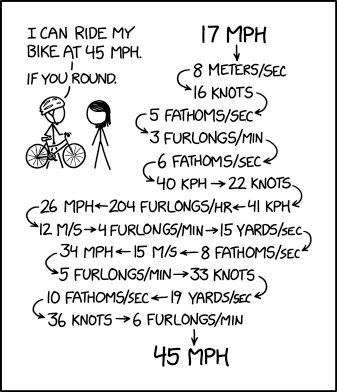
I love xkcd cartoons. I came across this one thing morning that shows the benefits(?) or rounding up.

My immediate idea was “what a great programming project!”  One of the first “hello world” type of exercises I often assign is simple conversations. Fahrenheit to centigrade, miles to kilometers, etc. This is a step beyond that but with a difference. The difference is rounding up and its effect on accuracy.

This is a good program to use to introduce rounding in general but to also talk about how rounding errors can have a large impact when they occur over and over again.

This example uses velocity but I can imaging there are interesting results with weights, simple distances, and almost anything else that normally requires better than integer accuracy. Currency anyone? I’m thinking about trying that one because it involves money.

It might be interesting and educational to try the difference between rounding normally, always rounding up, and always rounding down.

What do you think? Anyone doing something like this? Would it be useful?

Wednesday, February 16, 2022

Troubles with Error Messages

Error messages, in theory, are there to help programmers. Of course there are problems with then in practice. With students, the biggest problem is that  they don’t read the messages. I’ve long ago lost count of the times a student told me they had an error but can’t tell me what it is (or was) because they closed it without reading it.  Getting students to read the message and to try to work out the problem themselves can be a struggle but one we have to attempt.

Even if they do read the message, messages are not always clear. Have you seen this poem?

Roses are red
Violets are blue
Missing {
at Line 32

Seems simple enough but that can be deceiving. Often the message doesn’t actually give the right line. The reasons for this can be complicated for a beginner, or even an experienced programmer, to understand. It is a constant source of frustration.  At least one knows that a missing curly brace is (probably) the problem even if we are not really sure where it is missing from.

Other messages are less helpful because the programmer lacks knowledge to understand the words being used.  Or the message just does a poor job of explaining the problem.

Why are error messages less than helpful? Many reasons. One is that error messages are not fun and interesting to write. There are also strict limitations on the number of characters allowed. Still another is that the person writing the message is often so familiar with the software and the error that they write something that, while meaningful to them, is somewhat opaque to people newer to the software.

Reading error messages is not just a problem for students of course. When I was doing technical support for professional developers I would regularly get calls asking to explain an error message. A little secret here – a good explanation could often be found in the documentation! More than once I just looked up a message and read from the documentation. Even the explanation in the documentation needs a little help sometimes but it is a great place to start.

When teaching beginners we don’t often spend a lot of time on error handling which means we don’t spend much time talking about writing good error messages.  We do ask students to write messages in programs about games over and winning and losing. Occasionally we have to suggest rather strongly that an error message that calls the user “an idiot” is perhaps not appropriate.

Perhaps we should spend a bit more time on error handling and as part of that talk about good error messages. Maybe if we had beginners talking about the error messages they see from their systems and how they could do better we;d get better error messages later when (if) they turn professional?

Regardless, I think error messages should be a bigger part of the conversation. Reading them, researching what they mean, and thinking about how they could be done better.

Thursday, January 27, 2022

What Do Computer Science Teachers Need For Professional Development

Mike Zamansky had a great post called Trends In Professional Development in CS - it's not all good. We’re still at a very interesting place in the development of computer science education.  The shortage of qualified CS teachers is becoming more acute and more and more schools and school systems attempt to expand CS education. Professional development is also growing as well As Mike reports a lot of it is from content providers who have a vested interest in promoting their content.

What do CS teachers really need for professional development? Learning about tools and established curriculum is helpful for sure. Increasingly though, we are seeing teachers without a strong CS background being asked to teach CS classes. Few would ask teachers who could not speak Spanish to teach AP Spanish but that doesn’t mean that teachers who don’t know a lot of CS aren’t asked to teach AP CS courses. Weird isn’t it?

So clearly a lot of teachers need content knowledge. Learning along with students using canned curriculum sort of works I suppose but to be that feels like everyone is going to get shortchanged.  We are starting to see more pre-service programs for CS teachers. The program Mike Zamansky is helping to build at Hunter College for example. And there is usually the option, time consuming and possibly expensive, of taking regular university CS courses. The key thing is that school systems have to be supportive (with time and money) for teachers to get this training. A week or two in the summer is not going to cut it for CS content anymore than a week or two is enough to prepare is Physics or Chemistry teacher.

The other thing CS teachers need to know is how to teach CS. Content alone isn’t enough. As someone who entered teaching with lots of CS knowledge but nothing more than having been a student in terms of how to teach. That’s not as much as some might think! Teaching CS is different from a lot of other subjects. Similar in some ways for sure but also different. Learning how to use specific curriculum is helpful and I have learned a lot from content providers over the years. We could do more. While pre-service programs are starting to come online and include this sort of thing there is still a shortage of such education for in-service teachers.

We’re starting to see more “how to teach” sessions in conferences like CSTA. The one I lead in 2020 was very well attended which suggests that there is demand. Books are starting to come out as well. Computer Science in K-12: An A-to-Z Handbook on Teaching Programming edited by Shuchi Grover is my favorite and one I recommend highly.

We still need a lot of research on how to teach computer science. That looks like it is increasing as well. That’s great especially if researchers share their results in ways that are accusable to teachers. Not all K-12 teachers have access to papers that are behind paywalls. I’m sure hoping to see more research based teaching techniques at CSTA this summer.

What do you want to see in CS teacher professional development? Who is doing it well? Any other books to recommend? Feel free to add in the comments.

Tuesday, January 25, 2022

Writing The Wordle Clone

Kelly Powers posted a Wordle project document on the AP CS A Teachers Facebook page. It’s solid as one would expect from Kelly who is just awesome. It inspired me to write my own Wordle clone to better understand what is involved from a student project perspective. Of course I did it my way.

A Wordle project must consist of several parts:

  • Pick a word
  • Accept a guess from the player
  • Analyze the player’s guess
    • Look for letters in the right place in the work
    • Look for letters in the word but not in the right place
    • Look for letters not in the target word
  • Give the player feedback
  • Repeat accept and analyze until player finds the work or had 6 tries
  • Report on end of game

Most of this is platform and language independent. The exception is giving the player feedback. I’ll get back to that.

Picking a word can be easy (a hard coded selection – great for debugging) or a little more involved (picking randomly from a list). The list can be a small array or a large one that involved reading from a file. Which you select depends mostly on where students are with regards to reading from files and filling arrays or array lists. I have links to two large lists of 5 letter words at the end of the post. The first is one that I use and is on my web page. The other is a larger list on GitHub.

Accepting the player guess can be as easy as reading a work from a line. Analyzing the word is the first place where students have to think things our. String methods like SubString for looking at individual letters, IndexOf for locating specific letters in a string, and others are very handy here. Once can create new arrays of a) letters that are in the right place b) letters in the word but not the right place, and c) letters not in the word at all can be useful. I’ve sure there are lots of other ways as well. Much will depend on how you display the results to the player.

Feedback! One can reprint the player’s guess with letters that are in the correct place in UPPERCASE, letters in the word but the wrong place in lowercase, and empty spaces for letters that are not in the word at all. That’s probably a great way if you are totally text based. If you are graphically minded, you can try to duplicate how the web based game displays results.

There are lost of graphic libraries that will let programmers display things graphically. Swing in Java, Processing (for Java or Python), as well as many online drag and drop tools will all do this. I worry that for most of them students spend more time on the graphics than on the nuts and bolts of the rest of the program.

I’ve gotten a bit, ok maybe more than a bit, spoiled using Visual Studio and Windows Form projects in Visual Basic or C#. That is what I used to program my solution (image right). I have 6 arrays of label boxes. Yes, I should have used a two dimensional array. That would have made some things easier but I was not trying to make the best version ever. A lot of beginning programming classes skip multi-dimension arrays as well so I wanted to see how it would be done without them.

As each letter of a guess was entered on the keyboard it was entered in a label box. After all 5 letters for a guess was entered I checked all the letters against the Wordle word and the back color of the box was changed appropriately. The result was pleasing.

Checking for a winner was a matter of checking the state of all 5 label boxes in the row array. This would be similar in a text based display as well.

All in all a very doable project for many programming classes. And it is current which I see as a plus. Additionally students will probably be very happy to play help debug their peer’s programs.

Monday, January 17, 2022

Computer Science for the sake of ?

My grandson in kindergarten has a class in reading. It makes sense as he is just learning how to read. Over time, school spends less time teaching how to read and a lot more time using using reading to support learning. For many years, I have been saying that computer science and its tools should be the same.

Early on I thought of things like using spreadsheets to look at data. More and more I see programming as a learning tool as well. But coming back to data. I recently watched a TEDx talk by Emmanuel Schanzer titled Four Ingredients for K-12 Data Science. Watch it. It’s cool. In any case, it is clear that Bootstrap Data Science takes things I used to think about to a whole new level.  I saw a presentation on this by students at a conference in the before times and was impressed with what students had learned.

Now Bootstrap is probably best known for their mix of computer science and algebra but they are moving into more areas of the curriculum and I think that is a great thing.

I’ve also mentioned Mark Guzdial’s work in teaspoon languages. (task-specific programming => TSP => Teaspoon) Mark’s work involves “adding a teaspoon of computing into other subjects.” It’s still some early days on this effort but it looks very promising.

Last spring, while I was teaching at a new (to me) school I spend some time with a teacher of astronomy. He was having his students write Python programs to solve astrophysics problems. Faster and more accurate than the slide rule stuff back in my day.

In many ways, I think the CS 4 All movement has been a bit too focused on stand alone computer science classes. Those have a role for sure and some great value. But ultimately, computer science is used in just about every discipline we have today. Teaching it in those various contexts and using CS to help learn those other areas of knowledge is were CS education can have its greatest impact. And greatest relevance. Finding more ways to do that should be a priority. Not just for CS bot for all areas of teaching and learning.

Wednesday, January 12, 2022

Planning Before Coding

After all these years one would think I would know better. But it turns out that when coding for fun I don’t always do the planning that I should. It always comes back to hurt me. If you have been reading this blog lately you know that I have been playing with a Wordle solver. It’s going well. But ..

I started well. I identified several thins my solver should look for:

  • Words that include letters I know are in the word
  • Words that don’t include letters I know are not in the word.
  • Words where a letter (or letters) are in specific positions
  • Words that include required letters that are not in positions I know they don't  belong

I coded up the first two options first and a partial implementation of the third option. So far so good. The problem came when I wanted to add an implementation of the fourth option and a more complete implementation of the third. The problem is that I had neglected to plan for where in the code I would do those checks. I tried tossing them in to the existing method but it was a mess. I had to change a good bit of the code around filtering words to make it both work and be more understandable.

In hindsight, I think I would have been better off creating stub methods for all the options and filling them in one by one. It’s a technique I recommend to students all the time so I should have thought of it myself. This would have given me a stronger framework from the beginning and made my life easier.

In any case, this exercise was a reminder not to start coding before enough of the planning has been done. I know the mod these days is to write fast and break things with a lot of rewriting. I find that to be less than ideal for me though.

Tuesday, January 11, 2022

How Do You Define a Computer Scientist

The last few days have seem some social media discussion about requirements for a computer scientist. Is Calculus a requirement? Is Assembly/machine language a requirement? Among the “yes” and “no” answers there are requests for a definition of a computer scientist. I doubt we could get agreement on a single definition. The mental image people have of a computer scientist is closely related to what knowledge they think a computer scientist should have.

In K-12 education I think we should be very careful and drawing too narrow a definition of a computer scientist. If truth there are many kinds of computer scientist and each kind has its own requirements.

Someone exploring the science of compiler design and code optimization probably does need a solid understanding of machine language. Someone whose focus is on machine learning probably doesn’t as their tools will be at a higher level than the machine. Computer cryptography could probably use a good dose of Calculus. As could some other focuses. Does someone studying user interface? Maybe not.

Should students focus on a special area while in (or before) high school? I don’t think so. They'll have more opportunity to find a focus later. Is Calculus useful? Sure, and for more than just computer science. But there isn’t much that students will do in your average HS CS course that requires it.

The same is true of assembly language. Assembly language clearly gives students greater understanding of the machine below. Some exposure to it is good for programmers and computer scientists. Should it be required? Again, probably not at any depth unless there is a specific need to it.

Back when I was learning CS we had a computer without the memory for an operating system. Programming in assembly language was required. I had to learn how to program subtraction, division, and multiplication on a machine that lacked built-in instructions for those operations. A great learning experience but not one I found much use for later in my (almost 50 year) career. I did work on some projects that required a firm knowledge of the execution speed of different instructions. And knowledge of assembly language helped there. But we don’t see that sort of need except in rare cases these days.

What was required knowledge 50 years ago may not be the same as required knowledge today.  We have to avoid the blind assumption that what we learned and the way we learned “back in the day” is the way things have to be today.

Friday, January 07, 2022

Wordle Solving For Fun and Coding

After my post the other day (Is Wordle A Project To Assign Students to Program?) I got thinking about solver help for Wordle. I happen to have a huge word list I got some somewhere some time ago. For various reasons I had written a program to make sub list files of words of a specific length. So of course I have a list of 5 letter words – something over 8,000 of them. So that is a start.

Phase one of my program was to find all the words that had a specific letter in a specific location. That narrows things down a bit was not near enough. Phase two was to ignore words that had specific letters which I knew were not in the correct answer. That was very helpful.

If I don’t know where any letters were I was not getting close enough. So I added a method to include all words that had specific letters in any position while ignoring words with specific other letters.

You would be surprised at how many 5 letter words have the same five letters but in different position by the way. On the other hand if you get enough information about what letters to exclude, what letters to include, and one or more letters with a specific location than finding the answer is pretty easy.

This was a fun (for me anyway) coding exercise. Will it be fun for students? I have no idea. Let me know if you have an opinion or try it with students.

Tuesday, January 04, 2022

Is Wordle A Project To Assign Students to Program?

Seems like a lot of people are playing Wordle on social media these days. Have you tried it? It’s a word/letter version of old Mastermind game The idea is that you enter a five letter word and the game tells you if you have a letter from the word in the correct place (green highlight), a letter from the word in the wrong place (gold highlight), or a letter that isn’t in the word (grey highlight). You have 6 attempts to get it right.

You can read more about the game many places but I read about it here.

It’s a fun game to play especially if word puzzles are your thing. I’ve had students program Mastermind in the past. It goes pretty well. This might be a fun variation for students as well. The current tie in with social media may be a plus as well.

Oh, wait, can we program the computer to solve Wordles?

Friday, December 31, 2021

Looking Back on Computer Science Education in 2021

I’ve never felt less prepared to write a look back on CS education than I do today. I’ve been retired from most of the year and the world has been changed a bit because of COVID. I have noticed some things have clearly happened. One is the increase in online development tools which I talked about a year ago. The other is an apparent growth in cyber security education.

I’ve also noticed some increase in virtual reality programming courses as well. How that will go is anyone’s guess. There are two barriers. One is that VR hardware is still expensive. It’s not just devices like the Oculus but also computers capable enough to support VR and its development. A lack of training is also a barrier. Most teachers seem to be learning on their own with help from documentation and videos from companies. That and some support through social media from other teachers.

The Unity Teach Community has well over 2,000 members and is very active. I highly recommend it if you are looking to get involved in teaching VR.

Online teaching and programming tools have really taken off. The code.org courses support this sort of thing but they are far from the only option. CodeHS for example shows up a lot in social media discussions. As does Coding Rooms. And repl.it. I should probably collect a list of them for a future post. Perhaps you could add your favorites as comments and help me out?

Cyber security has also seen a lot of growth. Cyber.org has a lot of materials and provide cyber security professional development. Social media support for teachers coming from teachers has also been growing. I recommend the Cybersecurity Educators Facebook group. Over 1,000 members and active and growing. This field is going to boom as security gets more attention all the time.

Every year I expect  the Internet of Things to take off but it never really does. The pandemic has made doing any sort of physical computing more difficult. But I keep hoping.

Machine learning and artificial intelligence didn’t seem to pick up a great deal but it is growing. AI 4 K12 has a lot of useful resources from teachers and I recommend checking them out. Most of what I see in K-12 AI is units in existing courses and not specific full courses. That’s probably best at the K-12 level. The math and coding involved in creating AI from scratch is intense. Learning how to use existing tools is both useful and age appropriate.

So progress has been made and that’s a good thing. 2022 should be interesting. Hopefully, in a good way.

Monday, December 06, 2021

Computer Science Education Week 2021

Well, its CS Ed Week again. Still no cards in the Hallmark store for it. I’ll get back to that in a moment. CS Ed Week has long been a time to introduce more students to computer science. When it started there were only small percentage of schools that offered any computer science education at all. We’ve made a lot of progress. There is still a long way to go though as even though more schools offer CS the number of students taking it are still very low.

There is no shortage of ways to introduce students to computer science during CS Ed Week. Hour of Code is probably the best known and widest platform in use. And it is a great one.Miles Berry has several activates in his blog post Five (out of twenty) things to do with a computer with more information about using Turtles one another blog post - Make a Turtle!

I never made a big deal of CS Ed Week when I was teaching for the very simple reason that the school I was teaching at required a full year (or two semesters) of computer science as a graduation requirement. Getting students to take courses was not an issue. We spent more time trying to make the course interesting, relevant, and even fun while being rigorous.

In hind sight, perhaps I missed an opportunity to have students celebrate what they were doing though.  There are some activates not involving code that we could have done. Maybe you want to try them as well.

Grace Hopper – The timing of CS Ed Week is the week that includes Grace Hopper’s birthday – December 9th. So it is a good time to talk about her and other women in computing. Women have played a huge and often underrecognized role in computing. Maybe younger students would like to make Grace Hopper birthday cards?

CSTA ran a number of contests for student for CS Ed Week some years ago. They make good activities. For example, filming a PSA video to promote computer science in general or specific courses. Posters to promote taking a CS course might be fun. In fact, have students create posters for a specific course that might be over looked. That may help fill courses that students don’t understand from a course description in a program of studies.

Speaking of programs of studies, ask students to write their own description of the course they are or have taken. You may gain insights into how students view the course that help you make the course better.

About that greeting cards, what would a CS Ed Week greeting card look like? Ask students to create some. Let’s make is have a celebratory feel!

Friday, December 03, 2021

First - Understand the Problem

Things are different for me being retired. I don’t get the blogging inspiration the way I used to. Today a post by Mike Zamansky (Work through the example!!!!!) got me thinking. I used to talk to students about problem solving and one of the things I tried to highlight was the need to understand the problem as completely as possible.

All too often students read or listen to instructions lightly and make assumptions that are not really supported by what has been presented to them. It is often tempting to skim and assume with the idea that it will save time. It works often enough, for simple enough problems, to help people to fall into the trap of thinking they are smart enough to do this always. Until it doesn’t work.

It’s hard to get students to focus on understanding the problem completely. Honestly, it can be hard for more experienced people to do this as well. The urge to jump into the coding is strong. I have been known to start coding too early myself. The more important the project/problem the more important it is to make sure you really understand the problem.

In what seems like a different life I was a developer in an operating system group. The sub team I was on was writing a new print/batch subsystem from scratch. The three of us spent weeks looking at what features should be there and how they should be set up. We spent more weeks designing the code. All before we wrote a line of code. Honestly, the groups leadership was on our case to start coding before we were done understanding and planning. Long story short, we finished on-time without having to work crazy overtime hours. Planning paid off.

It’s a story I told regularly to students over the years. It may or may not have helped but I tried.

Monday, November 08, 2021

Money is Hard in Programming

Last week I wrote about the making change for a dollar project. It got me thinking about how hard dealing with money in programming really is. The problem with money is that 1/10 is an infinitely repeating fraction in Binary.If one adds 1/10

Take the following C$ code.

double penny = 1.0 / 10.0;
double dime = 0.0;
Console.WriteLine(penny);  
for (int I = 0; I < 100; I++)
{
     dime += penny;
}
if (dime == 10.0) Console.WriteLine("Dime");
Console.WriteLine(dime);

One might expect that the word “dime” would be printed but it’s not. What this code actually prints is the following.

0.1
9.99999999999998

The 0.1 is expected but as you can see, adding the 0.1 100 times doesn’t give exactly 10.0. The problem often doesn’t show up right away. This sort of thing often confuses beginners because the programming language “helpfully” hides the issue. When I had the program display the value of “dime” after every addition the discrepancy don’t show up until around 6.0.

5.8
5.9
5.99999999999999

It’s not only beginners who struggle with this issue. It’s a pretty common issue and some languages support a currency data type for that reason. The currency data type adds some overhead to operations and not everyone is a fan of using it. A different alternative is to use integers and insert a decimal point on display.

One of the first programming languages I used for business related software, called DIBOL, didn’t support floating point numbers at all. It supported 18 digits of integer accuracy. It was an interesting language. Using it did make it easier for me to think about using integers for money later in my career though. Most beginners don’t have that sort of a helpful start. They are used to thinking in digital rather than binary. To my way of thinking this reinforces my thinking that learning binary is an important part of computer science education.

Thursday, November 04, 2021

How Many Ways to Make a Dollar

I ran into a reminder of an interesting programming problem the other day. One I meant to use with students but never did. Other teachers I know do use it. Simply pot, how many possible combinations of coins are there that add up to a dollar. It’s easily solved with a set of nested loops like the ones below.

int count = 0;

for (int halves = 0; halves <= 2; halves++)
{
     for (int quarter = 0; quarter <= 4; quarter++)
     {
         for (int dimes = 0; dimes <= 10; dimes++)
         {
             for (int nickels = 0; nickels <= 20; nickels++)
             {
                 for (int penny = 0; penny <= 100; penny++)
                 {
                     int value = halves * 50 + quarter * 25 + dimes * 10 + nickels * 5 + penny;
                     if (value == 100)
                     {
                         count++;
                     }
                 }
             }
         }
     }
}
Console.WriteLine(count);

It’s pretty straight forward. The key thing is understanding what coins there are and what their value it. The code above doesn’t include a dollar coin. Should it? Probably but it depends on the way the problem is specified. Also these are the coins currently being minted. Over the history of the country there have been a number of other coins in circulation

US TREASURY: What denominations of coins are no longer being produced?

There are quite a few denominations of coins that the United States Mint does not produce any longer for general circulation. They are the half-cent coin, the two-cent coin, the three-cent coin, the half-dime coin (although it was replaced by the five-cent coin), a twenty-cent coins, and the various denominations of gold coins. Although the Mint does produce a series of gold bullion coins, these are not intended for circulation.

The problem would be more interesting if some of these were allowed. I keep thinking that there must be another way to solve the problem though. I just can’t think of what it might be.

[Edit] Jeremiah Simmons shared information about solving this problem using Dynamic Programming. It's more complicated but scales better. Take a look. Understanding The Coin Change Problem With Dynamic Programming

It is so sawesome when educators share ideas with each other.

Thursday, September 30, 2021

Define Learn To Code

I saw an interesting question today on Twitter:

My first response is that there is no definitive answer to that question. I thought about it for a while. One can learn to program by hooking a Raspberry Pi to a monitor, keyboard, and mouse and firing up Thonny and learn Python. One can use any number of online IDEs and a Chrome book. The last classes I taught had a mix of students running Eclipse and Processing on Mac and PC laptops with no appreciable difference. In short, does the computer even matter?

Maybe there is a question that has to be asked and answered before discussing the right or best laptop to use. That question is “what does it mean to “learn how to code?” I suspect we could have quite a long discussion on that question alone.

To me it boils down to:

  • What problem are you trying to solve – how do you define “learning to code”
  • What software helps you best learn to code by your definition
  • What hardware runs the software you want to run

Picking the hardware should almost always be the last thing one picks. Now I have to go think about what it means to “learn how to code.”

Sunday, September 26, 2021

Phun With Phone Numbers

Among the programming projects I ran into recently was one to calculate all of the combinations of letters one could make from a phone number. Companies do this sort of thing all the time. They generate the combinations and then look for words related to their business so they can use it as a mnemonic and help people remember their phone number. Probably a bigger deal before domain names than now but still useful.

How many possible combinations are there? Well, that depends. It can be a low or 2187 (3 to the 7th power) and a high of 16384 (4 to the 7th power). The highest number is for phone numbers with all 7s and/or 9s.

I’m trying to write small bits of code to keep my mind active and solving interesting (to me) little programs. Initially I didn’t care to write this program (though eventually I did) so was thinking around the problem from other directions. What if I took a word and had a program generate a phone number? That was fun. And pretty easy. So I thought about the logical (to me anyway) next step. What if I had a list of 7 letter words and generated a file with the phone numbers that matched each word?

It turns out I have a small word list with just under 114,000 words in it. Step one was building a new file with only the seven letter words in it. A nice little project that is simple even for beginners.

I borrowed the code from the earlier program that turned a word into a number. A handy thing that shows the value of methods and reusable code. I used that to create the file with a list of seven letter words and phone numbers. A list of just over 22,000 for what its worth.

When I did write the program to create all the possible combinations of characters for a phone number I had a nice data file to use to check my work. That was surprisingly helpful.

Anyone out there assigning the program to create all the combinations of letters for a phone number? What interesting solutions are students coming up with?

Friday, September 24, 2021

An AI Tutor for CS Education

Recently I came across a Microsoft Research project called AI for Programming Education. The project “goal is to build a personalized and autonomous intelligent teaching assistant (an AI Tutor) for programming education, enabling on-demand education.”

It’s an intriguing and I think ambiguous idea. I tend to be skeptical of AI tutors as a general idea. A half dozen years or so ago I attended a workshop at Microsoft Research dealing with hinting systems. In other words, how can the computer give hints to beginners. I wrote about hinting systems and the workshop here.

The tl;dr is that it is a hard problem. No surprise to teachers of course. Knowing when to hint and how much to hint is a tough problem for human teachers. For a computer AI it is going to be harder still. That’s just one part of what an AI tutor would have to be able to do.

I don’t know any more about the project than what I read on the web page (link above) and that they are looking for a CS Education researcher to help with pedagogy. CS Education/Pedagogy Research Internship Opportunity at Microsoft (AI-driven Program Synthesis in the PROSE team) That is an encouraging move.

With more and more of education moving to the cloud, more and more online curriculum being developed, and systems that are getting smarter about helping programmers to write code (IntelliCode Completion In Visual Studio (Preview) 2022), creating an AI tutor seems like a logical project to take on. I assume papers will be published. I look forward to reading more about this project over time.

Monday, September 20, 2021

Book Review–System Error: Where Big Tech Went Wrong and How We Can Reboot

System Error: Where Big Tech Went Wrong and How We Can Reboot is what you get when a top philosopher, a top political scientist, and a top computer scientist get together to think deeply about technology and society and write a book.  It’s not a book for just one group. It’s not a dry textbook or academic paper but a clearly written explanation of the issues. It’s a book for everyone.

The book talks a lot about both artificial intelligence and social computing which are more connected to each other than may be obvious at times. The social and political impacts of these topics and others are covered in a clear and understandable way without hyperbola, scaremongering, or blatant cheerleading. This is one more thing that makes it stand out from many other books on these topics.

Yes, there are parts that are scary. Yes, there are parts that are optimistic. All in all though it is as fair and open minded a book as one can get. The book askes questions that have to be asked. There is enough data and sets of facts to give one a lot to think about. In fact, I found several times that I had to put the book down to think about what I had read. It’s that sort of book.

Were I teaching Advanced Placement Computer Science today, especially Principles but also APCS A, I would assign reading from it and have class discussions. If I could not get a class set I would at least have some copies in the library put on reserve. But I’d really like my students to read it all.

This is a book that should be on some required reading lists. Computer scientists really do need to think about the “should we do this” question as much as the “can we do this” question. This is the book to start thinking that way. But policymakers need this books as well. So do business people. So give it to the polysci and business majors you know.  A lot of social scientists should read it as well – sociology, psychology, social work. Probably more. It will help one understand what people are dealing with in today’s world.

Technology is impacting society, and our democracy, in many ways. Some are obvious and some are not. If we want to have a civil society we need to think deeply about the impact of technology on individuals and organizations This book is a great way to start.

Friday, September 17, 2021

Debugging–Slow is Smooth and Smooth is Fast

Mike Zamansky had an interesting post called  What They Used To Know that got me thinking about the old days. Now Mike is a youngster and didn’t really start in computers until the 1980s.  I started in the 1970s with punch cards and batch processing. That meant that there was no instant gratification seeing your program run.

With batch, one handed their cards to an operator and some time later, hours or maybe a day, one got their cards back with a listing that showed the results. Results usually meaning a list of errors that kept the program from running.

Desk checking, studying the listing and trying to fix as many errors as possible before trying again was a bit of an art form. To this day I will often print out a program to look at the big picture in a way that still doesn’t feel effective on a screen. It’s tempting to see that as a way to go – limited opportunities to have the computer check ones code.

There are downsides to this sort of thing though. Specifically, having limited runs or at least long waits between runs encourages writing large amounts of code at a time and discourages writing and testing small pieces of code regularly.

Being able to hit “compile” every other minute though tends to encourage, or at least support, the beginner tendency to “throw some code in and see what happens.” This wastes time in the long run and often leads to ugly, hard to maintain, and inefficient code.

The military has a saying that “slow is smooth and smooth is fast” that some what applies. Slowing down to really analyze code, think smoothly, generally leads to a faster result. Tossing code in on a wing and a prayer is not smooth but chaotic. Slowing down to really look at what is happening is smooth and looks slow to the casual viewer but leads to faster results.

As I was thinking tonight and asking, “what if we limited people to some limited number of compiles a day?” It seemed like a good idea until I thought of the possible problems. That’s when I realized that external controls on speed are not the answer. Rather the answer is for developers to regulate themselves. To slow down and focus in ordered to make faster progress.

Tuesday, September 07, 2021

Some Simple Early Programming Projects

If you are not on Twitter you may be missing a lot of good things. For example, the other day Kelly Lougheed (@kellylougheed ) tweeted out a bunch of simple labs that only require user input and mathematical operations. I have copied them below because I want to be able to find them again later.

I’ve used unit conversion for years but it gets old. Fahrenheit to Celsius, miles to kilometers, grams to tons, you get the idea. It gets boring. Kelly has some great ideas. There is an idea from Neil Plotnick (@NeilPlotnick)  below Kelly’s ideas.

Have any more? Add them to the comments for future readers! And be sure to follow @kellylougheed and @NeilPlotnick on Twitter.


Kelly Lougheed (@kellylougheed )

Programming activities that involve ONLY user input and mathematical operations:

  • Program to calculate the tip
  • Program to calculate cost per person when dining out
  • Program to convert units (made-up units like Harry Potter currency okay) What else?

Also just wrote this silly lab where the user can input their age and be told their future in 10/20/30 years ("When you are X years old, you will retire to a desert island", etc.)

0.3 Fortune Teller Lab

Fortune Teller Lab Directions: Where do you see yourself in 10 years? Have the user type in their age, and tell them their future at various ages (which you calculate by adding years to their current…

docs.google.com

And for extensions, I love little math challenges that involve Ss printing out the result of mathematical expressions (getting practice with operators!). For example, there is the Four 4's Challenge, and also this 1996 Challenge:

0.3 1996 Lab

1996 Lab Directions: Use the numerals 1, 9, 9 and 6 exactly in that order to make a mathematical expression that prints the following numbers: 28, 32, 35, 38, 72, 73, 76, 77, 100 and 1000. You can…

docs.google.com


Neil Plotnick replying to @kellylougheed

I have my students code algebra equations like the distance formula. Also stuff for geometry such as area and volume measurements. Ohms law for physics. Ideal gas laws in chemistry.

Saturday, September 04, 2021

Are You Assigning Projects or Recipes?

Chris Lehmann, the amazing principal of Science Leadership Academy in Philadelphia,  says “If you assign a project and get back 30 of the same thing, that’s not a project, that is a recipe.”  Now recipes have their place for sure.  They often make a good start. I see programming as a creative thing (art/craft/skill/science/what ever) and I want to see creativity from my students.

For me this starts with day one. In my introduction to my classes I tell students that I want to see creativity. I want them to make projects their own. This can be a difficult thing for some students. There are teachers out there who do want to see the same thing from every student. It makes things easy to grade I guess. Or something.

Very often in early projects is is hard to be creative. There are only so many ways to calculate degrees Fahrenheit to Celsius. On the other hand you can ask students to find two measurements they like and convert one of them to the other. You’ll be amazed at the combinations students come up with. Sure you’ll get the simple conversion using degrees Kelvin but someone will do miles to furlongs.

Even simple programs can get creative with tools that make graphics easy. C# and Visual Basic both have the Windows Forms libraries to use but Processing can make using Java or Python colorful and graphic as well. To say nothing of a lot of block programming systems.

Of course, students getting bogged down in how a program looks can be an issue at times but that can be dealt with though conversation.

An even better way is often letting students choose their own projects. I always finish up a semester with a larger project that students select themselves. Student get very creative with those projects. The Advanced Placement Computer Science Principles course requires a Create project which serves a similar purpose.

For smaller projects it can take a bit more to encourage creativity. After all if there is known input and expected output that’s going to be the same. Here is where you want students to be creative in their code. Let students decide if they want to use a for loop, a while loop, or even a foreach loop. Decision structures can also be done in different ways. Having students turn in code that looks different is a great learning/teaching opportunity. I love showing students the different solutions that students turn in. This both encourages them to try to be different and lets them see different solutions. The idea is to open their minds to looking at problems in different ways.

The most important thing is to encourage creativity. Celebrate it!